Business Challenge
Seven posts of hybrid connectivity have been about reaching networks. This one is about reaching Google's own APIs from a VM that deliberately has no way onto the internet — and it starts with a name that misleads almost everybody.
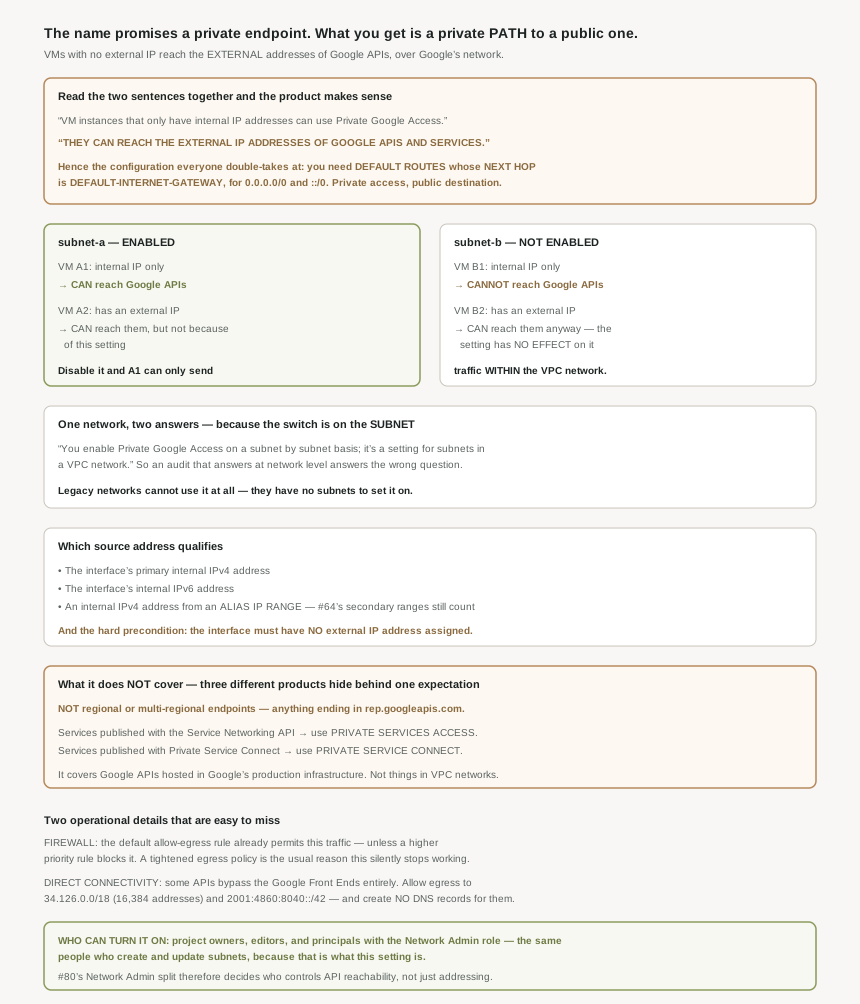
Two sentences, read together, are the whole product. VM instances that only have internal IP addresses (no external IP addresses) can use Private Google Access. And: they can reach the external IP addresses of Google APIs and services.
External. The destination is the ordinary public address of the API; what is private is the path, which stays on Google's network. Once that lands, the configuration step that otherwise looks like a documentation error makes sense: you need default routes pointing at the internet gateway.
The setting did not create that property; removing the external addresses did. Private Google Access has no effect on instances that have external IP addresses. Those VMs don't need any special configuration to send requests to the external IP addresses of Google APIs and services, and the configure page says the same from the other side: a VM with an external IPv4 or IPv6 address assigned to its network interface doesn't need Private Google Access to connect to Google APIs and services.
Correct approachAudit for external IP addresses, not for the flag. An estate that enables the setting everywhere and still assigns external addresses has changed nothing — the flag is inert, and the posture people believe it buys comes entirely from the addressing. The flag only begins to matter the moment the external addresses go away, which is the change worth tracking.
There is no network-level switch. You enable Private Google Access on a subnet by subnet basis; it's a setting for subnets in a VPC network. The documentation's own example is two subnets in one network behaving differently: Private Google Access has been enabled on subnet-a , but not on subnet-b, with the result that VM B1 cannot access Google APIs and services because it only has an internal IP address and Private Google Access is disabled for subnet-b.
Correct approachMake the subnet the unit of every question you ask about this. "Is Private Google Access enabled?" has no answer at network level, so an inventory that reports per network is reporting something that does not exist. The failure it produces is specific and annoying: a workload moved to a new subnet for capacity or segmentation reasons, which stops reaching Google APIs for a reason that has nothing to do with the workload.
It covers one category. Private Google Access lets you access Google APIs and services that are hosted in Google's production infrastructure — and there are two documented exclusions. Regional endpoints are out entirely: Private Google Access doesn't support regional and multi-regional endpoints (endpoints that end in rep.googleapis.com ). And anything hosted inside a VPC network needs a different product — to connect to services that are published using the Service Networking API , see private services access, while to connect to services that are published using Private Service Connect , see Access managed services.
Correct approach
Classify the endpoint before assuming coverage. Three products sit behind one expectation here, and the symptom of picking the wrong one is identical in all three cases: a VM with no external address that cannot reach something it is supposed to reach. The rep.googleapis.com exclusion is the one most likely to surprise, because the hostname looks like every other Google API hostname.
Architecture
A subnet flag, a route to the internet gateway, and a set of exclusions.
The route that confuses everyone
The network requirement is the clearest evidence of what this product is: confirm that you have default routes with next hop default-internet-gateway and a destination range of 0.0.0.0/0 (for IPv4 traffic) and ::/0 (for IPv6 traffic, if needed). And if they are absent, create those routes if they are missing.
A product called Private Google Access requiring a default route to the internet gateway reads like a contradiction until you accept that the destination addresses genuinely are public ones. The next hop is the mechanism by which the VPC network knows how to forward traffic to those ranges; it does not imply the traffic leaves Google's network. If a tightened network posture has removed the default route — a reasonable-sounding hardening step — Private Google Access stops working, and the cause looks nothing like the symptom.
There is an alternative for estates that do not want a blanket default route: create routes for the IP address ranges used by Google APIs and services, which narrows the destination rather than removing it. Either way the accompanying firewall requirement is to ensure that your firewall rules allow egress to the IP address ranges used by Google APIs and services.
The default allow egress firewall rule allows this traffic, if there is no higher priority rule that blocks it.
Which is to say: this works out of the box and breaks the moment somebody implements egress control, which is a thing security teams do deliberately and correctly. The conditional clause is the whole risk. A deny-egress rule added at a higher priority for good reasons will take Private Google Access with it, and the resulting failure — VMs that can reach each other but not Cloud Storage — presents as an API or permissions problem long before anyone looks at firewall precedence. If you are tightening egress on a network whose VMs have no external addresses, the Google API ranges belong in the allow list from the start.
Which source address counts
The qualifying addresses are specific, and one of them connects to earlier material. The source IP address of the packet can be the primary internal IP address of the network interface or an address in an alias IP range that is assigned to the interface. The configure page enumerates all three: the VM interface's primary internal IPv4 address, the VM interface's internal IPv6 address, and an internal IPv4 address from an alias IP range.
Alias IP ranges counting is worth knowing if you run containers. Pods addressed from a subnet's secondary range are using alias IPs, so their traffic qualifies on the same terms as the node's own — the subnet flag covers both without anything extra.
The precondition is absolute and sits on the interface rather than the instance: the VM interface does not have an external IP address assigned. Per interface, which matters for multi-NIC VMs, where one interface can qualify while another does not.
What happens when it is off
The consequence is stated more starkly than people expect: if you disable Private Google Access, the VM instances can no longer reach Google APIs and services; they can only send traffic within the VPC network.
"Only send traffic within the VPC network" is the accurate description of an internal-address VM without this setting, and it is worth quoting to anyone who treats the flag as an optimisation. For a VM with no external address and no Cloud NAT, this setting is the difference between a machine that can call Google APIs and a machine that can talk to its neighbours and nothing else.
Why This Architecture Holds Up
Three operational details, each of which has caused the same symptom for a different reason.
Direct connectivity. Not everything goes through the usual front door: some Google APIs and services offer direct connectivity from Compute Engine virtual machine (VM) instances, bypassing Google Front Ends (GFEs). Those need their own allowance — you must ensure that your routes and firewall rules allow egress traffic to reach 34.126.0.0/18 and 2001:4860:8040::/42, a range of 16,384 IPv4 addresses. The unusual part is what you do not do: you don't need to create DNS records for these addresses. And usefully for anyone building a perimeter, services that offer direct connectivity support VPC Service Controls.
Legacy networks. Because Private Google Access is enabled on a per-subnet basis, you must use a VPC network, and legacy networks are not supported because they don't support subnets. A clean piece of reasoning rather than an arbitrary limitation: the feature is a subnet property, so a network model without subnets has nowhere to put it.
Who can change it. Project owners, editors, and Identity and Access Management principals with the Network Admin role can create or update subnets and assign IP addresses. Since this is a subnet property, the people who can edit subnets can turn API reachability on and off.
#80 examined the Shared VPC separation between network administrators and the teams deploying workloads, and the usual framing is that network admins control addressing and connectivity while service project teams control compute. Private Google Access quietly widens that: the same role that manages subnets decides whether internal-only VMs can reach Google APIs at all.
So in a Shared VPC estate, a service project team can deploy a correctly configured workload with no external addresses, on a subnet they do not control, and find it unable to reach Cloud Storage for a reason that is not visible from anything they own. Worth making explicit in the contract between those teams — alongside the subnet itself, the Private Google Access state of that subnet is part of what the host project is providing.
Where it sits among the private-access options
The honest summary of scope is that Private Google Access answers one question well: how does a VM with no external address call a Google API hosted in Google's production infrastructure. For services published through the Service Networking API, private services access is the answer. For services published through Private Service Connect, that is the answer. The rep.googleapis.com regional endpoints are outside all of it and need the regional endpoint mechanism instead.
That is four mechanisms for what a reader reasonably thinks of as one requirement, and the division is by how the service is published rather than by anything visible to the caller. Which is why the diagnostic habit worth forming is to identify the endpoint's category first and the network configuration second — the reverse order wastes a lot of time on firewall rules that were never the problem.
Key Architecture Decisions
| Situation | Decision | Because |
|---|---|---|
| VMs with no external address must call Google APIs | Enable Private Google Access on their subnet | Without it they can only send traffic within the VPC network. |
| Auditing whether it is enabled | Ask per subnet, and audit external addresses too | It is a subnet setting, and it is inert on VMs that have external addresses. |
| Moving a workload to a new subnet | Check the new subnet's setting first | Two subnets in one network can give opposite answers. |
| Hardening a network by removing the default route | Create routes for the Google API ranges instead | The requirement is a route to those destinations, not an internet path. |
| Implementing egress firewall control | Allow the Google API ranges explicitly, up front | The default allow-egress rule covers it only until a higher priority rule blocks it. |
| Running containers with pods on a secondary range | Nothing extra | Alias IP range addresses qualify as source addresses. |
| Multi-NIC VMs | Check each interface | The no-external-address precondition is per interface. |
| Calling an endpoint ending in rep.googleapis.com | Use the regional endpoints mechanism | Private Google Access does not support those endpoints. |
| Reaching a service published via Service Networking | Private services access | That service is hosted in a VPC network, not Google's production infrastructure. |
| Reaching a service published via Private Service Connect | Private Service Connect | Same reason, different publishing mechanism. |
| An API that bypasses the Google Front Ends | Allow egress to 34.126.0.0/18 and the IPv6 range | Direct connectivity needs routes and firewall rules, but no DNS records. |
| Building a VPC Service Controls perimeter | Note that direct-connectivity services support it | Stated explicitly alongside the direct connectivity ranges. |
| Still on a legacy network | Migrate to a VPC network | Legacy networks have no subnets, so the setting has nowhere to live. |
| Shared VPC, service project team cannot reach Cloud Storage | Check the host project's subnet setting | Only those who can update subnets can change it. |
The one to look at today
List your subnets with the Private Google Access flag beside the count of VMs in each that have no external address. Those two columns together are the only honest picture: a subnet with the flag off and internal-only VMs is a workload that cannot call Google APIs, and a subnet with the flag on whose VMs all have external addresses is a setting doing nothing. Both appear correct in any report that looks at one column alone, which is why this is worth building as a single query rather than two.
Closing Thought
This is the first post in a while where the hardest part was the name. Private Google Access sounds like a private endpoint, and almost every misunderstanding of it — expecting it to cover services inside VPC networks, being alarmed by the internet gateway route, assuming it hardens a VM that has a public address anyway — traces back to that expectation rather than to anything difficult in the mechanism. The mechanism is a flag on a subnet.
What makes it worth care is that the flag sits at the intersection of three things owned by different people: addressing, which decides whether the flag does anything; routing and firewall policy, which decide whether it keeps working; and subnet administration, which decides who can change it. None of those teams is looking at a dashboard that says "Private Google Access", and the failure when they disagree is a VM that can talk to its neighbours and nothing else.
#91 extends the same idea past the VPC boundary: Private Google Access for on-premises hosts — reaching Google APIs from machines that are not in Google Cloud at all, over the hybrid links of the last seven posts.
Official Google Cloud Reference
- Private Google Access overview
- Configure Private Google Access
- Private access options for services
- Private Google Access for on-premises hosts
- Configure Private Google Access for on-premises hosts
- Private Service Connect
- Access Google APIs through endpoints
- Subnets
- Alias IP ranges
- Routes overview
- VPC firewall rules
- VPC networks overview
Comments