Business Challenge
#104's global load balancer ran on Google Front Ends: a fleet you cannot see, reach or size. The regional and internal Application Load Balancers are the same product family with a different engine. A Google Cloud internal Application Load Balancer is a proxy-based Layer 7 load balancer that enables you to run and scale your services behind a single internal IP address, and it is implemented as a managed service based on the open-source Envoy proxy.
Managed, but local. The proxies run in a subnet you created, using routes you administer, alongside every other Envoy load balancer in the region. That one difference drives most of this post.
That is the documented behaviour, and it has no partial setting: you cannot selectively share only some internal passthrough Network Load Balancers, regional internal proxy Network Load Balancers, or internal Application Load Balancers by using VPC Network Peering. All internal load balancers are shared automatically.
And the control you would reach for does not travel with the peering — Google Cloud firewall rules aren't shared among networks when using VPC Network Peering. So reachability arrives by default and restriction does not.
Correct approachTreat "peer this network" as "publish every internal load balancer in it", then write the ingress rules that narrow it back down, because nothing else will. If a service genuinely must not be reachable from the peer, the answer is a different network, not a firewall rule you intend to add later.
Not possible as an edit. After you create a load balancer, you can't edit its mode. Instead, you must delete the load balancer and create a new one.
Correct approachPlan the scope before creating anything, and reserve the address so a rebuild does not also become a DNS incident: we recommend that you reserve a static IP address; otherwise, you must update your DNS record with the newly assigned ephemeral IP address whenever you delete a forwarding rule and create a new one. That recommendation reads like housekeeping until the day the mode is wrong, at which point it is the difference between a rebuild and a rebuild plus a propagation wait.
You cannot, from the address. Backend VMs or endpoints of all internal Application Load Balancers in a region and VPC network receive connections from the proxy-only subnet — the same shared subnet #103 introduced, now carrying production traffic rather than merely existing as a prerequisite.
Correct approach
Identify the caller at the HTTP layer rather than the IP layer: a header set by the load balancer's URL map, or the Host it was reached on. The connected-networks page recommends the same approach for access control — controlling access by using HTTP headers (for example, X-Forwarded-For) — which is an admission that the network layer cannot distinguish these callers either.
Architecture
One shared subnet in the data path, a permanent mode choice, and high availability assembled from parts.
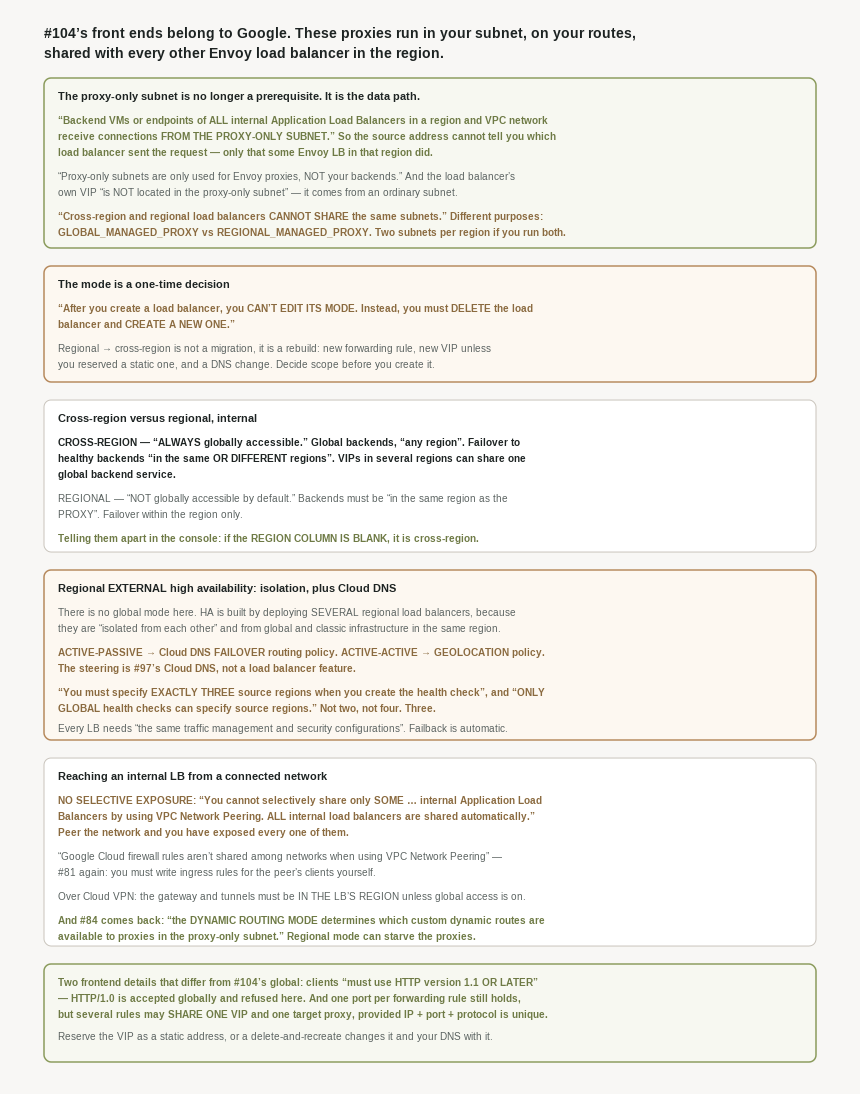
The proxy-only subnet, promoted from prerequisite to data path
#103 treated the proxy-only subnet as a thing you must create before deploying. Here it is where the traffic actually comes from, and three facts about it shape the design.
It is shared, per region and network. You must create a proxy-only subnet in each region of a VPC network where you use internal Application Load Balancers, and all the regional Envoy-based load balancers in a region and VPC network share the same proxy-only subnet. So its sizing is a platform concern and its address range is the one your backend firewall rules must allow — for every load balancer at once.
It is not for your backends, and not for the VIP. Proxy-only subnets are only used for Envoy proxies, not your backends, and the virtual IP address of an internal Application Load Balancer is not located in the proxy-only subnet. Three distinct address spaces are in play: an ordinary subnet for the VIP, the proxy-only subnet for the proxies, and a subnet for the backends.
The two modes cannot share one. Cross-region and regional load balancers cannot share the same subnets, because the purposes differ — GLOBAL_MANAGED_PROXY for cross-region, REGIONAL_MANAGED_PROXY for regional. And the cross-region Envoy-based load balancer must have a proxy-only subnet in each region in which the load balancer is configured. Running both modes in one region means two proxy-only subnets, each with its own address budget.
Cross-region and regional internal, side by side
The two internal modes are genuinely different products, and the table in the documentation is worth reproducing because the differences are not guessable from the names.
| Cross-region internal | Regional internal | |
|---|---|---|
| Client access | Always globally accessible — clients from any region in a VPC | Not globally accessible by default; global access is optional |
| Backends | Global — any region | Same region as the proxy |
| Failover | Same or different regions | Same region only |
| Backend service | VIPs from multiple regions can share one global backend service | Regional |
| Proxy-only subnet purpose | GLOBAL_MANAGED_PROXY |
REGIONAL_MANAGED_PROXY |
| Console region column | Blank | Names a region |
Two details in that table repay attention. The regional backend constraint is phrased against the proxy, not the load balancer — regional backends. Load balancer can only send traffic to backends that are in the same region as the proxy of the load balancer — which is the more precise statement once you know the proxies live in a regional subnet. And the console tell is genuinely useful: if the region is blank, then the load balancer is in the cross-region mode.
Global access is the one flag that moves the regional mode's boundary, and it is worth knowing which way each default points. For cross-region, global access is enabled by default to allow clients from any region in a VPC to access your load balancer. For regional, clients can be limited to that region or can be in any region, based on whether global access is disabled or enabled on the forwarding rule. It widens client reach only — backends stay regional either way.
The flag reaches further than the client question, because two separate restrictions are written as waived when it is on.
Over peering: for regional internal Application Load Balancers, client virtual machine (VM) instances in the peer network must be located in the same region as your internal load balancer. This restriction is waived if you configure global access. Over VPN: both the Cloud VPN gateway and tunnel(s) must be located in the same region as the load balancer when global access is disabled.
So a hybrid design where the tunnel lands in one region and the load balancer sits in another is not a routing problem to solve — it is a flag that has not been set.
High availability for the regional external variant
There is no global mode for a regional external load balancer, so high availability is assembled rather than configured. To achieve high availability, deploy multiple individual regional external Application Load Balancers in regions that best support your application's traffic.
The reason that works is isolation, stated unusually plainly: regional external Application Load Balancers in different regions are not only isolated from each other, they are also isolated from any global external Application Load Balancer or classic Application Load Balancer infrastructure running in the same region. Independence is the feature.
The steering is not a load balancer feature at all — it is #97's Cloud DNS. Active-passive: in steady state, Cloud DNS routes all traffic to the primary load balancer, and if the primary load balancer fails health checks, Cloud DNS uses a failover routing policy to route traffic to the backup regional load balancers. Active-active: use a Cloud DNS geolocation routing policy to direct clients to the nearest healthy region. Recovery needs no intervention — failback is automatic when health checks start passing again.
One requirement in that design is exact rather than advisory, and it is the kind of thing that fails a terraform apply rather than a review: you must specify exactly three source regions when you create the health check. Not two, not four. Also only global health checks can specify source regions, and the probes are not quite where you name them — the health check probes originate from a Point of Presence (PoP) on the internet within some small distance of the configured Google Cloud source region.
And one requirement that is easy to let drift once the deployment exists: each of these load balancers must have the same traffic management and security configurations. Two regional load balancers that have diverged are not a failover pair; they are two services that happen to share a DNS name.
Frontend details that differ from #104
Two differences from the global external load balancer are worth carrying forward.
HTTP/1.0 is not accepted. Clients connecting to a load balancer must use HTTP version 1.1 or later. #104's global mode accepts HTTP/1.0 through HTTP/3; this one starts at 1.1. Any ancient internal client or hand-rolled health prober that still speaks 1.0 works through one and not the other.
Several forwarding rules can share one address. The port rule is the same — each forwarding rule for an Application Load Balancer can reference a single port from 1-65535. To support multiple ports, you must configure multiple forwarding rules — but the sharing is explicit here: you can configure multiple forwarding rules to use the same internal IP address (VIP) and to reference the same target HTTP or HTTPS proxy as long as the overall combination of IP address, port, and protocol is unique for each forwarding rule. One VIP, one URL map, many ports, several applications.
For IPv6 the prerequisites are specific: you must use a custom mode VPC network configured with the --enable-ula-internal-ipv6 flag, and the forwarding rule must reference a /96 range of IPv6 addresses from the subnet's /64 internal IPv6 address range. A /96 carved out of a /64 is a very large range reserved for a single forwarding rule, which is a reminder that IPv6 subnetting does not reward IPv4 instincts.
Why This Architecture Holds Up
Both of these load balancers are managed services. Google allocates the proxies — after the load balancer is configured, it automatically allocates Envoy proxies to meet your traffic needs — and you never see a proxy instance. But the resources they depend on are entirely yours, and that is where the operational surprises live.
The proxies draw addresses from your subnet, so you own its sizing and its exhaustion. They send from that subnet, so your backend firewall rules must name it and cannot distinguish between the load balancers using it. And they route using your routes, which produces the sharpest cross-reference in this post: the dynamic routing mode determines which custom dynamic routes are available to proxies in the proxy-only subnet.
That is #84, returning four weeks later with teeth. A VPC network on regional dynamic routing learns on-premises prefixes only in the region where the Cloud Router sits — so an Envoy proxy in another region cannot reach an on-premises backend, no matter how correct the backend service is. The load balancer looks misconfigured; the network's routing mode is the cause.
A regional Envoy load balancer is a managed service wired into shared, self-administered infrastructure. The proxy is Google's problem. The subnet, the firewall rules, the routes and the DNS are yours — and three of those four are shared with other teams.
Which suggests one habit: before deploying, check the proxy-only subnet's remaining addresses, confirm the network's dynamic routing mode covers every region your backends live in, and look at who else is already behind the same subnet. None of that is in the load balancer's configuration, and all of it can stop the load balancer working.
Where this one wins
It is worth being clear that the regional modes are not a lesser option. They terminate TLS in a region you name, which #103 established is the only way to satisfy a jurisdictional requirement. They show no extra open ports to a scan, which #104 noted the GFE-based ones do. They are isolated from each other and from global infrastructure, which is what makes the Cloud DNS failover pattern credible. And in the internal case they are the only Application Load Balancer available at all, since #103's rule still holds: only external load balancers come in a global mode.
Key Architecture Decisions
| Situation | Decision | Because |
|---|---|---|
| Peering a network to share one internal service | Assume every internal load balancer is now reachable | All internal load balancers are shared automatically. |
| Restricting a peer's access | Write ingress rules yourself | Firewall rules aren't shared across a peering. |
| A service must not be reachable from the peer | Separate network, not a firewall rule | Sharing has no per-load-balancer setting. |
| Choosing cross-region or regional | Decide before creating; it is permanent | The mode cannot be edited after creation. |
| Any internal Application Load Balancer | Reserve a static VIP | A rebuild otherwise changes the address and your DNS. |
| Running both modes in one region | Two proxy-only subnets | The two modes cannot share one. |
| Backend firewall rules | Allow the proxy-only subnet range | All connections arrive from it. |
| Identifying which load balancer called a backend | Use an HTTP header or Host, not the source IP | Every Envoy LB in the region shares one source range. |
| Clients in another region, regional mode | Enable global access on the forwarding rule | Not globally accessible by default. |
| VPN tunnel lands in a different region to the LB | Enable global access | The same-region restriction is waived by it. |
| Backends needed in several regions, internally | Cross-region mode | Regional backends must match the proxy's region. |
| High availability for regional external | Several load balancers plus Cloud DNS | Their isolation from each other is the mechanism. |
| Active-passive versus active-active | Failover policy versus geolocation policy | Both are Cloud DNS routing policies. |
| Health check for a multi-region deployment | Exactly three source regions, global check | Both are hard requirements, not defaults. |
| A failover pair whose configs have drifted | Reconcile them | They must have the same traffic and security config. |
| A client that only speaks HTTP/1.0 | It will not work here | Clients must use HTTP 1.1 or later. |
| Several applications on one internal address | Multiple forwarding rules sharing the VIP | Allowed if IP, port and protocol are unique per rule. |
| Proxies cannot reach an on-premises backend | Check the network's dynamic routing mode | It decides which routes the proxies can use. |
The one to look at today
Two checks, both outside the load balancer. First, list which internal load balancers exist in any network you have peered to another party — that list is what the peer can reach, and the only thing narrowing it is your ingress rules. Second, if any Envoy-based load balancer has backends reached over VPN or Interconnect, confirm the VPC network is on global dynamic routing; on regional mode, proxies outside the Cloud Router's region cannot see those prefixes, and the symptom will look like an unhealthy backend.
Closing Thought
The contrast with #104 is the whole post. A global external Application Load Balancer fails in ways you cannot inspect and cannot cause — the fleet is Google's, the routes are Google's, and your only lever is configuration. These fail in ways you can absolutely cause, because the proxy's addresses, firewall rules, routes and DNS records are all administered by you, and three of the four are shared with people who have never heard of your service.
That is not worse, it is differently distributed. But it does mean the pre-deployment checklist is longer and almost none of it is in the load balancer: how many addresses are left in the proxy-only subnet, what the network's dynamic routing mode is, who else is behind the same subnet, and whether peering this network has already published more than anyone intended.
#106 leaves Layer 7 for the Network Load Balancers — passthrough and proxy — where direct server return means the load balancer sees only half the conversation, and the client's source address survives all the way to the backend.
Official Google Cloud Reference
- Internal Application Load Balancer overview
- High availability for regional external Application Load Balancers
- Internal Application Load Balancers and connected networks
- Proxy-only subnets for Envoy-based load balancers
- External Application Load Balancer overview
- Application Load Balancer overview
- Traffic management for internal Application Load Balancers
- Health check concepts
- Forwarding rules overview
- Internal Application Load Balancers and Shared VPC
- Choose a load balancer
- Load balancer feature comparison
Comments