Business Challenge
#104 was about keeping traffic apart and proving it. This post is the hole that gets cut in it on purpose: administrators still have to reach the machines. Every segmentation design eventually has to answer how, and the honest version of that answer has to survive the sentence “show me who connected to that server last Tuesday.”
Bastion is the service for this, and it is genuinely good at the part people choose it for. Connections are “RDP/SSH over TLS on port 443”, the target machines need no public IP, no agent and no special client, and the VMs are “protected from port scanning.” One deployment serves peered networks, so it is one control point rather than a jump box per environment.
Where it gets decided badly is the SKU, and for a predictable reason: the comparison page leads with concurrency numbers, so the conversation becomes “how many admins do we have?” That is the least consequential question on the page.
Two things that are easy to get wrong before anyone connects at all
Billing starts at deployment. “Billing starts from the moment Bastion is deployed, regardless of usage.” A Bastion in a rarely-touched environment costs the same as a busy one, which makes a per-environment deployment an expensive habit and peering the cheaper pattern.
The SKU ratchet only turns one way. Azure “supports upgrading from lower SKUs to higher SKUs, but downgrading isn't supported” — to go down you “must delete and recreate Azure Bastion.” Upgrades take about 10 minutes and features can be added during the process, so starting low and growing is safe. Starting high and regretting it is not.
Architecture
Capacity is one number times the instance count
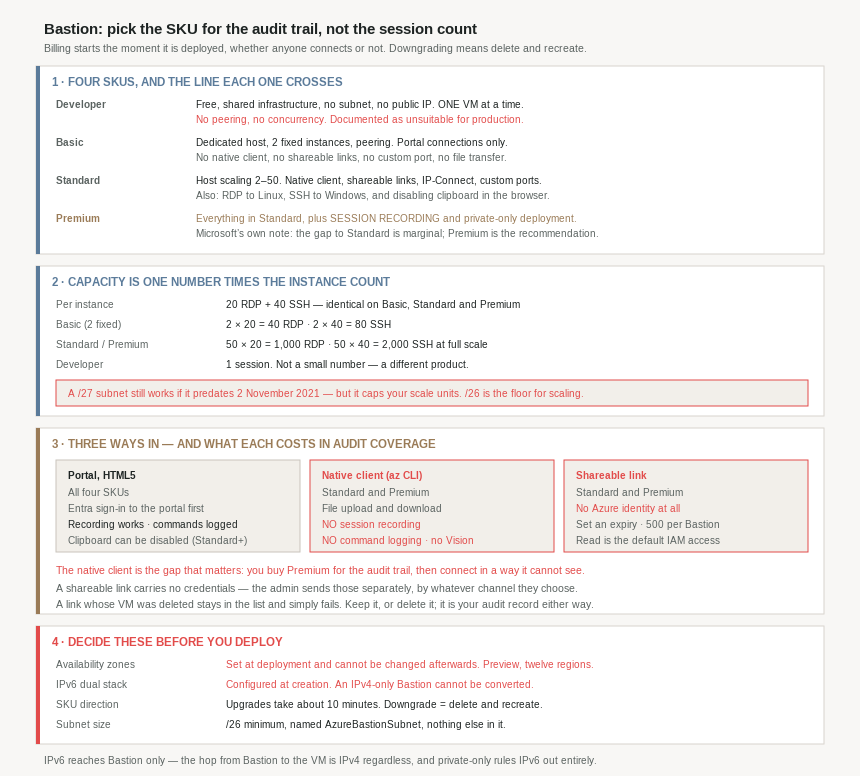
The scaling model is simpler than the tables suggest. An instance is “an optimized Azure VM that is created when you configure Azure Bastion”, also called a scale unit, and per-instance capacity is 20 RDP plus 40 SSH sessions — the same on Basic, Standard and Premium. Everything else is multiplication.
| SKU | Instances | Max concurrent RDP | Max concurrent SSH |
|---|---|---|---|
| Developer | Shared resource | 1 | 1 |
| Basic | 2, fixed | 40 (2 × 20) | 80 (2 × 40) |
| Standard | 2–50, configurable | 1,000 (50 × 20) | 2,000 (50 × 40) |
| Premium | 2–50, configurable | 1,000 (50 × 20) | 2,000 (50 × 40) |
Two readings of that table matter. First, Basic's 40 RDP sessions are usually plenty, so concurrency is almost never the reason to leave Basic — features are. Second, Developer's “1” is not a small capacity, it is a different product: a shared resource supporting “one VM connection at a time”, with no virtual network peering and no concurrent connections, and the documentation carries a warning that it “isn't suitable for production workloads.”
The subnet decision outlives the SKU decision
AzureBastionSubnet must be /26 or larger for anything deployed on or after 2 November 2021, must carry that exact name, must sit in the same virtual network and resource group as the host, and “can't contain other resources.” Older /27 subnets “are unaffected by this change and will continue to work” — but “using a smaller subnet space limits the number of scale units.”
So an inherited /27 is not a problem until the day you need host scaling, at which point it is the problem, and fixing it means resizing a subnet in a live virtual network. Size it /26 even on Basic, where scaling is not available, because the SKU can be upgraded later and the subnet is the harder thing to change.
Why This Architecture Holds Up
Because the convenient paths are the unaudited ones
This is the finding I would take away from the whole post. Premium exists largely for session recording — recorded graphical sessions land “in a blob container within your storage account” after the session closes, which is what satisfies an audit requirement. Premium in preview also adds SSH command logging, a text record of commands run, and RDP Vision and SSH Vision, which analyse a finished session for suspicious activity.
And then, stated plainly in the same document: “Command logging isn't currently available for native client connections”, and “because session recording isn't available for native client connections, RDP Vision doesn't analyze those sessions.”
Buying Premium does not mean sessions are recorded
The native client — connecting through the Azure CLI with the RDP or SSH client already on your laptop — is the method experienced administrators prefer, and it is the method that produces no recording, no command log, and therefore no Vision analysis. It is also the only method that supports file upload and download.
So the uncomfortable combination is real: the path with file transfer is the path with no recording. If the control you told an auditor about is session recording, then the native client has to be prevented by policy, not merely discouraged — because nothing in Bastion stops someone with Standard or Premium from using it.
The portal path, by contrast, is fully covered and can be tightened further: disabling copy and paste in the web client is a Standard-and-above feature. That gives a coherent posture for a regulated environment — portal only, clipboard disabled, recording on — at the cost of the convenience that makes administrators reach for the CLI.
Because a shareable link is an identity decision, not a networking one
Shareable links are the feature most likely to be enabled for a good reason and reviewed for a bad one. They let a user “connect to a target resource… without accessing the Azure portal”, which is exactly what you want for a vendor, an auditor or a contractor who should not be given a tenant identity.
The design is better than it first sounds. “The shareable link doesn't contain any credentials - the admin must provide sign-in credentials to the user”, so possession of the URL is not access. Links take an explicit expiry, and after it “the link can't be used to connect to the target resource”, with the status changing to Link expired. And the default IAM posture is restrictive: “By default, users in your org have only Read access to shared links” — enough to use and view, not to create or delete.
What to design around:
- Credential delivery is yours to solve. The link is safe to email; the password is not, and Bastion has no opinion about how you send it. That channel is now part of your access control, and it is the part with no logs.
- The ceilings are real. “Bastion only supports 500 shareable links per Bastion resource” and “only supports 50 requests, including creates and deletes, for shareable links at a time” — so filling a Bastion to its ceiling is ten batches, and bulk cleanup is batched too.
- Visibility needs its own permission. Creation and deletion map to
createShareableLinksanddeleteShareableLinksactions, and withoutgetShareableLinks“the user won't be able to see a shareable link.” A reviewer who cannot list links cannot review them. - Dead links persist, and that is useful. If a link stops working it means “someone in your organization has deleted that resource”; the link stays in the list and fails. The documentation suggests you may “keep it for auditing purposes”, which is the right instinct — it is evidence of what access existed.
- Topology limits. Not supported “for peered virtual networks across tenants”, not supported “over Virtual WAN”, and no connections to on-premises or non-Azure machines. A hub-and-spoke estate on Virtual WAN cannot use this at all.
Because the protocol crossings are a Standard feature, and nobody expects that
Two rows in the SKU matrix catch people out, because they look like protocol support rather than tier gating: RDP to a Linux VM and SSH to a Windows VM are both No on Developer and Basic, and Yes only from Standard.
In a mixed estate that is a real constraint. A Windows administrator who wants SSH to a Windows box, or a Linux team running a desktop environment over RDP, needs Standard — and the requirement usually surfaces after Basic is already deployed and in use. Custom inbound ports are also Standard-only, with the defaults being 3389 for RDP and 22 for SSH; if a host listens elsewhere, that too is a tier conversation.
Because two settings are frozen at deployment
Most Bastion settings are changeable. Two are not, and both are the kind of thing discovered during a resilience review rather than during design.
Availability zones. You must deploy “using manually specified settings” and specify the zones at deployment time, because “you can't change availability zone settings after Azure Bastion is deployed.” Accepting the portal's defaults forfeits the choice. Zone support is in preview in twelve regions.
IPv6 dual stack. “Dual stack must be configured when the Bastion is created; existing IPv4-only Bastions can't be converted to dual stack.” And the scope is narrower than it reads: IPv6 covers “the connection between the user and Azure Bastion only” — the hop from Bastion to the target VM stays IPv4, IPv6-only is unsupported, and IPv6 is not supported on private-only deployments at all. So “Bastion supports IPv6” is true for the client side of one hop and nothing else.
Private-only deployment is the Premium feature that completes the segmentation story from #104: a “non-internet routable deployment of Bastion that allows only private IP address access”, with no public IP on the host at all. It is the one configuration where the administrative entry point is not reachable from the internet — and it is mutually exclusive with IPv6.
Key Architecture Decisions
| Decision | Choose | Because |
|---|---|---|
| Dev or test environment | Developer SKU | Free, no subnet, no public IP — and one VM at a time, which is the trade. |
| Anything production | Basic at minimum, Premium if audited | Developer is documented as unsuitable for production. |
| Session recording is a requirement | Premium, and block the native client | Recording and command logging don't cover native client connections. |
| Choosing between Standard and Premium | Premium | Microsoft's own note: the cost difference is marginal and Premium is recommended. |
| Mixed Windows and Linux estate | Standard at minimum | RDP to Linux and SSH to Windows are both Standard-and-above. |
| Hosts on non-default ports | Standard at minimum | Custom inbound ports are Standard-only; defaults are 3389 and 22. |
| Subnet sizing, any SKU | /26 or larger | Smaller subnets cap scale units, and the SKU is easier to change than the subnet. |
| Several environments | One Bastion plus peering | Billing starts at deployment regardless of usage. |
| Zone redundancy wanted | Specify zones at deployment | It cannot be changed afterwards, and defaults don't ask. |
| IPv6 clients | Decide at creation; not with private-only | No conversion path, and IPv6 doesn't reach the target VM anyway. |
| Third-party or vendor access | Shareable link with an expiry | No tenant identity needed, and the link carries no credentials. |
| Estate on Virtual WAN, or cross-tenant peering | Not shareable links | Explicitly unsupported in both topologies. |
| Who may create links | Grant the three actions deliberately | Read is the default; and without getShareableLinks a reviewer sees nothing. |
| No public entry point permitted | Premium, private-only | The only deployment with no public IP on the host. |
| Clipboard exfiltration a concern | Portal only, copy/paste disabled | Disabling it is Standard-and-above and applies to web clients. |
Closing Thought
The SKU table is organised by capability, and capability is the wrong axis to read it on. Read it by what survives the session instead. Developer leaves nothing and reaches one machine. Basic leaves a portal sign-in. Standard adds three ways in, two of which produce no record. Premium adds the record — and does not withdraw the two ways around it.
That is not a criticism of the service. It is the ordinary shape of an access control: the convenient path and the observable path are usually different paths, and the design work is deciding which one you are actually going to permit. Buying Premium is the easy half. Declaring that connections must come through the portal, and then enforcing it somewhere other than a wiki page, is the half that makes the audit answer true.
The one line to take away
Premium gives you session recording; the native client and shareable links give you convenience with no recording at all. Pick the SKU for the trail you need, then decide — in policy, not in hope — which connection methods you are prepared to allow.
Next in the series: just-in-time VM access, which is the other half of this — not how an administrator gets in, but for how long the door is open at all.
Official Azure Reference
- Choose the right Azure Bastion SKU — the full four-SKU feature matrix including the protocol crossings, session recording and private-only rows, the per-instance capacity of 20 RDP and 40 SSH, the Basic fixed-two and Standard/Premium 2-to-50 host scaling with the resulting 40/80 and 1,000/2,000 ceilings, the Developer warning and regional subset, the upgrade-only ratchet with its approximate ten-minute duration, the Developer upgrade prerequisites, the marginal-cost note recommending Premium, and the 5 GB free monthly data transfer
- About Azure Bastion configuration settings — the AzureBastionSubnet naming, /26 minimum since 2 November 2021 and the scale-unit consequence of going smaller, the Standard and Static public IP requirement, the instance and scale unit definition, the 3389 and 22 defaults with Standard-only custom ports, availability zones fixed at deployment and their twelve preview regions, the IPv6 dual stack creation-time requirement and its client-side-only scope, private-only deployment, session recording and its single combined setting, SSH command logging and its native client gap, and RDP and SSH Vision with their requirements, regions and preview billing
- Create a shareable link for Azure Bastion — what a link does and that it carries no credentials, the default Read access, the 500-per-resource and 50-requests-at-a-time ceilings, the cross-tenant peering, Virtual WAN and non-Azure exclusions, the Standard SKU requirement and ten-minute update, link expiry and the Link expired status, one link per resource, the behaviour when the target resource is deleted, the four IAM actions including the one needed merely to see a link, and custom port and protocol support
- What is Azure Bastion — the managed PaaS model and private-IP reach, RDP and SSH over TLS on port 443 and protection from port scanning, the four SKUs, the three deployment architectures, the three connection methods and which SKUs offer each, peering to serve multiple networks, and billing from the moment of deployment
- Bastion session recording — the configuration detail behind the Premium audit trail (no claims drawn from it)
- Deploy Bastion as private-only — the deployment with no public IP on the host (no claims drawn from it)
Comments