Business Challenge
Every post in this series so far has treated a project allow policy as something you write. Open one on a project that has been used for a while and there are principals in it you have never typed, holding roles you did not choose. They are not a misconfiguration. They are how the platform works.
It is not, and the documentation is blunt about the consequence. Google grants roles to service agents automatically, so those roles appear in your actual allow policy, but not in your stored copy of the allow policy. If your configuration does not include them, then those roles are revoked when you apply your configuration.
Correct approachTreat the allow policy as co-authored. Either represent the service agent grants in your configuration deliberately, or enforce the organization policy that stops them being revoked at all.
It does not, by default. Service agents are not listed on the IAM page even when they hold a role on your project. To view role grants for service agents, you select the Include Google-provided role grants checkbox — and until you do, a whole class of principal is simply absent from the screen people use to answer "who can do what here".
Correct approach
Audit from the API, not the console. gcloud projects get-iam-policy returns the whole policy with no checkbox to forget.
Mostly, then not at the moment it matters. Compute Engine uses compute-system.iam.gserviceaccount.com and Cloud Run uses serverless-robot-prod.iam.gserviceaccount.com — neither matches the gcp-sa- pattern people write their regex against. And Google reserves the ground entirely: both the creation time and the email address format for service agents are subject to change.
Never pattern-match a service agent address to decide policy. Use the service agent principal set, which is a supported identifier rather than a guess about a string.
You reviewed it once. The documentation attaches a warning to these roles that it attaches to almost nothing else: some service agent roles contain very powerful permissions, and the permissions within these roles can change without notice.
Correct approachAccept that a service agent binding is an open-ended grant and contain it elsewhere — at the resource, with VPC Service Controls, and with the audit trail — rather than by sizing the role.
Architecture
The reason these accounts exist is straightforward. Some Google Cloud services need access to your resources so that they can act on your behalf. A logging sink writing to a bucket, a Cloud Run service reading the Pub/Sub topic that triggers it, a managed cluster creating the VMs it runs on — each is the service doing work inside your project, and IAM has no way to express that except as a principal holding a role.
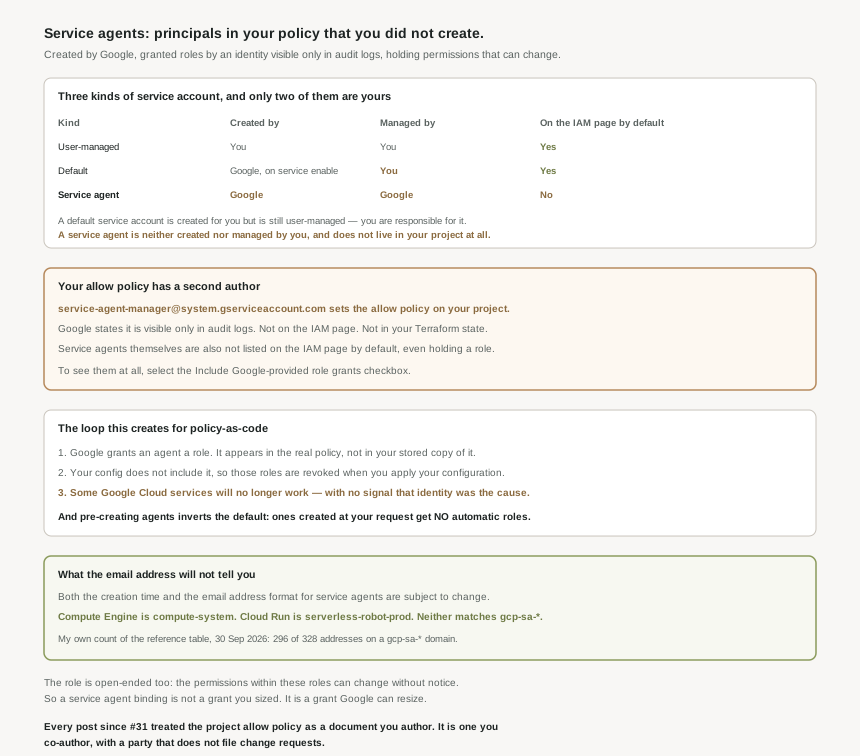
Three kinds of service account, and the distinction that gets lost
| Kind | Created by | Managed by | Lives in your project |
|---|---|---|---|
| User-managed | You | You | Yes |
| Default | Google, when you enable or use a service | You | Yes |
| Service agent | No |
The middle row is the one people collapse into the third. Default service accounts are user-managed service accounts that are created automatically when you enable or use certain Google Cloud services — created for you, but yours, and your responsibility to manage. The Compute Engine and App Engine default accounts from #46 are this kind. A service agent is the genuinely different thing: not created in your project, not visible among your service accounts, and not something you can manage.
When they appear, and why you cannot pre-empt them
Creation is lazy and tied to use. If an API requires a service agent, then Google Cloud creates the service agent at some point after you activate and use the API. For project, folder and organization scope, they are created as you need them, usually when you first use a service. Agents tied to a specific resource — a Cloud SQL instance, for example — arrive when that resource does.
Which means the set of principals on a project is a function of its history. It grows as teams enable APIs, and it grows from the other direction too: Google Cloud can introduce new service agents at any time, both for existing services and for new services.
The email address tells you the scope, not the service
There is one genuinely useful thing encoded in the address, and it is not the product name. The numeric ID in it identifies the resource the agent is associated with, and that resource defines the scope of what the agent acts on. A project number means the agent acts on that project and its descendants; an organization number means organization scope. That is worth reading. The rest of the string is not a contract — on the reference page I counted 328 addresses across 308 listed agents, of which 296 sit on a gcp-sa- domain and 32 do not, including the two busiest services most estates run. That count is my own measurement of the page on 30 September 2026, not a figure Google publishes.
Why This Architecture Holds Up
This is the part that reframes the previous seventeen posts, and it is easy to read past in the documentation because it is stated as a note about audit logs.
When Google Cloud grants a service agent a role on your project, something has to perform that write. It is a service account called service-agent-manager@system.gserviceaccount.com, and the description is exact: this service account manages the roles that are granted to other service agents, and it is visible only in audit logs.
It is not in your project. It is not on the IAM page. It is not in your Terraform state, your policy-as-code repository, or any inventory built from the resources you declared. The only place its writes are observable is the audit log, where they appear as SetIamPolicy on your project by a principal nobody in your organization controls. Everything this series has said about least privilege, about reviewing who holds what, and about the allow policy being the authoritative answer, was written as though you were the only author of that document. You are not, and the co-author does not raise a change request.
The drift loop, and why it ends in an outage rather than an alert
Put the two halves together and the failure mode is mechanical rather than unlucky:
- Google writes a binding. A team enables an API; the Service Agent Manager grants the new agent its role. Those roles appear in your actual allow policy, but not in your stored copy of the allow policy.
- Your pipeline sees drift. A reconciling system compares intent with reality and finds a binding it has no record of. To resolve this inconsistency, you might incorrectly revoke these roles — and with a declarative framework you do not even choose: if the configuration does not include the service agent roles, then those roles are revoked when you apply your configuration.
- A service stops working. Not the pipeline, and not immediately. The documentation states the outcome plainly: if you revoke these roles in a way that is not suggested by a role recommendation, some Google Cloud services will no longer work.
The gap between step two and step three is what makes this expensive. The revocation is a successful apply. The breakage surfaces later, in a different service, as a permission error on an operation nobody changed — and the change that caused it was a clean run of the tool whose job is to keep the policy correct.
The remedy inverts a default, which is the part to read twice
The documented answer to the drift is to create the service agents yourself, ahead of using the service, so they exist in your configuration and are therefore not revoked by it. That works. It also changes the rules: after you trigger service agent creation, you must grant the service agents the roles that they are typically granted automatically, because agents created at your own request do not receive them.
So the automatic grant that was quietly keeping your services working is not a property of service agents. It is a property of service agents that Google created. Take that job over and you have taken over the whole of it, including for every future agent of that service, and including the ones introduced after you wrote the configuration. The safety net is removed at exactly the moment you start managing the thing it was protecting.
Neither is a re-grant by hand. First, a custom organization policy that prevents users from revoking service agent roles — which makes the drift non-destructive rather than merely visible, and is the right answer when the pipeline is the thing you cannot fully trust. Second, when you write deny policies against broad principal sets, add your service agents as exceptions in the deny rule, using the project, folder or organization service agent principal set rather than matching on email addresses. A deny rule aimed at everything is the other way people break Google services without touching a grant.
One warning that runs the other way
There is a temptation, once you know these roles exist, to reuse them: they are well-named, they clearly work, and they are right there. The reference page answers it before you ask. Do not grant service agent roles to any principals except service agents — both because the permissions are wider than the name suggests, and because they can be widened again without notice. A role you borrowed today is a role somebody else resizes later, on a principal that is yours.
And if one is deleted
The recovery window is the ordinary service account one, and it is shorter than most incident timelines assume: after 30 days, IAM permanently removes the service account. The detail that catches people is what happens if you rebuild instead of restoring — recreate an account with the same name and the new service account is treated as a separate identity; it does not inherit the roles granted to the deleted service account. The email address matches, the bindings referencing the old numeric identity do not follow, and the symptom is a permission failure on a principal that looks correct in every list you can read.
Key Architecture Decisions
| Decision | Choose this | Because |
|---|---|---|
| Reconciling IAM with a declarative tool | Enforce the organization policy against revoking service agent roles | Otherwise a clean apply removes bindings your services depend on. |
| Representing service agents in code | Only with the grants included | Agents created at your request are not granted roles automatically. |
| Auditing who has access to a project | Read the policy from the API | The IAM page omits service agents unless a checkbox is set. |
| Identifying service agents in policy | The service agent principal set | The email address format is subject to change. |
| Writing a broad deny policy | Add service agents as exceptions | A deny aimed at everything also denies the platform. |
| Needing a role with similar power | A custom role, never the service agent role | Its permissions can change without notice. |
| Reviewing the Google APIs Service Agent | Check whether it holds Editor | Editor is granted on projects created before April 2026. |
| An unexplained permission error after a policy change | Diff the allow policy against the audit log | The write may have come from a principal not in any inventory. |
| Recovering a deleted service agent | Undelete it, do not recreate it | A same-named account is a separate identity and inherits nothing. |
The one to look at today
Of everything above, the Google APIs Service Agent is the concrete item worth checking on a real project this afternoon. It is the account at cloudservices.gserviceaccount.com that runs internal processes on your behalf, primarily for Compute Engine features. Its default grant is now the narrow roles/compute.instanceGroupManagerServiceAgent, but Editor is still granted if your project was created before April 2026 or if you enable the Cloud Deployment Manager API — and as the documentation says, the Editor role is highly permissive.
That is two conditions most estates meet. Anything created before this year qualifies on age alone, and Deployment Manager re-grants it regardless of age. So on a mature organization the likely finding is a Google-managed principal, absent from the default console view, holding Editor on production — not through anyone getting it wrong, but because the default changed and the projects did not.
Closing Thought
The design here is defensible and probably correct. Managed services have to act inside your project, an identity is the honest way to represent that, and making those identities first-class principals in the same policy as everyone else is better than a hidden side channel with no audit trail. Given the alternatives, this is the one that can be inspected at all.
What is worth sitting with is the shape it gives the artifact. Seventeen posts have treated the allow policy as a design document — something you reason about, review and keep minimal. It is also a live record of what the platform has decided it needs, written continuously by a party outside your organization, using a principal that appears on no screen that lists principals. Both descriptions are accurate. Only the first one is in anybody's runbook, and the gap between them is where a pipeline whose entire job is to keep the policy correct removes the bindings that keep it working.
#49 moves from the identities Google creates to the ones your organization brings: Cloud Identity — users, groups, and why domain verification is the step that decides who owns an account.
Comments