📋 In This Post
Lab Overview
"Show me every ERROR across the platform in the last hour." With one account that is a query. With ten accounts it is ten logins, ten consoles and the same query typed ten times — and if one of those accounts is the one that got compromised, its logs are sitting inside the blast radius.
The old fix was expensive enough that most teams skipped it: subscription filters into Kinesis Firehose into an OpenSearch cluster, comfortably $1,000 a month at scale plus someone's half-time job. In 2025 AWS made cross-account querying native and the first centralized copy free. This lab builds the version that exists now — and runs into one feature that was not ready.
| What it does | Queries every account's logs from one place, and keeps a copy of the evidence in an account the source cannot write to |
|---|---|
| Core services | CloudWatch Logs, CloudWatch OAM, Logs centralization rules, Logs Insights, Lambda, EventBridge, SNS, AWS Organizations |
| Terraform resources | 17 across five modules, one HCP workspace, two providers (management account and an assumed role in the source account) |
| Outcome | OAM sharing, cross-account queries, the dashboard and the alarm all worked. The org-wide centralization rule did not — AWS refused to create it for over 24 hours. See Troubleshooting |
| Lab runtime | Not recorded |
| Cost | Estimated under $2/month while running. Destroyed: $0 |
| Status | Published 19 July 2026 — resources destroyed, one AWS-side item still open at publish time |
Cloud Services and Concepts
| Service or concept | Its job here |
|---|---|
| CloudWatch OAM (sink + link) | Links accounts so the monitoring account can query logs and metrics in place. Nothing moves, nothing extra is billed, and it works across regions |
| Logs centralization rules | Organizations-integrated rules that physically replicate matching log groups into one destination account |
| Logs Insights | The query layer; now speaks OpenSearch PPL and SQL as well as its own syntax |
| Lambda + EventBridge | A generator emitting ~25 structured JSON lines every five minutes, so every layer has live data to prove itself |
| SNS | Carries the alarm to a human |
| AWS Organizations | Trusted access for CloudWatch — the prerequisite with no Terraform resource |
Sharing and copying are different tools
OAM answers "query everything, now, for free" but the only copy of the data still lives in the account that produced it. A centralization rule answers "keep evidence that outlives the account" at the cost of storing it twice. Neither replaces the other, which is why this build runs both paths.
Log class is an irreversible choice
The Infrequent Access class halves ingestion cost — $0.25/GB against $0.50/GB — but permanently disables metric filters, subscription filters and Live Tail, and a log group's class can never be changed after creation. The destination groups here stay Standard, because the alarm needs a metric filter and first-copy ingestion is free anyway. IA would have bought nothing and cost the alerting design.
The pattern AWS is retiring
Subscription filters into Firehose into OpenSearch is the architecture AWS is itself sunsetting: the official "Centralized Logging with OpenSearch" solution retires in December 2026, with customers steered to the native capabilities. Worth re-checking a "best practice" diagram against the current platform before rebuilding it.
Architecture and Workflow
- Generate. An EventBridge rule in the source account invokes a 128 MB Lambda every five minutes, emitting around 25 structured JSON lines per run with weighted INFO/WARN/ERROR levels.
- Land. The function's
logging_configroutes its output into/platform-lab/week10/log-generatorwith 14-day retention, rather than the default/aws/lambda/*group, so one group carries the whole story. - Share, and copy. The OAM link makes the source account's logs and metrics queryable from the monitoring account instantly and at no charge. In parallel, the org-wide centralization rule is meant to replicate those groups into the management account, tagging each stream with its source account and region.
- Watch the copy, not just store it. A metric filter counts ERROR events in the centralized stream; an alarm fires at five or more errors in five minutes and publishes to SNS. A cross-account dashboard puts that error count next to the source account's own Lambda metrics — the OAM half made visible.
Prerequisites
| Requirement | Why | How to check |
|---|---|---|
| Organizations trusted access for CloudWatch | Centralization rules will not be created without it, and the Terraform AWS provider has no resource for it — this is a one-time manual step before any apply | aws organizations list-aws-service-access-for-organization
shows observabilityadmin.amazonaws.com |
| The centralization service-linked role | The console path creates it for you; the CLI path does not, and rule creation fails later without it | aws iam create-service-linked-role --aws-service-name
logs-centralization.observabilityadmin.amazonaws.com |
| Terraform ≥ 1.10, AWS provider ~> 6.39 | The centralization-rule resource only exists from provider 6.21.0, so the 5.x pin earlier weeks carry will not work here | terraform version |
| A role the management account can assume in the source account | Hub and spoke resources live in one plan with no static credentials;
the aliased provider assumes
OrganizationAccountAccessRole |
The plan shows resources under both providers |
| Destination log groups on the Standard class | The alarm depends on a metric filter, which Infrequent Access disables permanently | Set at creation — it cannot be changed afterwards |
Implementation
| Module | Resources | Its job |
|---|---|---|
oam_hub | 2 | The sink in the monitoring account, plus an org-scoped sink policy |
oam_spoke | 1 | The link, created under the source-account provider |
log_generator | 7 | The Lambda, its role and policy, log group, and the EventBridge schedule |
log_centralization | 1 | The org-wide rule — the one resource AWS refused to create |
alerting | 6 | Metric filter, alarm, SNS topic and subscription, and the cross-account dashboard |
One HCP workspace (week-10-dev, VCS-driven) applies all of it. The
root declares two providers: the default one for the management account, and an
aliased one that assumes a role in the source account. Hub and spoke therefore
appear in a single plan, and no static credentials exist anywhere — HCP
authenticates to AWS over OIDC.
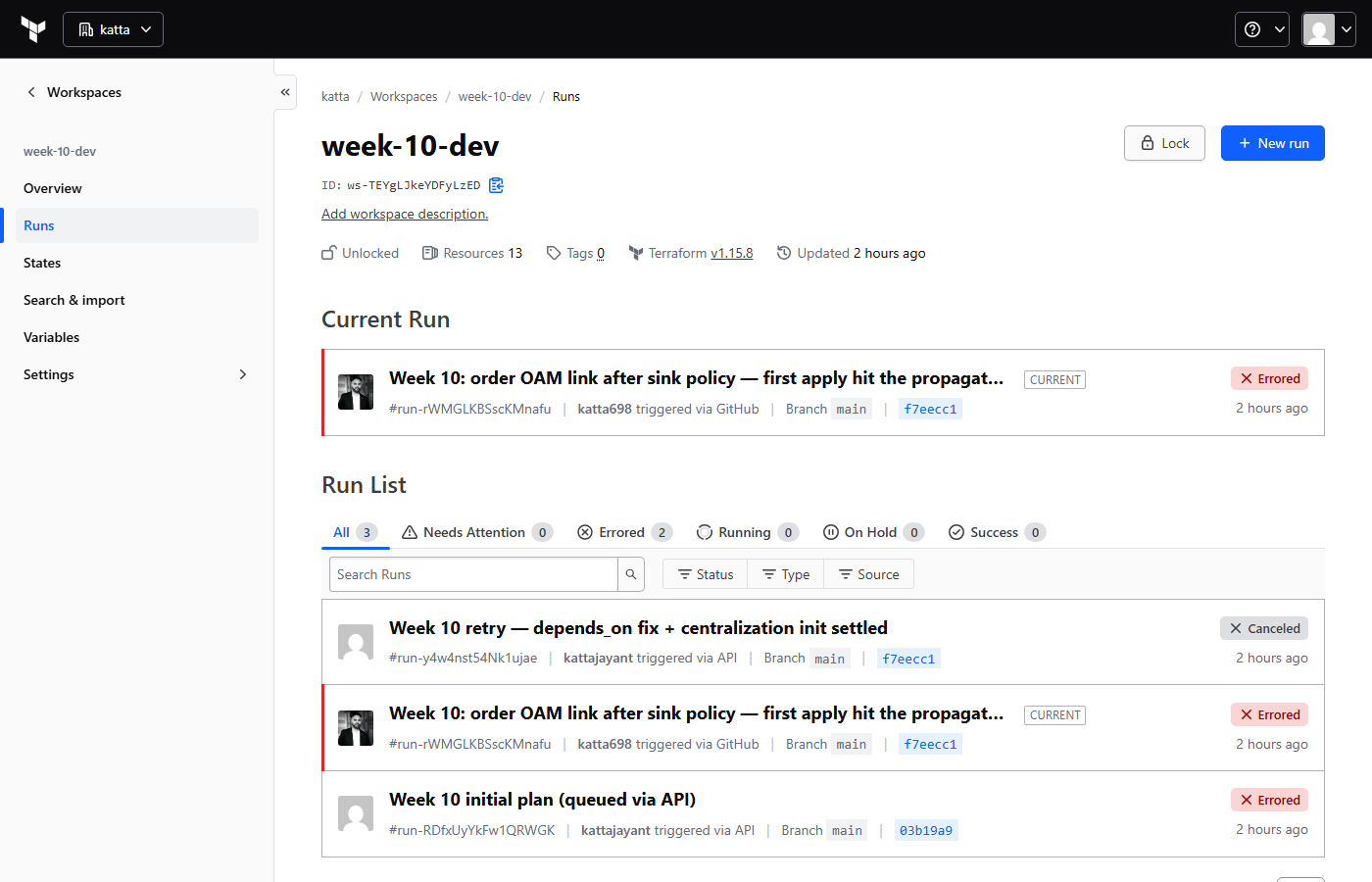
week-10-dev — VCS-driven plans from GitHub pushes, applies confirmed manually.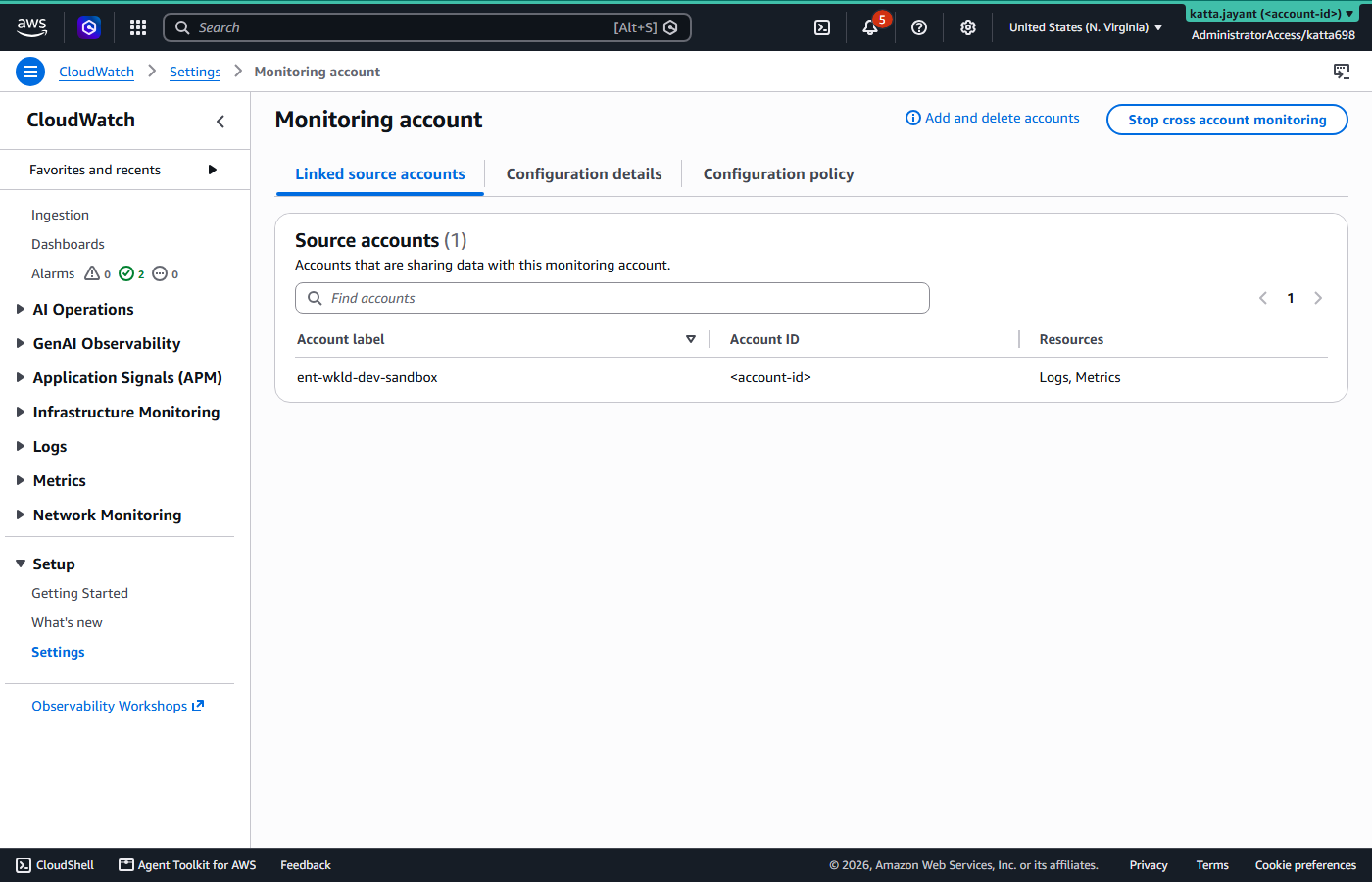
Validation and Evidence
| Test | Expected | Actual | Status |
|---|---|---|---|
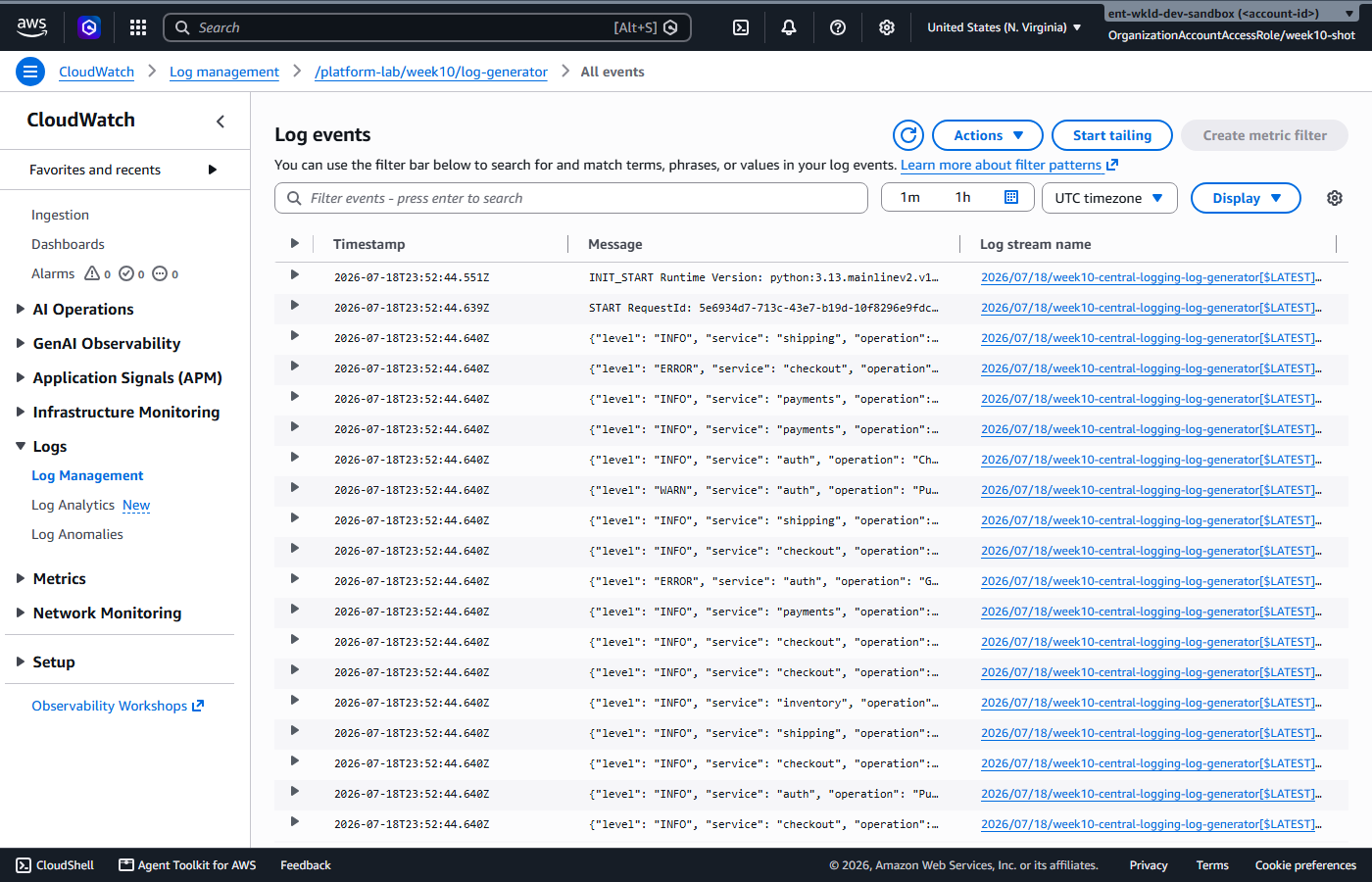
| Generator writes to the intended log group | Structured JSON in
/platform-lab/week10/log-generator |
Events landing every five minutes with the expected level mix | Pass |
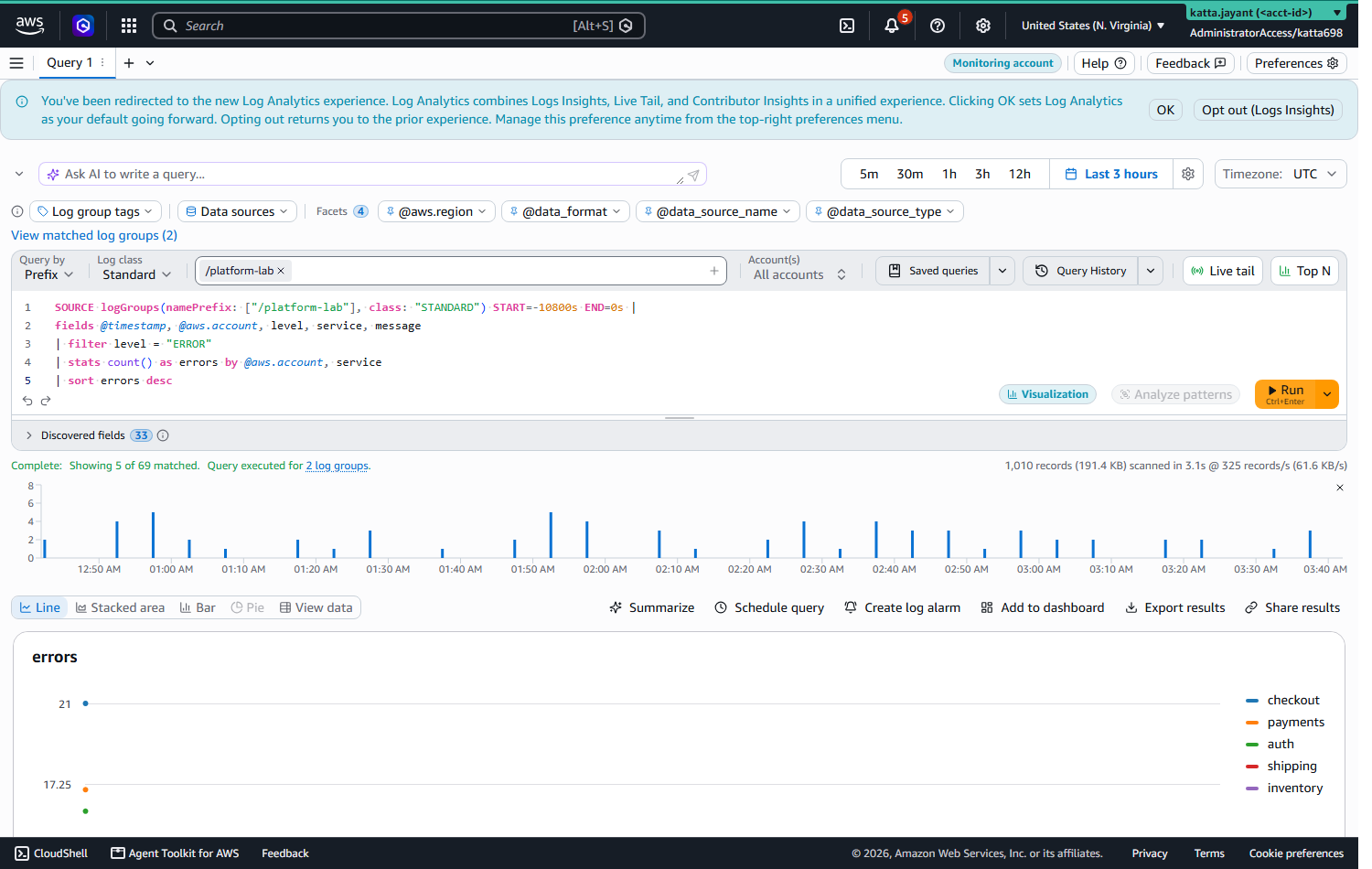
| Cross-account query from the monitoring account | One Logs Insights query, scope "All accounts", returns results from the source account | Query executed across two log groups and grouped errors by account | Pass |
| Alarm fires on an error spike | Five or more ERROR events in five minutes moves the alarm to ALARM and emails SNS | Alarm entered ALARM after a synthetic metric injection; the email arrived with the state change and threshold | Pass |
| Cross-account dashboard | Centralized error count beside the source account's Lambda metrics | Rendered, with the centralized error widget empty because the rule never created | Partial |
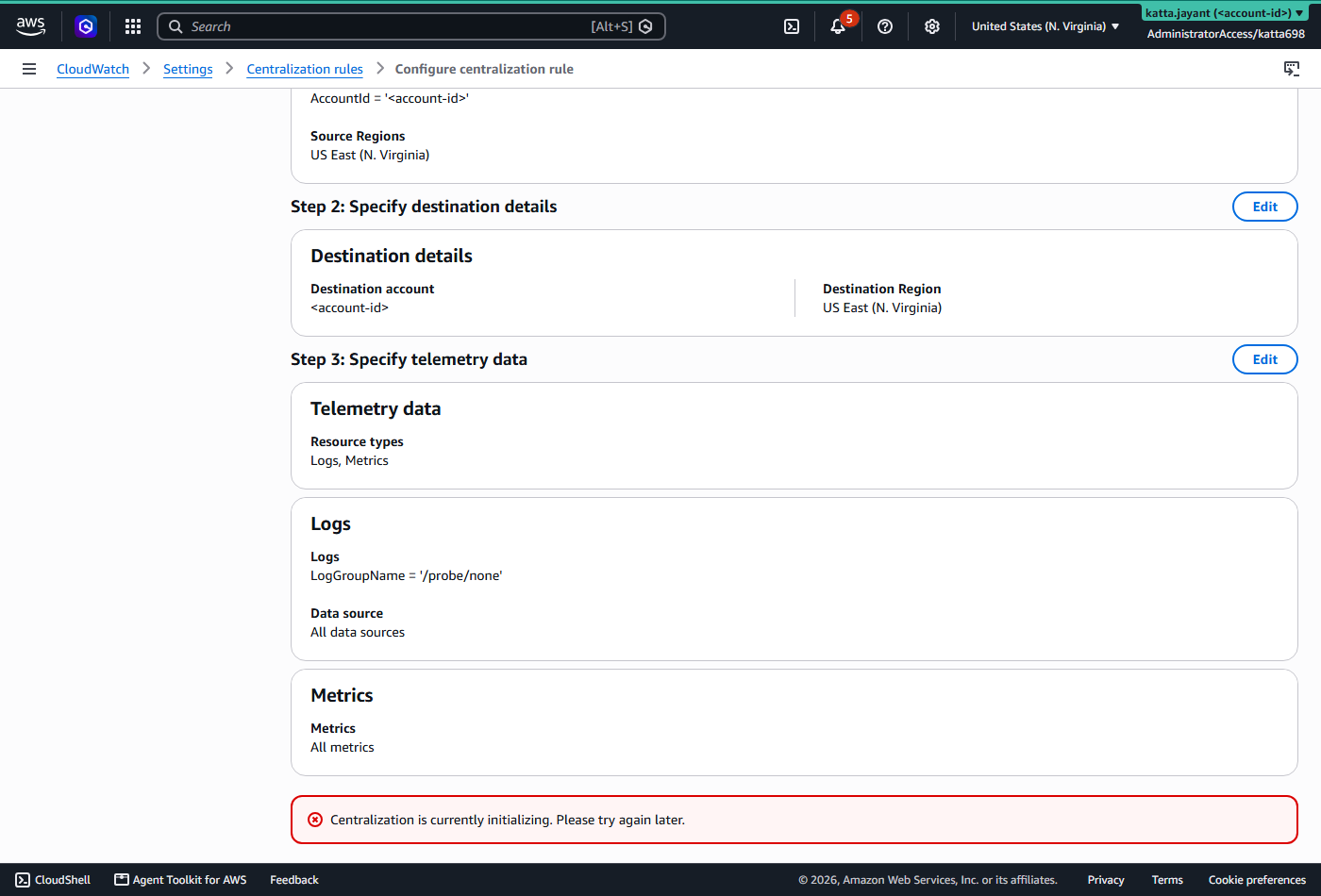
| Org-wide centralization rule | Matching log groups replicated into the management account | AWS refused creation for over 24 hours with "Centralization is currently initializing"; no copy was ever made | Blocked |
Security and Cost
- The sink policy is scoped twice. Only accounts inside the
organization can link to it (
aws:PrincipalOrgID), and only for logs and metrics (oam:ResourceTypes) — no outside account, no other telemetry types. - Evidence outlives the account. Centralized copies live where the source account has no write access. That is the whole security argument for physical copies over pure sharing, and it is the half of this build that did not land.
- No static credentials. HCP authenticates over OIDC, the spoke is reached by role assumption, and the service-linked role bounds what the centralization service can do.
- Retention as a control. 14 days at source, 30 days centralized. Logs are a liability as much as an asset; unbounded default retention is both a cost leak and an exposure surface.
Cost
Estimated from published rates in July 2026; the deployed footprint was small enough that no meaningful charge was measured.
| Component | Cost | Note |
|---|---|---|
| OAM sink and link | $0 | Sharing logs and metrics cross-account is not billed |
| Centralization rule, first copy | $0 ingestion | Additional copies, such as a backup region, would be $0.05/GB |
| Log storage, both copies | ~$0.03/GB-month | Bounded by the retention settings above |
| Lambda, EventBridge, SNS | ~$0 | Around 8,640 invocations a month at 128 MB — well inside the free tier |
| Total | Under $2/month | Destroyed: $0 |
For scale, the retired Firehose-to-OpenSearch pattern at 50 accounts and 100 GB a day runs $1,000–2,500 a month before anyone queries anything. The native equivalent is $0 first-copy ingestion, roughly $90 a month of storage at 30-day retention, and per-GB query charges only when a query runs.
Troubleshooting and Lessons
"Centralization is currently initializing. Please try again later."
This is the one that did not get fixed. After trusted access was enabled,
CreateCentralizationRuleForOrganization returned a
ValidationException and kept returning it, retried every few minutes
for more than 24 hours, while read APIs on the same service answered normally. No
documentation mentions an initialization window at all.
Root cause: never established. Everything checkable was ruled out — the service-linked role exists, trusted access reads On, a delegated administrator was registered, and CloudTrail confirms the calls arrive and are rejected. The console's own wizard accepts the entire configuration and then refuses the final create with the same message, and its "turn off trusted access" button greys out while initializing, so the setting cannot even be re-toggled. One suspect worth naming without claiming it: this organization contains eight closed accounts sitting in their 90-day post-closure SUSPENDED state, and an org-wide provisioning workflow that touches every member account may not enjoy meeting them.
Lesson, which stands whenever AWS finishes: never put an org-wide enablement with an unbounded activation time on the critical path of a build. The OAM half of this architecture was queryable in minutes; the half that depended on an organization-wide backend was not, and no amount of correct Terraform changed that.
The OAM link raced a policy it never referenced
First apply: 15 of 17 resources created, then aws_oam_link failed
with AccessDeniedException ... explicit deny in a resource-based
policy. The policy was correct — the identical
CreateLink call succeeded from the CLI minutes later.
Root cause: Terraform called CreateLink 14 seconds
after creating the sink policy, before the resource policy had propagated. The
dependency graph permitted it, because the link references the sink's ARN and
nothing ordered it after the policy.
Fix: a module-level
depends_on = [module.oam_hub] on the spoke. The general shape is worth
keeping: when resource A must satisfy a resource-based policy created by resource
B, referencing A's parent does not order it after B. Say the dependency
out loud.
A new feature has four clocks
Docs, console, CLI and Terraform provider each described this feature slightly differently in the same week — including an undocumented initialization wait. Verify each layer live rather than assuming they agree.
Cleanup and Key Takeaways
The workspace is VCS-connected, so destroy through HCP:
week-10-dev → Settings → Destruction and Deletion →
Queue destroy plan. Afterwards confirm three things are actually gone: log groups
under /platform-lab/week10 in both accounts, the OAM sink and link
pair, and the centralization rule. Organizations trusted access is an org-level
setting rather than a billed resource — leaving it on costs nothing and saves
the initialization wait next time.
- Sharing and copying are different tools; run both. OAM gives you the query, centralization gives you the evidence that survives the account that produced it.
- The 2025 primitives deleted a whole architecture. Three billed hops became one native feature. Re-check inherited "best practice" diagrams against the current platform.
- Log class is irreversible and invisible. Infrequent Access halves ingestion and permanently kills metric filters. Decide per log group, at creation, with the alerting design in front of you.
- Terraform's graph only knows what you reference. When
correctness depends on a policy existing,
depends_onis the honest fix rather than a retry loop. - Publish the part that did not work. Four of five paths worked; one was refused by AWS for a day with no documented reason. A lab writeup that quietly omits that is a worse artifact than one that names it.
Comments