📋 In This Post
Why — The Problem This Solves
Every S3 bucket accumulates objects over time. Log files written daily, data exports from pipelines, backups, media uploads — they all go in at Standard storage rates and, without intervention, they all stay there at Standard rates indefinitely. Standard costs $0.023/GB/month. S3 Glacier Instant Retrieval costs $0.004/GB/month. That’s an 83% gap sitting there untouched on every cold object in your account.
The fix isn’t complicated: AWS already built the mechanism. S3 Intelligent-Tiering monitors individual object access patterns and moves objects between tiers automatically. S3 Lifecycle Policies transition objects on a schedule when the access pattern is already known. Neither requires any application changes. The cost is just that someone has to set it up — and in most environments, nobody does, because the objects keep working and the bill just quietly grows.
Storage cost reviews at scale consistently find that 60–80% of S3 data is in the Standard tier despite being cold for months or years. The objects still serve their purpose. The access patterns just don’t justify Standard pricing — and without automation, they stay there until someone manually moves them or writes a one-off migration script.
The Business Value
This platform delivers three things at once: automatic tiering that requires no application changes, deterministic lifecycle rules for data where the access pattern is already known, and a daily email report that shows exactly how much those two things saved versus doing nothing.
Automatic Tiering (Intelligent-Tiering)
AWS monitors object access frequency and moves objects between Frequent Access, Infrequent Access (30d), Archive Instant (90d), and Deep Archive (180d) tiers automatically. No application code changes required.
Deterministic Lifecycle (logs/ prefix)
Log files follow a known pattern — hot for a few days, cold forever after. A lifecycle rule transitions them to Standard-IA at 30 days, Glacier Instant Retrieval at 90, and deletes them at 365. No guesswork, no monitoring fee.
Silent Cost Killers Eliminated
Two lifecycle rules exist purely to prevent invisible charges: AbortIncompleteMultipartUpload after 7 days (orphaned upload parts billed at Standard forever) and NoncurrentVersionExpiration after 30 days (every overwrite retains its previous version indefinitely with versioning on).
Daily Savings Report via Email
A Lambda function runs on an EventBridge daily schedule, queries CloudWatch for actual storage distribution by tier, calculates savings versus all-Standard cost, and sends the result to your inbox via SNS.
What You Need to Know — Skills & Tools
S3 Storage Classes
S3 has seven storage classes. The ones that matter here:
| Class | Use When | Price (us-east-1, July 2026) |
|---|---|---|
| Standard | Frequent access, unknown access pattern | $0.023/GB/month |
| Standard-IA | Infrequent access, retrieval in milliseconds | $0.0125/GB/month |
| Glacier Instant Retrieval | Archive, retrieval in milliseconds | $0.004/GB/month |
| Glacier Deep Archive | Long-term archive, 12h retrieval | $0.00099/GB/month |
Prices verified 2026-06-30. Always check aws.amazon.com/s3/pricing/ for current rates.
Intelligent-Tiering vs. Lifecycle Policies
Intelligent-Tiering
Use when you don't know the access pattern. AWS monitors each object and moves it automatically. Costs $0.0025/1,000 objects/month for monitoring. Objects under 128KB are exempt from IT (they never move — the monitoring fee would exceed the savings).
Lifecycle Policies
Use when you do know the access pattern. Rules are deterministic: transition after N days, expire after M days. No monitoring fee. The logs/ prefix is a perfect candidate — logs are hot for days, cold forever after.
Key Concepts
S3 storage metrics (BucketSizeBytes, NumberOfObjects) are published to CloudWatch once daily, not in real time. The first time you invoke the cost reporter Lambda after deploy, it will return zero values — this is expected. Upload test objects, wait 24 hours, then invoke again to see real data.
Architecture — How It Fits Together
Two independent automation paths run on the same bucket. The event-driven path (S3 → SQS → Lambda) tags every new object. The scheduled path (EventBridge → Lambda → SNS) delivers the daily savings report.
Why SQS Between S3 and Lambda?
S3 supports direct Lambda triggers. The production reason to use SQS instead: at high object creation rates, direct S3 → Lambda triggers can throttle or drop events. SQS provides buffering — events queue up and Lambda processes them at its own pace. The DLQ gives you visibility when the tagger fails; without it, a tagging failure would silently disappear.
Why Lambda for Both Functions?
Both workloads fit Lambda’s constraints cleanly. The object tagger: event-triggered, stateless, completes in under a second, essentially zero base concurrency. The cost reporter: runs once per day, needs about 5 seconds to call CloudWatch and SNS, produces no output beyond the email. Neither workload has duration (ECS), parallelism (Batch), or orchestration (Step Functions) characteristics. Lambda is the right tool here — not because it was used in prior weeks, but because the workload shape matches.
How We Built It — Step by Step
Step 1 — Terraform Structure
Two Terraform modules under week-08-s3-intelligent-storage/terraform/modules/:
- s3-storage — the bucket, IT config, lifecycle rules, and bucket notification
- cost-automation — SQS, DLQ, both Lambdas, EventBridge rule, SNS topic, IAM roles, CloudWatch alarm
The two modules had a circular dependency: s3-storage needed the SQS queue ARN (from cost-automation), and cost-automation needed the bucket ARN (from s3-storage). Both ARNs are deterministic — computable from the account ID and naming convention without waiting for either resource to be created. Resolved in environments/dev/main.tf locals:
locals {
  account_id     = data.aws_caller_identity.current.account_id
  name_prefix    = "${var.project}-${var.environment}"
  bucket_name    = "${local.name_prefix}-${local.account_id}"
  bucket_arn     = "arn:aws:s3:::${local.bucket_name}"
  sqs_queue_name = "${local.name_prefix}-object-events"
  sqs_queue_arn  = "arn:aws:sqs:${var.aws_region}:${local.account_id}:${local.sqs_queue_name}"
}
Neither module output feeds the other — Terraform can plan and apply both in parallel with no dependency graph cycle.
Step 2 — S3 Intelligent-Tiering Configuration
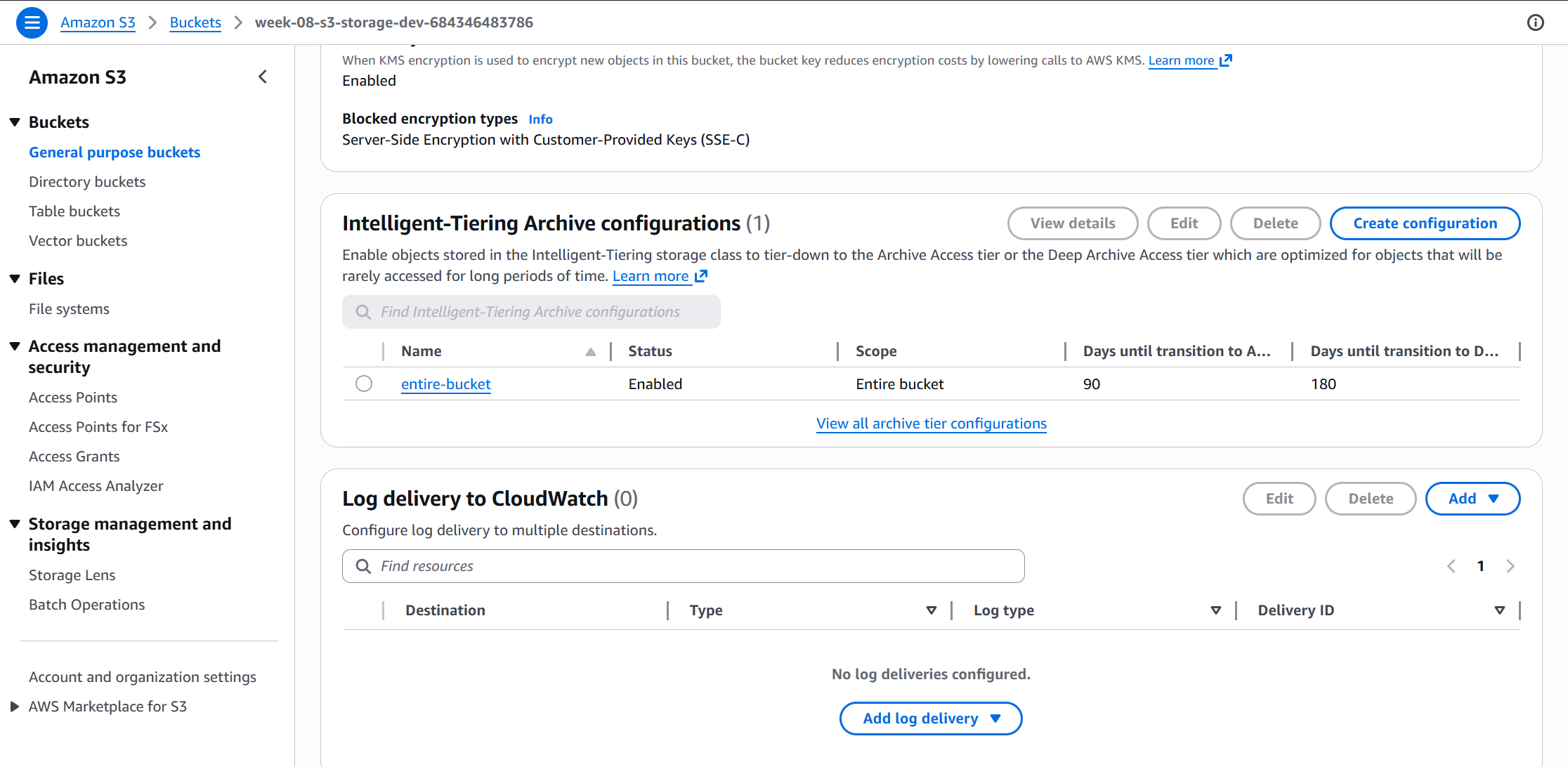
IT is configured as a bucket-level rule (no prefix filter, so it covers all objects). Archive Instant tier activates at 90 days of no access; Deep Archive at 180 days. Objects under 128KB are automatically excluded by AWS and stay in Standard — the IT monitoring fee on small objects would exceed any storage savings.
resource "aws_s3_bucket_intelligent_tiering_configuration" "main" {
  bucket = aws_s3_bucket.main.id
  name   = "EntireBucket"

  tiering {
    access_tier = "ARCHIVE_ACCESS"
    days        = var.intelligent_tiering_archive_days  # 90
  }
  tiering {
    access_tier = "DEEP_ARCHIVE_ACCESS"
    days        = var.intelligent_tiering_deep_archive_days  # 180
  }
}
Step 3 — Lifecycle Policies
Three lifecycle rules on the same bucket:
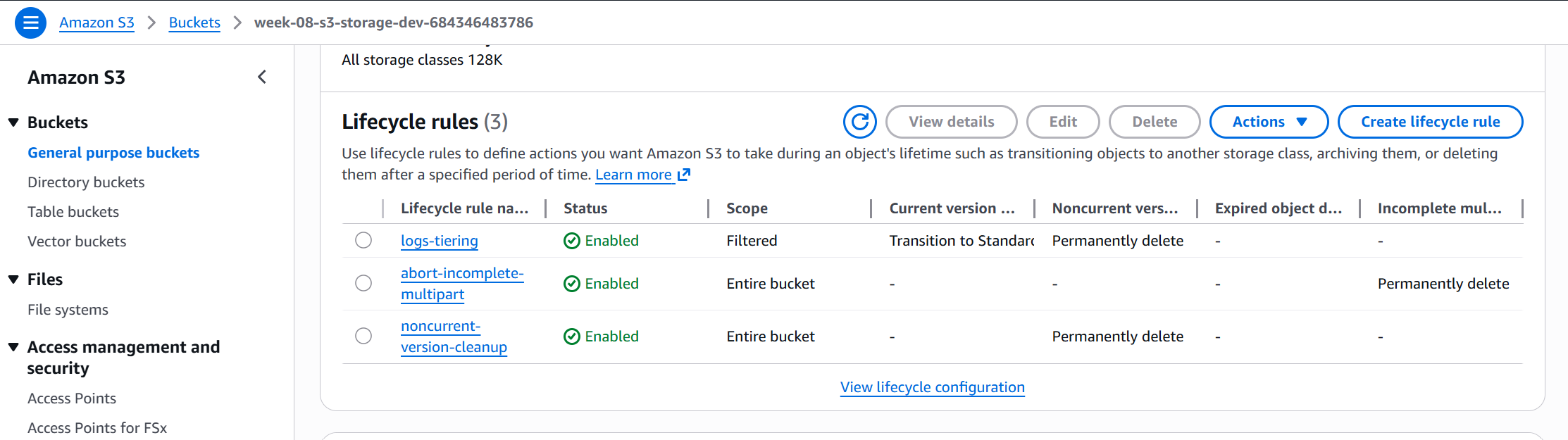
- logs/ prefix rule — Standard-IA at 30d, Glacier Instant Retrieval at 90d, delete at 365d
- AbortIncompleteMultipartUpload — kills orphaned upload parts after 7 days (silent cost if skipped)
- NoncurrentVersionExpiration — expires old versions after 30 days (versioning is on; without this, every overwrite retains prior versions forever)
Step 4 — SQS + DLQ + Lambda: object_tagger
The SQS queue policy restricts SendMessage to the specific bucket ARN — no other principal can write to it. The Lambda reads from SQS, classifies the object by prefix (logs/, data/, media/, archive/) or file extension, and applies content-type and upload-date tags via PutObjectTagging. On failure, the message retries up to 3 times before landing in the DLQ.
def classify_object(key: str) -> str:
    key_lower = key.lower()
    if key_lower.startswith("logs/"):
        return "logs"
    if key_lower.startswith("data/"):
        return "data"
    if key_lower.startswith("media/"):
        return "media"
    if key_lower.startswith("archive/"):
        return "archive"
    if any(key_lower.endswith(ext) for ext in [".log", ".txt", ".csv"]):
        return "logs"
    return "data"
Step 5 — EventBridge + Lambda: storage_cost_reporter
An EventBridge rule fires once per day (rate(1 day)). The Lambda queries CloudWatch BucketSizeBytes with the StorageType dimension for each tier, computes actual cost, computes what the same bytes would cost at Standard, and publishes the difference to SNS as a plain-text email report.
Step 6 — Deploy via HCP Terraform
Backend is HCP Terraform Cloud (same pattern as weeks 5, 6, 7):
cloud {
  organization = "Katta"
  workspaces {
    name = "week-08-dev"
  }
}
Created workspace week-08-dev in HCP Terraform, connected to the GitHub repo via the existing GitHub App installation, and triggered the first apply from the HCP UI.
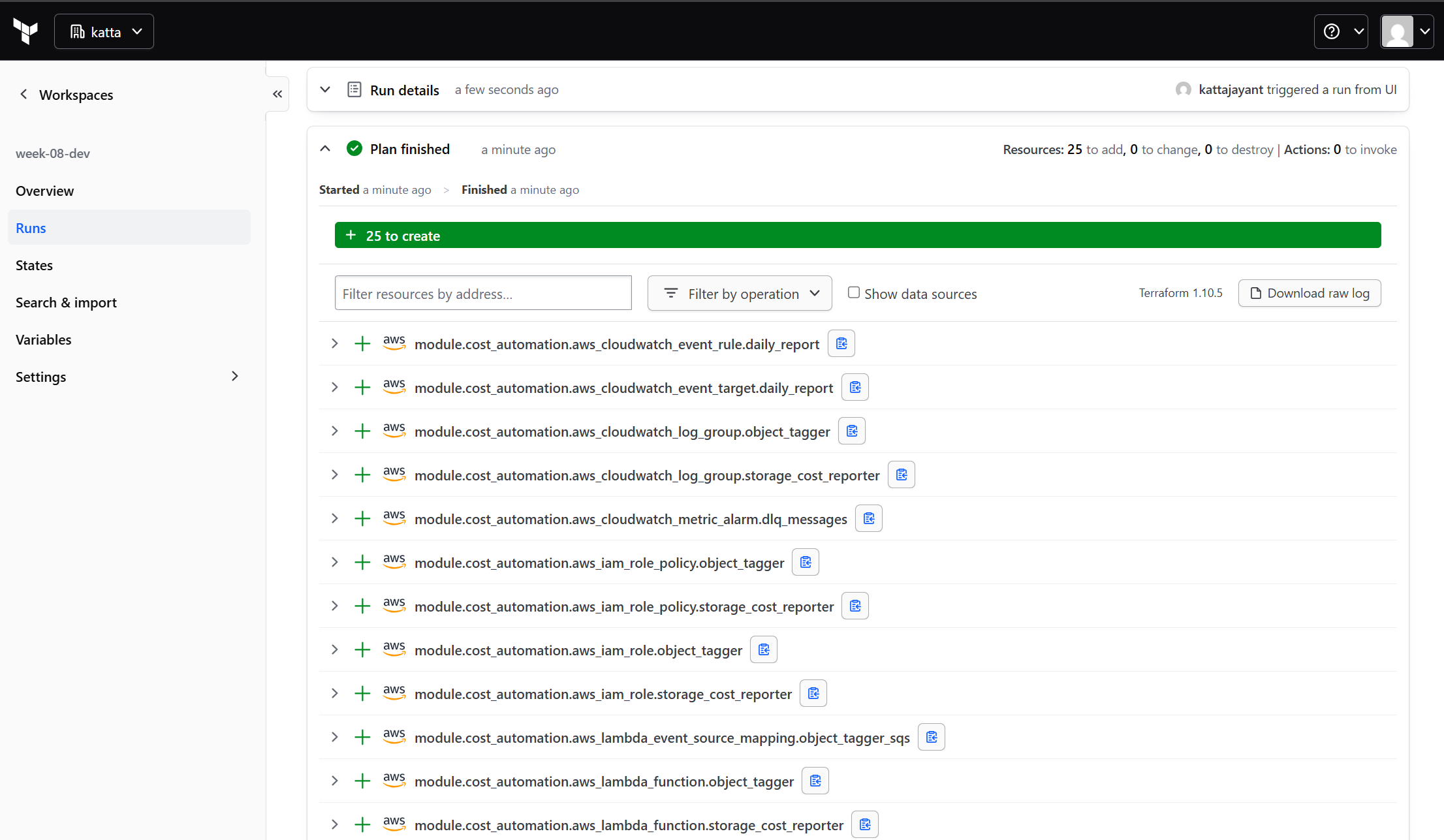
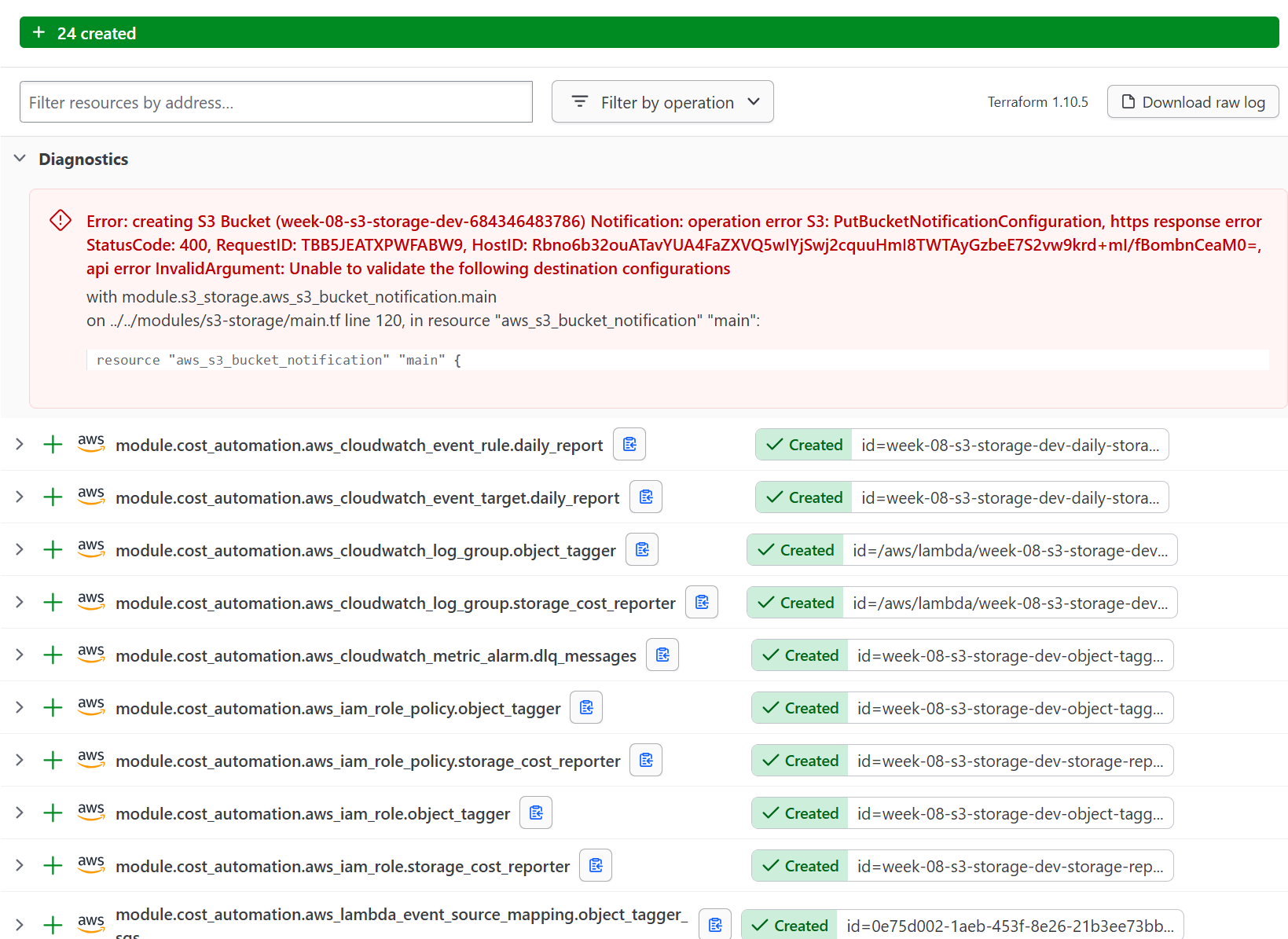
The plan showed 25 resources: the S3 bucket, IT config, lifecycle rules, SQS queue and DLQ, SQS queue policy, both Lambda functions, both IAM roles, EventBridge rule and target, SNS topic and subscription, CloudWatch alarm, and supporting permissions. First apply errored at 24/25 — see Challenges below.
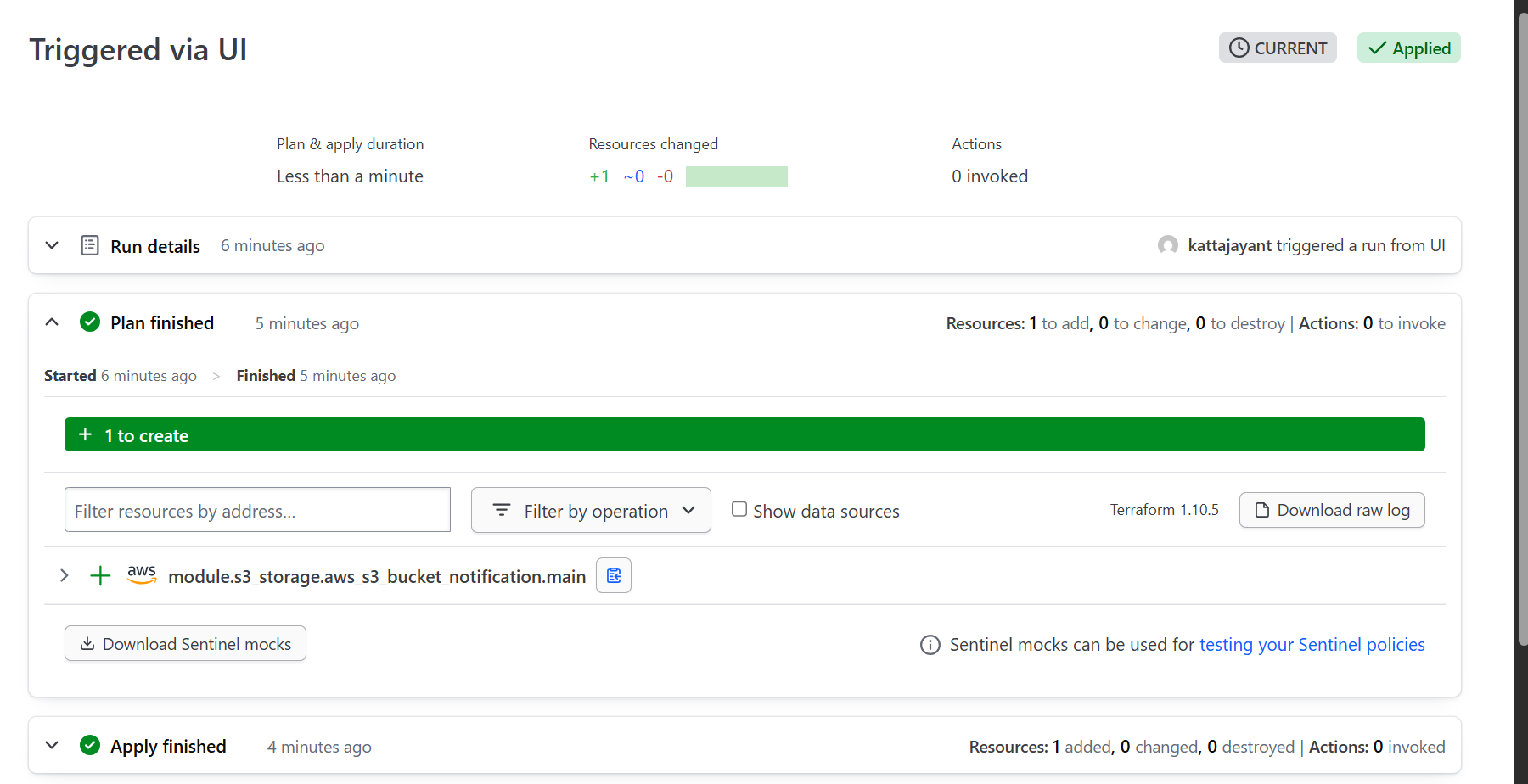
After adding depends_on = [module.cost_automation] to the s3_storage module, re-applying created the remaining resource cleanly:
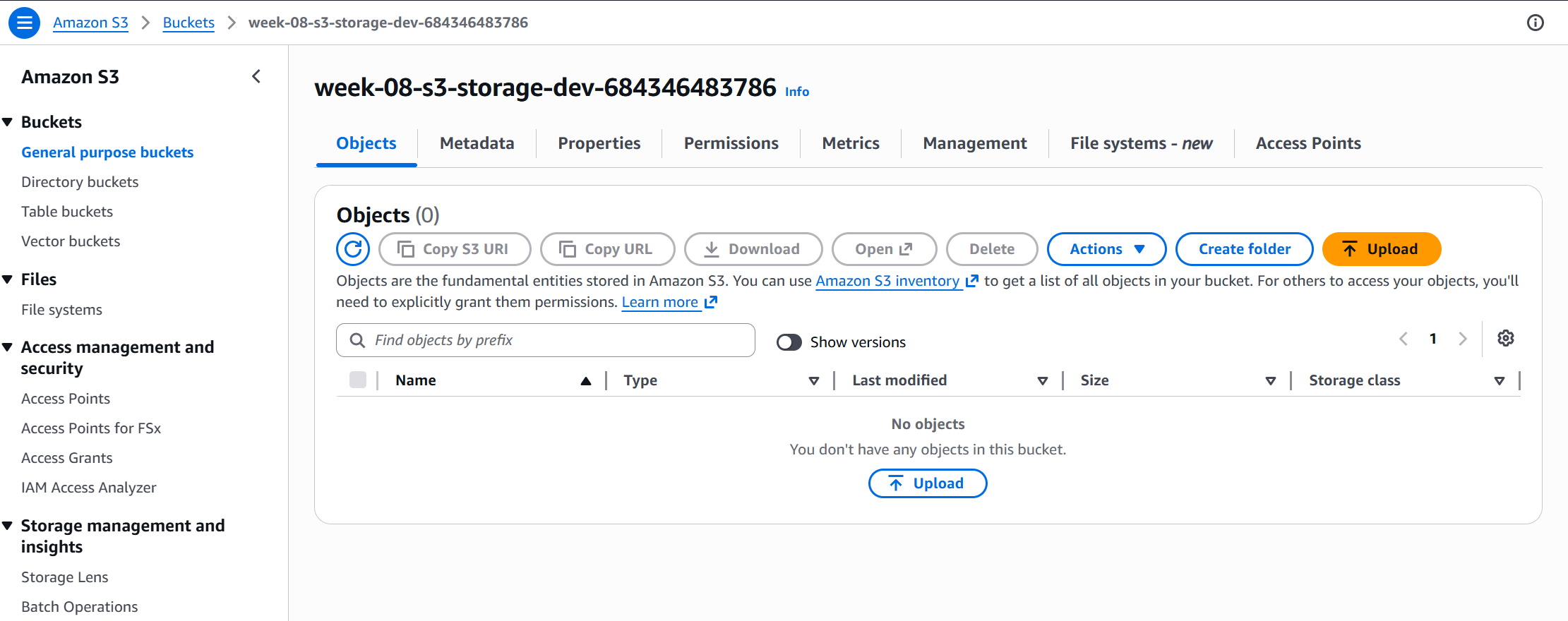
Step 7 — Verify S3 Configuration in the Console
After deploy, confirmed the bucket exists with the correct naming convention and verified both the Intelligent-Tiering configuration and lifecycle rules were applied:
Step 8 — Confirm SNS Subscription
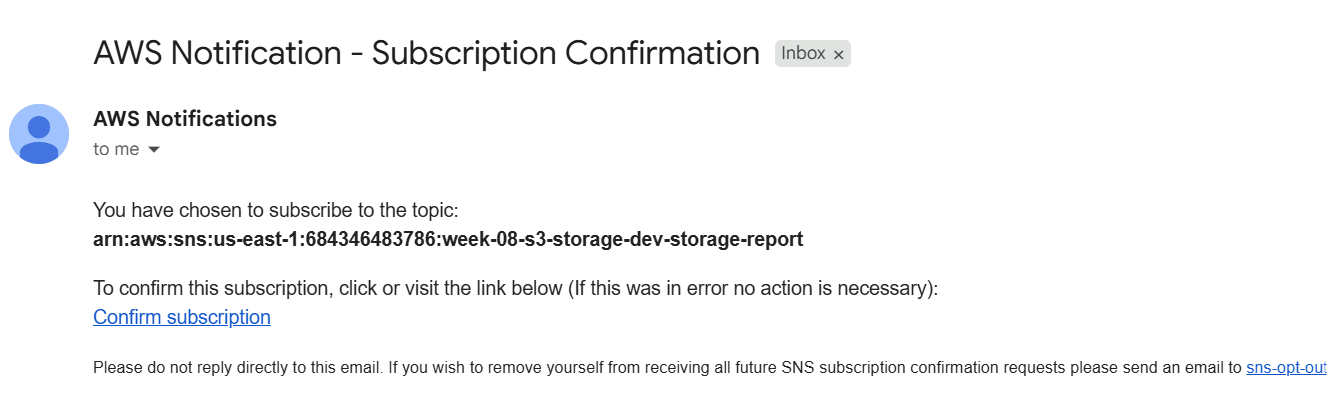
The SNS email subscription requires a one-click confirmation from the target inbox. The daily reporter will not deliver until this is confirmed.
Step 9 — Test Object Tagging
Uploaded a test object to the logs/ prefix to trigger the SQS → Lambda pipeline. The object_tagger classified it by prefix and applied two tags:
echo "test log entry" | aws s3 cp - s3://$BUCKET/logs/app/2026-07-02.log --profile personal
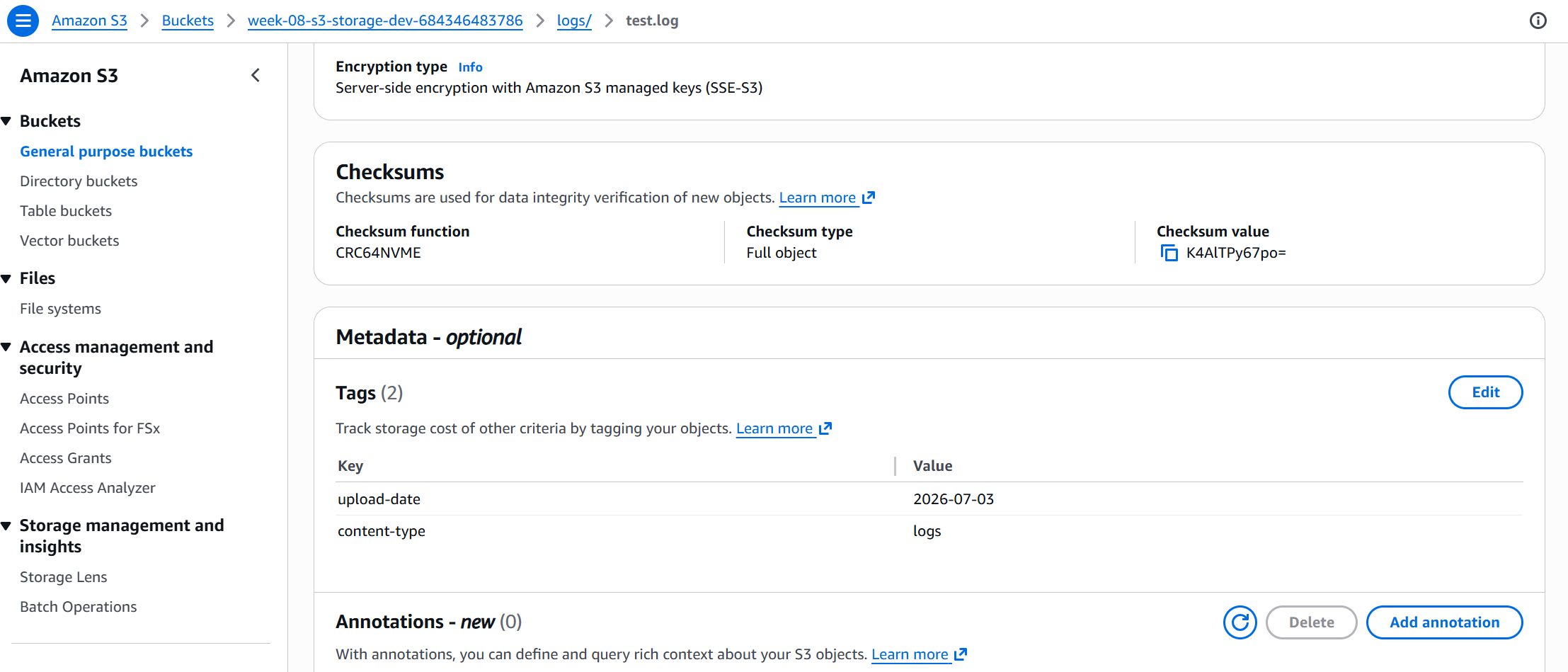
content-type: logs, upload-date: 2026-07-03Step 10 — Invoke the Cost Reporter Manually
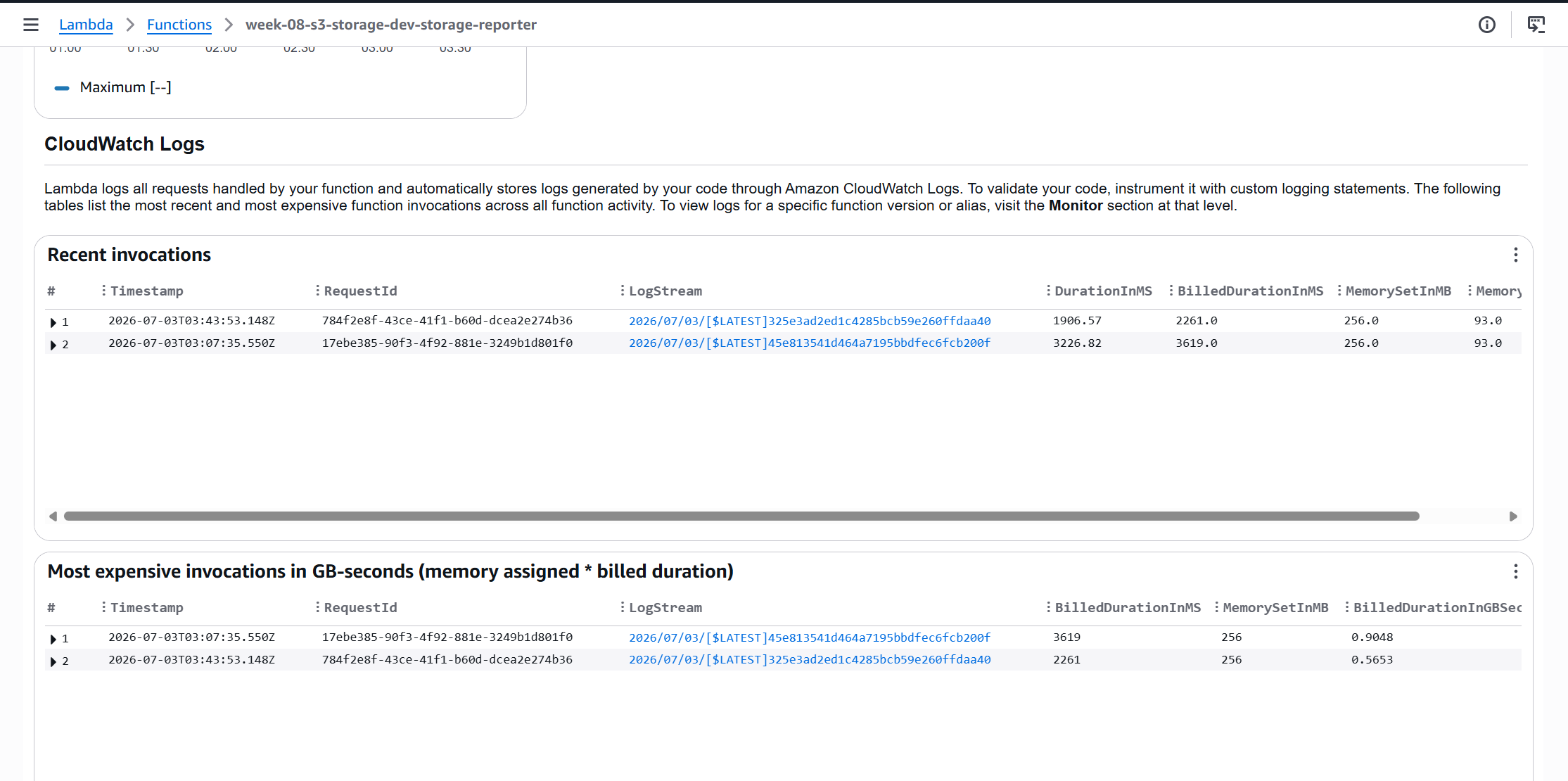
Triggered the storage_cost_reporter Lambda manually to verify the function runs end-to-end. CloudWatch S3 metrics have a 24-hour delay, so the first invocation returned zero values — this is expected behavior, not a bug. The function returned StatusCode: 200 and a report noting no metric data yet:
aws lambda invoke \
  --function-name week-08-s3-storage-dev-storage-reporter \
  --invocation-type RequestResponse \
  out.json --profile personal && cat out.json
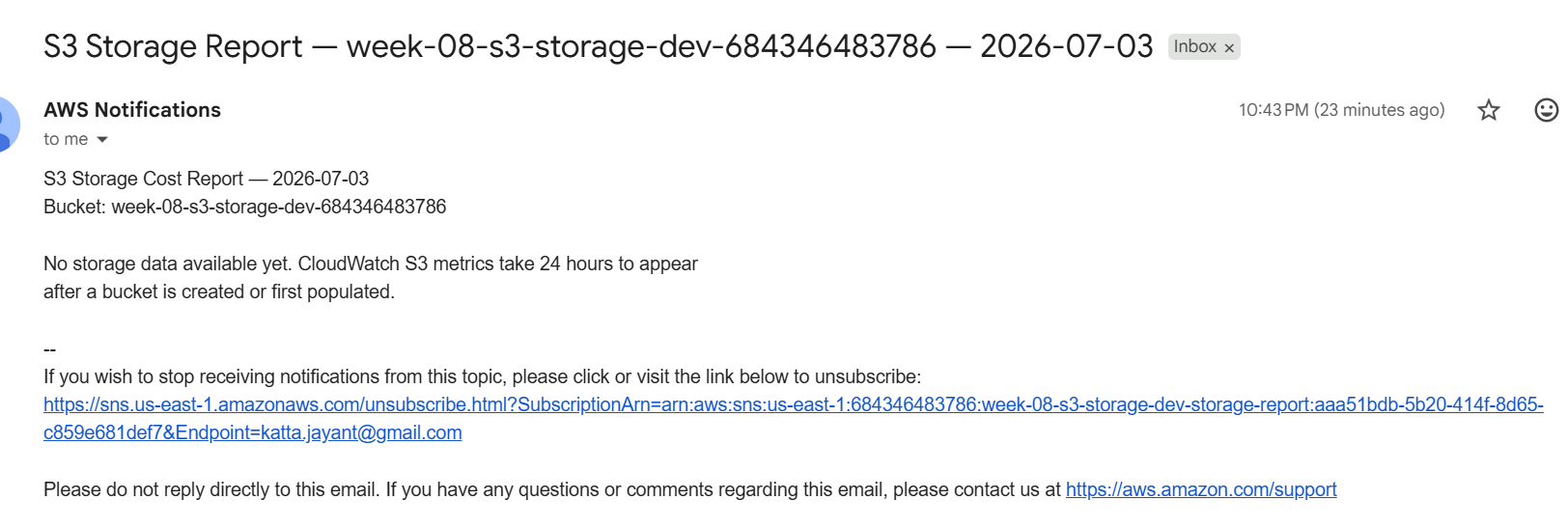
The next morning, the EventBridge daily schedule fired automatically and delivered the first real email report to the inbox — confirming the full end-to-end loop works:
Step 11 — Confirm EventBridge Schedule
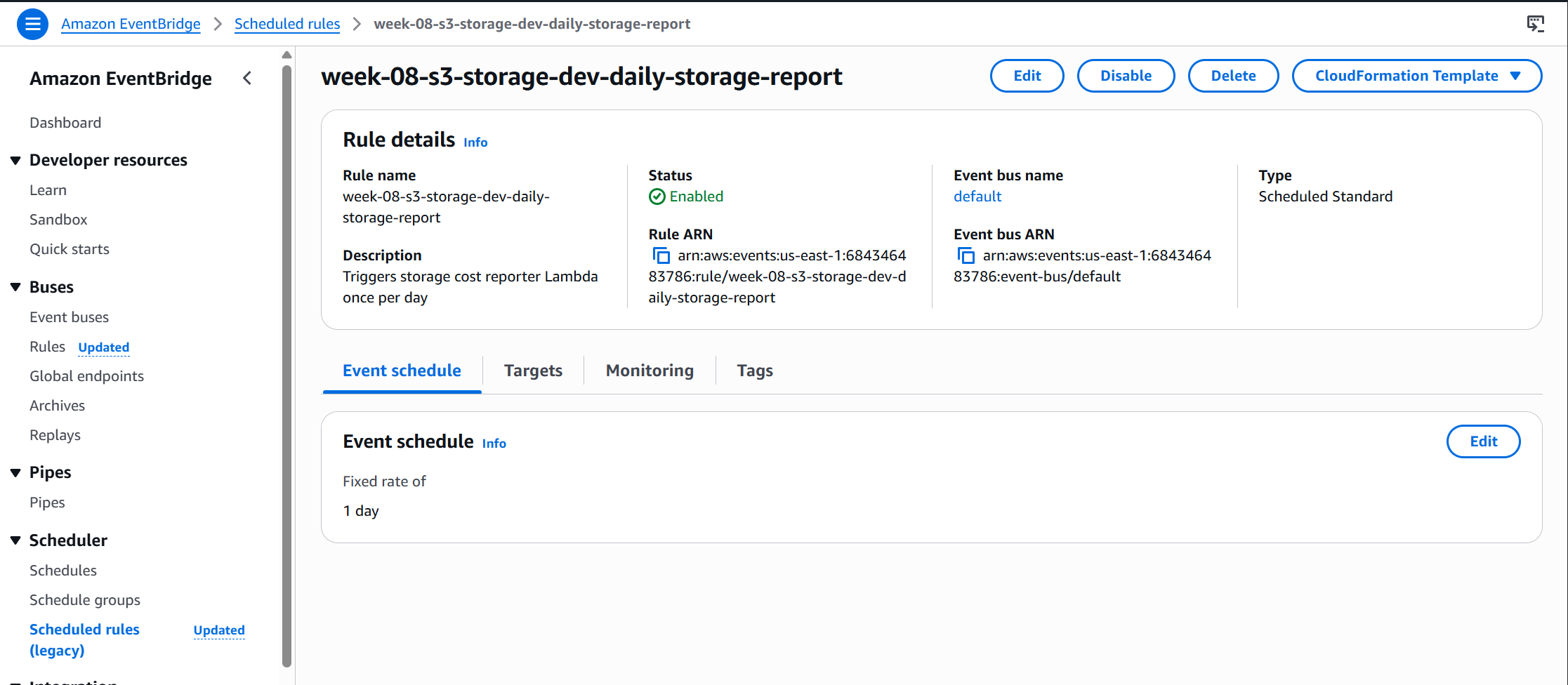
Verified the EventBridge rule was created and enabled, confirming the daily schedule will fire automatically going forward:
Step 12 — Confirm object_tagger Invocations
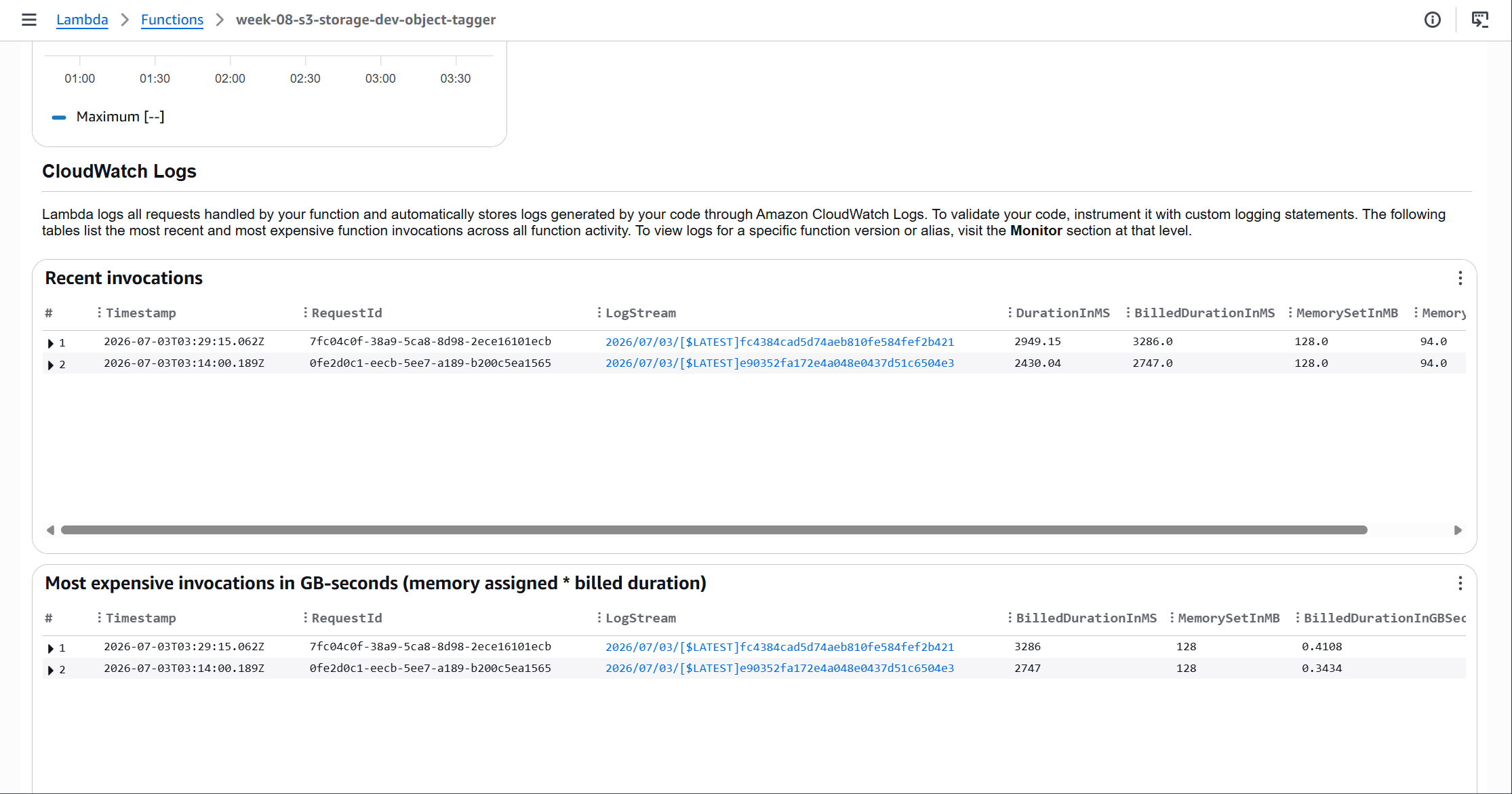
Checked the object_tagger Lambda’s monitor tab to confirm the test upload triggered a successful invocation through the SQS queue:
Challenges — What Actually Went Wrong
The first apply created 24 out of 25 resources and then failed with: InvalidArgument: Unable to validate the following destination configurations on the S3 bucket notification resource.
Root cause: AWS validates the SQS queue policy before accepting a bucket notification configuration. The s3-storage module and cost-automation module had no explicit dependency between them — Terraform applied them in parallel. The S3 notification tried to write before the SQS queue policy had propagated.
Added depends_on = [module.cost_automation] to the s3_storage module call in environments/dev/main.tf. This serializes the apply: cost-automation (and its SQS queue policy) fully completes before s3-storage attempts to write the bucket notification. Second apply: 1 resource created, 25 total done.
Why this matters: S3 bucket notification validation is silent during terraform plan — the plan succeeds because the queue will exist by apply time. The timing issue only surfaces at apply. A depends_on at the module level is the correct fix; adding a Terraform sleep is a workaround, not a solution.
After running aws sso login successfully, subsequent aws commands failed: “Credentials were refreshed, but the refreshed credentials are still expired.” The SSO login appeared to complete but credentials weren’t actually being used.
Root cause: Two separate issues in the AWS CLI config files. First, ~/.aws/credentials had a [default] section header (even though the keys underneath were commented out). The CLI uses this file with higher precedence than ~/.aws/config, so the empty [default] section shadowed the SSO profile configured in config. Second, the [default] profile in ~/.aws/config only had region = us-east-1 — the SSO fields were only in [profile personal].
Removed the [default] section header from ~/.aws/credentials (leaving the commented-out keys as comments only). Added the full SSO configuration to the [default] profile in ~/.aws/config. Cleared both SSO caches (~/.aws/sso/cache/ and ~/.aws/cli/cache/). After re-running aws sso login, both aws sts get-caller-identity (default) and --profile personal worked correctly.
Key learning: A section header in ~/.aws/credentials takes precedence over ~/.aws/config even if all the values under it are comments. The section header alone is enough to shadow the config file profile.
Security — Controls at Every Layer
| Control | Implementation | Why It Matters |
|---|---|---|
| Encryption at rest | AES-256 (SSE-S3) with bucket key enabled | Bucket key reduces KMS API calls if switching to SSE-KMS later |
| Public access blocked | All four public access block settings enabled | Prevents accidental public exposure regardless of bucket policy or ACL |
| SQS source restriction | Queue policy restricts SendMessage to the specific bucket ARN | No other S3 bucket (or principal) can write events to this queue |
| IAM least privilege | object_tagger: s3:GetObject, s3:PutObjectTagging on one bucket only; reporter: cloudwatch:GetMetricStatistics, sns:Publish only | Each Lambda can only do exactly what it needs |
| OIDC authentication | GitHub Actions uses OIDC, no static AWS credentials stored | No long-lived keys to rotate or leak |
| DLQ visibility | CloudWatch alarm on DLQ depth > 0 | Silent tagging failures become visible alerts |
Cost
All prices us-east-1, verified 2026-06-30. Check aws.amazon.com/s3/pricing/ for current rates.
| Resource | Rate | Notes |
|---|---|---|
| S3 Standard storage | $0.023/GB/month | Starting tier; IT moves objects out over time |
| S3 Standard-IA | $0.0125/GB/month | logs/ prefix after 30 days |
| S3 Glacier Instant Retrieval | $0.004/GB/month | logs/ after 90d, IT Archive after 90d |
| S3 Glacier Deep Archive | $0.00099/GB/month | IT Deep Archive after 180d |
| IT monitoring fee | $0.0025/1,000 objects/month | Objects <128KB exempt from monitoring (and never transition) |
| Lambda (2 functions) | < $0.01/month | Low invocation count; well within free tier |
| SQS | < $0.01/month | Pay per request; negligible for test volumes |
| SNS (1 email/day) | < $0.01/month | First 1,000 email notifications free/month |
| EventBridge | < $0.01/month | Scheduled rules are free; custom events at $1/million |
AWS publishes data showing 67% average storage cost reduction for buckets with mixed hot/cold data once Intelligent-Tiering is active. For a 1 TB bucket: $23.55/month at Standard, $7.79/month with IT fully tiered = $15.76/month savings. IT monitoring fee on 1,000 objects: $0.0025. The break-even is near-instant for any bucket with meaningful data volume.
Cleanup
terraform destroy will fail on a non-empty versioned S3 bucket. AWS requires you to delete all object versions and delete markers before the bucket itself can be removed.
The repo includes week-08-s3-intelligent-storage/scripts/cleanup.sh which empties the bucket (all versions and delete markers) before running destroy. The week-08-destroy.yml GitHub Actions workflow calls this script automatically before terraform destroy.
To destroy, run the week-08-destroy.yml GitHub Actions workflow — it empties the bucket automatically before calling terraform destroy. Alternatively, trigger destroy directly from the HCP Terraform UI (week-08-dev workspace → Actions → Start destroy plan) after running the cleanup script first:
# Empty the versioned bucket before HCP destroy
BUCKET=$(aws s3api list-buckets --query "Buckets[?contains(Name,'week-08-s3-storage')].Name" --output text --profile personal)
bash week-08-s3-intelligent-storage/scripts/cleanup.sh $BUCKET

# Then trigger destroy from HCP Terraform UI: week-08-dev → Actions → Start destroy plan
References
Key Takeaways
Intelligent-Tiering vs. Lifecycle: not either/or
Use IT when access patterns are unknown. Use lifecycle rules when they’re known. The same bucket can run both simultaneously — IT covers the whole bucket; lifecycle rules use prefix filters to override specific data types.
The silent cost killers matter most
AbortIncompleteMultipartUpload and NoncurrentVersionExpiration are the unglamorous rules that save the most money per line of Terraform. Failed uploads and orphaned versions are invisible in the console and compound indefinitely without cleanup rules.
SQS between S3 and Lambda is the production pattern
Direct S3 → Lambda triggers work at low volume. At scale, SQS provides the buffering and retry semantics you need. A DLQ turns silent failures into visible alerts. The extra resource is worth it.
CloudWatch S3 metrics lag 24 hours
BucketSizeBytes and NumberOfObjects are published once daily. Any automation that reads these metrics on the same day objects are uploaded will see zero. Design for this: return gracefully on empty data rather than erroring.
Module dependency order matters for AWS validation
S3 validates the SQS queue policy before accepting a bucket notification — even if the queue itself exists. Terraform’s parallel apply can hit this race. Explicit depends_on at the module level is the fix; terraform plan won’t catch it.
AWS credential resolution order is strict
A [default] section header in ~/.aws/credentials shadows the entire ~/.aws/config default profile — even if every value under it is commented out. The header alone is enough to take precedence.
Comments