Business Challenge
This is the fourth post in a run on the same question: how do you say which resources belong together? #104 governed the shape of tags. #105 found the resources carrying none. #106 turned tags into a query that automations act on. Each of those is a primitive. AWS also shipped the abstraction on top — an application, as a first-class object you create and associate resources with.
It shipped that abstraction twice, and has now withdrawn both.
“AWS Service Catalog AppRegistry is transitioning to maintenance mode, and will no longer be open to new customers starting July 30, 2026.” And the console product that replaced it: “myApplications no longer allows creation of new applications or updates of existing applications.”
This post is not a recommendation to adopt either. It is a reading of what they were made of, because that is the part that did not go away — and because what AWS names in their place is exactly the three primitives the last three posts covered.
Neither product is being shut down, and the wording is careful about that. AppRegistry keeps running for accounts that already used it, but “AWS will not add new features or expand the service into new AWS Regions.” myApplications is narrower still — existing applications cannot even be updated: “Existing users may continue to access and view their previously created applications. AWS will continue to address critical security patches and operational issues. No new features, integrations, or regional expansions will be released.”
What AWS points at instead is not a third application product. It is the primitives: “Tagging, AWS Resource Groups, and AWS Resource Explorer are available at no additional cost”, with CloudWatch Application Signals for the observability case. The myApplications notice is blunter still — “We recommend using AWS Resource Groups”, which is #106.
So the modelling decision has moved back to you, including the part AWS used to make for you:
which tag key means application. AWS declines to pick one:
“There is no single mandated tag key, giving customers the flexibility to select their
own custom tag key for their use case. Common conventions include application,
project, or workload.”
Pick the key deliberately and write it down, because nothing will enforce it for you now. Then give it the protection #106 argues for: a tag policy from #104 for shape, and a condition on aws:TagKeys for who may change it. A key chosen by convention and defended by nothing is the state these two products existed to improve on.
Here is what an application actually was.
“When you create an application, AppRegistry vends a user tag called the
awsApplication tag.” The value is not a name. It is a resource group ARN:
awsApplication →
arn:aws:resource-groups:us-east-1:234567891011:group/myExampleApp/012345example6789101112131
Membership follows from the tag, not from the application object:
“Any resource tagged with the awsApplication tag for this application will
be a member of this group.” And because it is an ordinary user tag, you could always
write it yourself — “You can add and remove application resources with any of the
existing methods for tagging resources, infrastructure as code, and the AppRegistry API.”
Which is why the withdrawal breaks nothing, and AWS can say so plainly:
“No action is required. Resources you previously associated with myApplications retain
the awsApplication tag and remain accessible through tools like AWS Resource
Groups.” The tag is explicitly permanent —
“a user tag, persists indefinitely, and can continue to be used for resource grouping,
cost allocation, and filtering”, with
“no requirement to remove or replace this tag as part of the transition”.
That is genuinely good design. It is also a tag on your resources, written by a product you can no longer create applications in, whose value encodes an account ID and a group identifier. Nothing will maintain those values now — which means you own them, whether or not anyone decided to. It occupies one of the 50 user tags a resource is allowed, leaving 49.
FixInventory awsApplication before it becomes folklore — a tag:none-style sweep from #105 run the other way, looking for the key rather than its absence. Then make a decision and record it: keep it, because it still works for grouping and cost allocation, or migrate to your own key. Both are defensible. What is not defensible is a tag nobody can explain, whose value points at a group nobody authored.
#106 ended on the advice to audit the groups you did not create. This is the concrete case, and the multiplier is per stack:
“AppRegistry integrates with AWS Resource Groups. When you create an application, AWS Resource Groups creates an application resource group and a resource group for every CloudFormation stack or tag-based resource you associate with your application.”
An application spanning forty stacks is forty-one groups nobody wrote. The relevant ceiling is the one from #106 — “Resource groups per account | Each supported Region: 100” — and it is per Region, per account. Two or three applications of that size and the quota is a live constraint, reached by groups that arrived as a side effect.
The quota is adjustable, which is the saving grace. The harder part is noticing — and to be
precise about why, after #106: these groups
are recorded. CreateGroup generates a CloudTrail entry like any other
Resource Groups call. What they skipped is review. The principal in that entry is a service acting
on your behalf, the group arrived as a consequence of creating an application rather than as a
decision anyone made about grouping, and nothing in the group says which application produced it
unless you resolve the tag. Recorded and unreviewed is the normal state for anything a product
creates for you.
Count your groups per account per Region against the 100 ceiling, and separate the ones a person authored from the ones a product did. Then run #106's read-versus-execute split over the product-created ones specifically: a group feeding a console view is harmless, and an AppRegistry-created group named in a Systems Manager document is a control nobody reviewed. Its creation is in CloudTrail if you go looking; what is missing is the approval, not the record.
Architecture
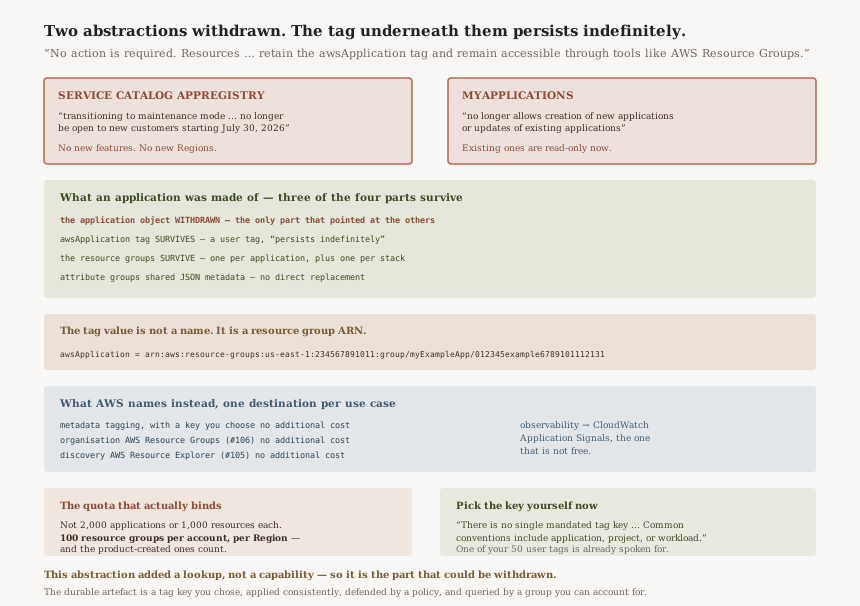
What an application was actually made of
| Part | What it is | Withdrawn? |
|---|---|---|
| The application object | “An application is a group of resources and metadata” | Yes — no new applications in either product |
The awsApplication tag |
A user tag whose value is a resource group ARN | No — “persists indefinitely” |
| The resource groups | One per application, plus one per associated stack or tag-based resource | No — they are ordinary Resource Groups groups |
| Attribute groups | “JSON objects that store application metadata” | Only reachable through the frozen products |
Three of the four rows survive the withdrawal, and they survive because they were never AppRegistry's own data structures — they were a tag and some resource groups. The object that is going away is the one that only ever pointed at the other three.
Attribute groups are the part with no direct replacement
A tag carries one value. An attribute group carries a document: “Attribute groups are JSON objects that store application metadata”, and they are shared rather than copied — “When you update an attribute group definition, the update applies to every application the attribute group is associated with.”
Nothing in the replacement list does that. Tags, Resource Groups and Resource Explorer are all keyed on flat key-value pairs, so team name, department number and contact alias become three tags per resource rather than one document referenced by many applications — against a ceiling of 50 user tags, one of which is already spoken for. If you relied on attribute groups, this is the migration with actual work in it, and the honest answer is that it lands in your own metadata store or your IaC repository rather than in another AWS service.
The two withdrawals, and what AWS names per use case
| Use case | What AWS names | Cost |
|---|---|---|
| Assigning metadata to resources | Tagging, with a key you choose | “no additional cost” |
| Resource organisation and management | AWS Resource Groups — #106 | “no additional cost” |
| Resource discovery | AWS Resource Explorer — #105 | “no additional cost” |
| Application-level observability | CloudWatch Application Signals | Paid, with a free tier |
Three of the four were free before and are free now, which tells you the abstraction was never where the value was priced. myApplications was free too — “myApplications on AWS is offered at no additional charge”.
The quotas, and what they were sized for
“Applications per region | Each supported Region: 2,000” and “Resources per application | Each supported Region: 1,000”, both adjustable. That is a documented ceiling of two million resource associations in a single Region — which is the shape of a product built for an estate far larger than the one most readers have, and worth noting because the constraint you will actually hit is the 100 resource groups per account per Region underneath it, not anything in this list.
“Attribute groups per application | Each supported Region: 1,000” and “Attribute groups per region | Each supported Region: 2,000” are generous for the same reason. The one that is not adjustable is organisational: “Delegated administrators per organization | Each supported Region: 50”.
Why This Architecture Holds Up
Vending a user tag rather than a system tag is why nothing breaks
AppRegistry could have recorded membership in its own store, or applied an aws:-prefixed
tag you cannot write. It did neither. It wrote an ordinary user tag that you could always set yourself,
which means the data outlives the product that created it and remains editable by its owner. That is
the single decision that turns a service withdrawal into a notice saying
“No action is required”.
Deflating to the primitive is the right end state
Two attempts at an application abstraction, both withdrawn, is not a happy history. But the place it landed is defensible: a tag key, a group, and a search. Those compose with everything — Billing, CloudWatch, Config, Systems Manager, Security Hub all read tags — where an application object composed only with the services that had been taught about it.
Saying what replaces it, per use case, is the part often skipped
The availability notices split the service into four use cases and name a destination for each, rather than pointing at one successor and leaving you to discover the gaps. The gap that remains — attribute groups — is visible precisely because the list is itemised. A single-line deprecation notice would have hidden it.
Key Architecture Decisions
| Decision | Choose this | Because |
|---|---|---|
| Modelling applications from today | Your own tag key plus a Resource Group | Both application products are closed to new applications, and Resource Groups is what the notice names |
| Which tag key | Decide and document it once | “There is no single mandated tag key” — the convention is now yours to hold |
Existing awsApplication tags |
Keep them, or migrate deliberately — not drift | They persist indefinitely and still work for grouping and cost allocation |
| Existing applications in either product | Leave them; treat them as read-only inventory | myApplications no longer allows updates, so the object is already frozen |
| Attribute group metadata | Move it to IaC or your own store before you need it | Nothing in the named replacements stores a shared JSON document |
| Groups the products created | Count them against the 100-per-account-per-Region ceiling | One per application plus one per associated stack or tag-based resource. Resource Groups creation operations are logged in CloudTrail, although these automatically created groups may not have undergone a separate change-management review |
| Application-level observability | Price Application Signals before adopting it | It is the one replacement that is not free |
The audit worth running
Search for the awsApplication tag key across your estate. If it returns
nothing, none of this is yours and the post is a reason to pick your own key deliberately. If it
returns resources, you have inherited metadata from a product in maintenance mode, and the next two
checks matter.
Resolve one of those tag values. It is a resource group ARN. Open the group and see whether anything acts on it — a Systems Manager document, a Network Access Scope, a CloudWatch view. That tells you whether the tag is decoration or a control surface.
Then count groups per account per Region against 100. Separate person-authored from product-authored. If an application spanned many stacks, the product-authored side will be larger than anyone expects, and the quota is the thing that will eventually say so.
Closing Thought
The pattern across this run of posts has been controls narrower than their names, and tools whose output does not say which calibration produced it. This one is different again: a layer that was withdrawn twice while the thing underneath it never moved.
It is worth being precise about what that does and does not tell you. It does not say abstractions are a mistake. It says this abstraction added a lookup and not a capability — an application was a tag whose value was a group ARN, and everything that consumed it consumed the tag. When the only thing an object adds is a name for something addressable without it, the object is the part that can be withdrawn, and the name is the part you end up owning.
Which is the practical ending for the four posts together. The durable artefact in all of this is a tag key you chose, applied consistently, defended by a policy, and queried by a group you can account for. AWS has now said as much in a deprecation notice, which is a blunt way to find out you were going to have to own the convention either way.
Reliability — AWS Resilience Hub: what it means for a resilience assessment to take its application definition from a resource group, how a policy expresses RTO and RPO, and what an assessment can and cannot conclude about a workload it discovered rather than was told about.
Official AWS Reference
- AWS Service Catalog AppRegistry availability change — maintenance mode and the 30 July 2026 date for new customers, no new features or Regions, the four named alternatives and their costs, that the
awsApplicationtag is a user tag that persists indefinitely with no requirement to remove it, and that there is no mandated replacement tag key - myApplications availability change — that no new applications can be created and existing ones cannot be updated, what existing users retain, the recommendation of AWS Resource Groups, and the
awsApplicationtag key and ARN-shaped value - Key concepts of AWS Service Catalog AppRegistry — that an application is a group of resources and metadata, that AppRegistry vends the
awsApplicationuser tag, theapplicationTagexample showing the resource group ARN as its value, and attribute groups as shared JSON metadata documents - Managing application resources — that Resource Groups creates an application group plus one per associated CloudFormation stack or tag-based resource, that membership follows the
awsApplicationtag, and that resources can be associated with ordinary tagging methods or IaC - AWS Service Catalog endpoints and quotas — 2,000 applications and 2,000 attribute groups per Region, 1,000 resources and 1,000 attribute groups per application, and the non-adjustable 50 delegated administrators per organization
- Logging and monitoring in Resource Groups — that all Resource Groups actions are logged in CloudTrail and that
CreateGroupgenerates an entry, which is why a product-created group is recorded even though nobody reviewed it - AWS Resource Groups and Tagging endpoints and quotas — the 50 user-created tags per resource that the
awsApplicationtag counts against, and the 100 resource groups per account in each Region that product-created groups consume - What is myApplications in AWS Console Home? — the feature list and that it is offered at no additional charge
- Best Practices for Tagging AWS Resources — further reading on choosing a tagging strategy, named by the availability notice; no claims in this post are drawn from it
Comments