Business Challenge
The previous four posts in this series each ended at the same place: a replacement behaviour that depends on which feature triggered it. A health check failure replaces one way, an instance refresh another, a maximum instance lifetime a third. An instance maintenance policy is AWS's answer to that, and it works — one minimum and maximum healthy percentage set on the group, applied to every event that replaces an instance.
The reason to read the page rather than set the policy and move on is that the floor it establishes is not a guarantee, and the documentation says so plainly in a paragraph that is easy to read past.
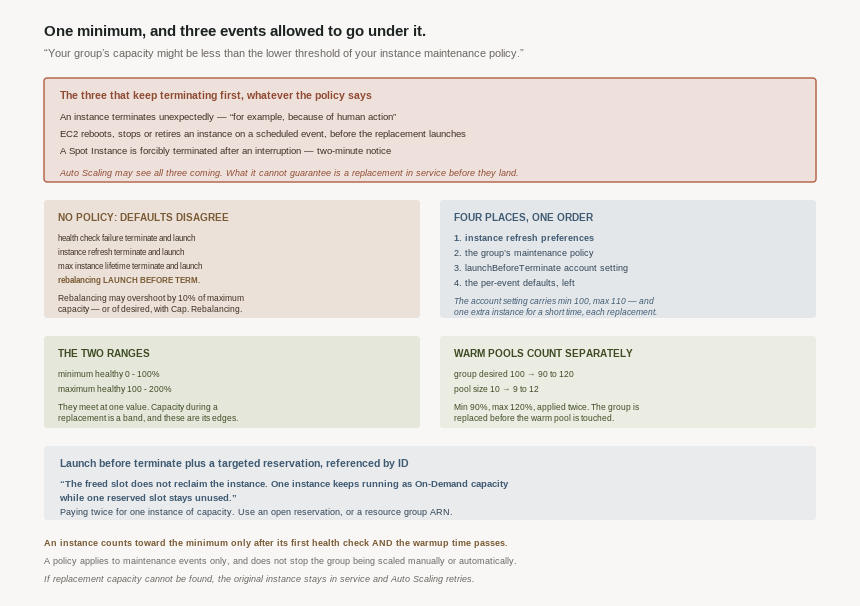
“Amazon EC2 Auto Scaling will continue to default to terminate and launch in the following situations. Therefore, when one of these situations occur, your group's capacity might be less than the lower threshold of your instance maintenance policy.”
- An instance terminates unexpectedly, for example because of human action.
- Amazon EC2 reboots, stops or retires an instance as part of a scheduled event before Auto Scaling can launch the replacement.
- The Spot Service initiates an interruption and a Spot Instance is then forcibly terminated.
None of the three is exotic. The second is ordinary scheduled maintenance on AWS's side, and the third is the normal operation of a Spot fleet: “because Spot Instances are not guaranteed to remain available and can be terminated with a two-minute Spot Instance interruption notice, your instance maintenance policy's lower threshold can be exceeded if instances are interrupted before your new instances have launched.”
So the floor holds for the replacements Auto Scaling paces itself. For these three it is a target rather than a guarantee, and a minimum healthy percentage read as a capacity guarantee is being read as something stronger than it is.
“The default for an Auto Scaling group is to not have an instance maintenance policy, which causes it to respond to instance maintenance events with the default behaviors.” Those behaviours are not the same for every event.
| Event | Default behaviour |
|---|---|
| Health check failure | Terminate and launch |
| Instance refresh | Terminate and launch |
| Maximum instance lifetime | Terminate and launch |
| Rebalancing | Launch before terminating |
Rebalancing is also the one event permitted to overshoot: “Amazon EC2 Auto Scaling can exceed your group's size limits by up to 10 percent of its maximum capacity. However, if you're using Capacity Rebalancing, it can only exceed these limits by up to 10 percent of the desired capacity.”
Two different bases for the same 10 percent, decided by whether Capacity Rebalancing is on. For a group whose maximum is well above its desired capacity, those are very different numbers of instances.
The percentages can come from an instance refresh preference, a group policy, an account setting, or nowhere. The order matters and is documented across two pages rather than one.
| Set where | Wins over |
|---|---|
| Instance refresh preferences | Everything, for that refresh |
| Instance maintenance policy on the group | The account setting |
launchBeforeTerminate account setting | The per-event defaults |
| Nothing set | — the per-event defaults above apply |
“If you configure an instance maintenance policy on a group, that policy takes precedence.” And the account setting is not a toggle with no numbers behind it: “When the account setting is enabled, Amazon EC2 Auto Scaling uses a minimum healthy percentage of 100 and a maximum healthy percentage of 110 by default.”
Architecture
What the three console options actually set
The console presents three choices, and two of them are the ends of one range rather than separate mechanisms. “Launch before terminating – A new instance must be provisioned first before an existing instance can be terminated.” Against “Terminate and launch – New instances are provisioned at the same time your existing instances are terminated.” The third, a custom policy, exposes the minimum and maximum directly.
The valid ranges are not symmetrical, and they tell you what each number is for. The minimum healthy percentage accepts 0 to 100 percent: it describes how far below desired capacity the group may fall. The maximum accepts 100 to 200 percent: it describes how far above. Neither can cross into the other's territory, which is why one dial cannot express both and the policy needs two.
When an instance starts counting
The minimum healthy percentage is a count of instances that are ready, not instances that exist. “An instance is considered healthy and ready to use after it successfully completes its first health check and the specified warmup time passes.”
That makes the default instance warmup part of this policy's behaviour rather than a separate concern. Without it, an instance that has passed one health check but is still loading a cache counts toward the minimum, and Auto Scaling is free to terminate the next instance on the strength of capacity that cannot yet serve a request. With it, the group waits.
Warm pools are counted separately
“When you use an instance maintenance policy with an Auto Scaling group that has a warm pool, the minimum and maximum healthy percentages are applied separately to the Auto Scaling group and the warm pool.”
AWS's own worked example is the clearest statement of it. With a minimum of 90 percent, a maximum of 120 percent, a desired capacity of 100 and a warm pool of 10: “During any instance maintenance event, your Auto Scaling group might have as few as 90 instances and as many as 120.” Then, once the group is done, “While this is happening, the warm pool might have as few as 9 instances and as many as 12.”
One policy, two independent applications of it, and the group is replaced before the warm pool is touched.
What the policy does not touch
“An instance maintenance policy only applies to instance maintenance events and doesn't prevent the group from being manually or automatically scaled.” Scaling policies and scheduled actions keep running during a maintenance event and can move desired capacity underneath it, within the group's scaling limits.
Worth stating because the percentages are expressed against desired capacity. If a scheduled action halves desired capacity in the middle of an instance refresh, the absolute number of instances the minimum healthy percentage protects halves with it.
One setting for every group in the account
launchBeforeTerminate is an account setting, applied with
put-account-setting, that makes launch before terminate the default for groups that
have neither a policy nor refresh preferences. It brings two numbers with it — 100 and 110
— and
“An instance refresh started without those preferences uses the 100 and 110 defaults if
there is no instance maintenance policy.”
It also brings a cost that is stated rather than implied: “This setting runs one additional instance for a short time during each replacement.” For an account with many small groups replacing instances regularly, that is a real line item, and it is the correct trade for availability-sensitive groups and the wrong one for a batch fleet.
The failure mode is the safe one
Launch before terminate has to get capacity before it can proceed, which raises the obvious question of what happens when it cannot. “If Amazon EC2 Auto Scaling can't get capacity for the replacement, it keeps the original instance in service and retries, so your group doesn't lose capacity.”
That is the right answer, and it means a capacity shortage during a replacement shows up as a slow refresh rather than as a shrunken group. The documented remedies are to reserve more capacity than desired capacity, to let the group use On-Demand capacity, and to give it more instance types and Availability Zones.
The Capacity Reservation case that leaves a slot empty
This is the sharpest detail on the page, and it only exists because launch before terminate needs one extra instance. A group of 10 with a fully used reservation for 10 momentarily needs capacity for 11, so the replacement launches as regular On-Demand. What happens next depends on how the reservation is referenced.
| Reservation referenced as | After the old instance terminates |
|---|---|
| Open Capacity Reservation | The freed slot reclaims the instance; coverage restored |
| Through a Capacity Reservation resource group | The freed slot reclaims the instance; coverage restored |
| Targeted, by a specific Capacity Reservation ID | Neither — see below |
“If you use a targeted Capacity Reservation that you reference by a specific Capacity Reservation ID, the freed slot does not reclaim the instance. One instance keeps running as On-Demand capacity while one reserved slot stays unused.”
You are then paying twice for one instance's worth of capacity — the unused reserved slot and
the uncovered On-Demand instance — and nothing about the group's health reports it. The
documented fix is to reference the reservation through a resource group using
CapacityReservationResourceGroupArns, or to use an open reservation.
The one case where the extra instance is free
If the reservation has more capacity than the group uses, the replacement launches straight into a free reserved slot. No uncovered instance, no idle slot. A reservation sized one above desired capacity is what makes launch before terminate and a targeted reservation compatible.
Why This Architecture Holds Up
Naming the exceptions is better than a floor that quietly leaks
A minimum healthy percentage that Auto Scaling honoured for its own replacements and silently missed for a Spot interruption would be worse than one with three documented exceptions. What the three cases share is not that Auto Scaling is told too late. A scheduled EC2 event is known in advance, and with Capacity Rebalancing enabled the group “tries to launch new Spot Instances before existing ones are interrupted”, so a replacement may already be pending when the interruption lands. What Auto Scaling cannot do is guarantee that the replacement is in service in time — “your instance maintenance policy's lower threshold can be exceeded if instances are interrupted before your new instances have launched” — and the termination proceeds either way. Documenting a limit it cannot hold, rather than implying a floor it can, is the honest option, and it is the one AWS took.
Two ranges rather than one dial
Minimum 0 to 100 and maximum 100 to 200 looks redundant until you notice they meet at exactly one value. Capacity during a replacement is a band around desired capacity, and the two numbers are its edges. A single dial for how aggressively to replace would have had to pick a shape for that band on your behalf.
Rebalancing defaulting the other way is right
The one event that defaults to launch before terminating is the one you did not ask for. A health check failure, a refresh and a maximum lifetime expiry are all consequences of something you configured; rebalancing happens because an Availability Zone recovered or a Spot pool moved. A default that protects capacity during an event you did not schedule is the defensible asymmetry, and it is the only one on the page.
Key Architecture Decisions
| Decision | Take | Why |
|---|---|---|
| Consistent replacement behaviour | Set an instance maintenance policy on the group | Without one, the four replacement events do not agree |
| Treating the minimum as a capacity guarantee | Do not | Three documented situations can take capacity below it |
| Spot fleets | Size for the floor being breached, not for the policy | A forced Spot termination can breach the floor before a replacement is in service |
| Account-wide launch before terminate | Enable deliberately, per account | It brings 100 and 110, and one extra instance per replacement |
| Instances that need warmup | Set the default instance warmup as well | The minimum counts ready instances, not running ones |
| Targeted Capacity Reservations | Reference them through a resource group | By ID, a replacement leaves a reserved slot unused and pays On-Demand |
| Overriding the policy for one rollout | Set refresh preferences on that refresh | They take precedence, and only for that operation |
The audit worth running
- Every group with a maintenance policy, checked for whether the workload can survive the lower threshold being breached — because for Spot and scheduled EC2 events it will be.
-
Every account, for whether
launchBeforeTerminateis enabled, since it changes the replacement behaviour of every group that has no policy of its own. - Every group that references a targeted Capacity Reservation by ID and uses launch before terminate in any form, for the unused slot.
- Every group with a policy but no default instance warmup, where the minimum is being satisfied by instances that have passed one health check and nothing else.
Closing Thought
Six posts into Auto Scaling, this is the first setting whose purpose is to make the others agree, and it is worth noticing what that costs. The policy does not replace the per-feature settings; it sits above them, below the per-refresh preferences, and above an account setting that most people do not know exists. Consistency arrived as a fourth place to look rather than as a replacement for the other three.
The finding I would act on is the floor. A minimum healthy percentage reads like a contract, and for the replacements Auto Scaling schedules it is one. For a Spot interruption, an EC2 scheduled event or a human with the console open it is a target, and the group can go below it without reporting anything unusual. If the number you chose was chosen because the workload breaks below it, the number is not the thing protecting you.
Official AWS Reference
- Instance maintenance policy for Auto Scaling group — the three console options and what each provisions, the per-event default behaviour table including rebalancing defaulting to launch before terminating, the 10 percent overshoot and its two bases, the three situations that continue to default to terminate and launch and can take capacity below the policy's lower threshold, the two-minute Spot interruption notice, the minimum and maximum healthy percentage definitions and their valid ranges, when an instance starts counting toward the minimum, that the policy does not prevent scaling, and the warm pool worked example
- Launch replacement instances before terminating old ones — the
launchBeforeTerminateaccount setting, its 100 and 110 defaults, that a group policy and refresh preferences both take precedence over it, the extra instance per replacement and its cost, the retry behaviour when replacement capacity cannot be obtained, and the Capacity Reservation example in which a targeted reservation referenced by ID leaves one reserved slot unused - Set an instance maintenance policy on your Auto Scaling groups — that setting a policy removes the need to specify minimum and maximum healthy percentages for an instance refresh unless you intend to override the policy
- Instance maintenance policies — further reading on the small-group case the feature was designed for; no claims in this post are drawn from it
- Set the default instance warmup for an Auto Scaling group — further reading on the warmup period that decides when an instance counts toward the minimum; no claims in this post are drawn from it
Comments