The useful part of this launch is not the migration path, though that matters. It is that semantic enrichment is how you make an AI answer questions about your data correctly — and the three places you write that context into have different limits and, more importantly, different visibility.
“While this information is used by AI models rather than displayed in the UI, it enables catalog-grade metadata at scale.”
Executive summary
“Today, AWS Quick makes your legacy datasets AI ready through the new technology stack used by its improved visual data preparation experience”, and that “stack powers Dataset Semantics, topics and semantic models, and Dataset Evaluation”.
The migration is the friendly part: “When authors edit a supported legacy dataset, AWS Quick automatically opens it in the visual data preparation experience, carrying over its existing data sources, joins, transformations, and calculated fields” — so enrichment does not require rebuilding anything. It is “available in all supported AWS Quick Regions”.
What the announcement does not set out is the shape of the enrichment itself: three dataset-level channels with limits of 5,000, 5,000 and 50,000 characters, of which only the first two appear in the interface at all.
What changed
Two things, and they are different in kind. The capability already existed on the new stack; what is new is that legacy datasets can reach it.
The stack itself is a year old: “The visual data preparation experience runs on a new technology stack for structured data, introduced in October 2025. It supports visual, multi-step transformations such as Append, Aggregate, and Pivot, faster ingestion for larger datasets, and up to 20 times higher cross-source join limits than the legacy experience.”
And the compatibility work is what makes migration possible: “AWS Quick has expanded support for Google Sheets and Salesforce connectors, JODA date formats, incremental refresh, and preservation of existing unmaterialized calculated columns during legacy dataset upgrades.” That last clause is the one a dataset owner should read twice — unmaterialized calculated columns surviving an upgrade is exactly the kind of thing that silently breaks a migration.
Architecture
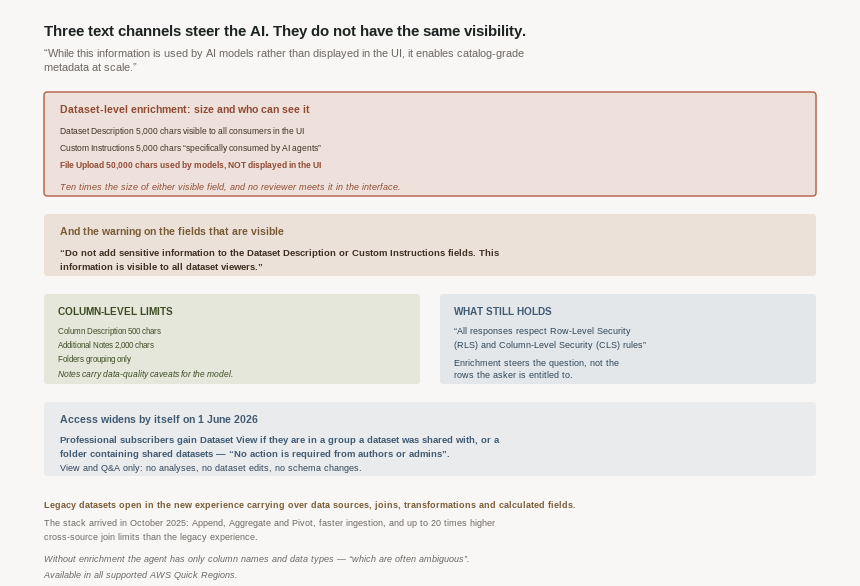
Three channels, three visibilities
| Channel | Limit | Who sees it |
|---|---|---|
| Dataset Description | 5,000 characters | “visible to all dataset consumers in the UI” |
| Custom Instructions | 5,000 characters | Visible to viewers; “specifically consumed by AI agents” |
| File Upload (YAML, JSON, TXT) | 50,000 characters | “used by AI models rather than displayed in the UI” |
| Column Description | 500 characters | Visible in the schema |
| Additional Notes (per column) | 2,000 characters | Supplementary context for the model |
The file upload is ten times the size of either visible field, and it is the one that does not appear in the interface. Its purpose is legitimate and well explained — it “enables hundreds of column definitions, business rules, and metric calculations to be ingested in a single upload” from tools like Databricks, dbt or Alation, which is far better than retyping them.
But it is worth being precise about what it is. This is free text that shapes how an AI interprets and queries your data, it can be fifty thousand characters long, and a reviewer looking at the dataset in Quick will not see it. The content lives in your external catalog, so the review happens there or not at all.
The warning is on the visible fields, not the invisible one
“Do not add sensitive information to the Dataset Description or Custom Instructions fields. This information is visible to all dataset viewers.”
Correct and clearly stated. The asymmetry is that the two fields carrying the warning are the two a human will notice, while the uploaded file — which carries no such warning because it is not displayed — is where catalog exports of business rules and metric definitions land. An export from a data catalog is exactly the kind of artefact that can contain internal thresholds, customer names in example values, or commentary never intended for a BI tool.
The practical reading: treat the uploaded file as having the sensitivity of your catalog, review it before upload rather than after, and do not assume invisibility is protection. It is invisible to the people who might spot a problem, not to the model.
What enrichment does not change
This is the reassuring half, and it is explicit: “Governed responses - All responses respect Row-Level Security (RLS) and Column-Level Security (CLS) rules.”
So enrichment steers the question, not entitlement. A custom instruction telling the agent which column holds revenue does not let a user see rows their RLS rule excludes. That is the right boundary, and it means the risk of over-enriching is bad answers and disclosure through description text, not privilege escalation.
Who can write it is bounded too: “Authors and author pros with Enterprise licenses can enrich any dataset they own or manage.”
The access change that happens on its own
“Starting June 1, 2026, Dataset View permissions are available for Professional subscribers (Reader Pro)”, and the propagation is automatic: “No action is required from authors or admins - existing sharing configurations automatically extend Dataset View access to Professional subscribers who are already part of these groups or folders.”
The scope is narrow — “Professional subscribers cannot create analyses, edit datasets, or modify schema. Access is strictly View and Q&A for shared datasets” — but View includes the schema and the descriptions. So the audience for the Dataset Description and Custom Instructions grows without anyone re-sharing anything, which makes the do not add sensitive information warning retroactive in effect: text written when the audience was a handful of authors is now read by every Professional subscriber in the relevant groups and folders.
Why the enrichment matters at all
The documentation makes the case in one sentence: “Without enrichment, the AI agent only has column names and data types to work with - which are often ambiguous.” And it names the highest-leverage field: “Custom Instructions are the most impactful component of Dataset Enrichment. They directly guide AI agents on how to interpret and query a dataset.”
The announcement's own framing is the right workflow: “They can then compare answer accuracy before and after semantic enrichment to assess how well AI answers reflect their business definitions.” Measuring the delta is the only way to know whether the prose you wrote helped, and it is the part most teams will skip.
Business value
The real cost of natural-language querying is not the model, it is that a column called
rev_net means something specific to four people and nothing to anyone else. Enrichment is
where that knowledge becomes machine-readable, and the migration path means it can be applied to
datasets that already exist rather than only to new ones.
The file-upload route is the one that makes this tractable at scale. An organisation with a populated dbt or Alation catalog has already written the definitions once; importing them per dataset is dramatically cheaper than re-entering them column by column, and it keeps the catalog as the source of truth.
The join-limit improvement — “up to 20 times higher cross-source join limits than the legacy experience” — is the thing most likely to unblock a dataset that could not previously be modelled the way the business thinks about it.
Security considerations
The boundary that holds is the important one: RLS and CLS still govern every answer, so enrichment cannot widen what a user can read. Treat that as settled and spend your attention elsewhere.
Where to spend it: the three text channels are disclosure surfaces with different audiences. The Dataset Description and Custom Instructions are visible to all dataset viewers and AWS says so outright. The uploaded metadata file is not displayed, which means it escapes casual review rather than being protected — and it is the channel most likely to contain a bulk export you did not read line by line.
The June 2026 automatic extension of Dataset View deserves a deliberate pass over existing descriptions. Anything written when the readership was a small set of authors is now readable by Professional subscribers who inherit access through group or folder membership, with no re-share and no notification.
One more worth noting: custom instructions are, functionally, prompt text that a privileged user attaches to a dataset. Anyone who can enrich a dataset can influence how every subsequent AI answer about it is framed, without changing a single row. That is not a vulnerability, but it is an authoring power that belongs in your change-review habits.
Cost considerations
The announcement states no charge for the capability and no Region restriction beyond Quick's own footprint. The costs that move are indirect: the new stack offers “faster ingestion for larger datasets”, and the migration brings “incremental refresh” support to legacy datasets, which for a large table is a direct reduction in refresh work compared with a full reload.
The spend to watch is query volume. Enrichment exists to make Dataset Q&A good enough that people use it, and the June 2026 extension widens who can ask. A successful enrichment programme therefore increases usage by design — which is the outcome you wanted and still a line on a bill.
Operational considerations
Review the uploaded semantic file in the system it came from, before it reaches Quick. It is the one channel with no in-product review step, and at 50,000 characters it is too large to eyeball after the fact.
Use the before-and-after accuracy comparison the announcement describes rather than assuming the prose helped. The documentation's own examples of good and bad custom instructions are unusually concrete — the ineffective one “describes what is already obvious from column names”, which is what most first attempts look like.
And treat the migration as a change, not a side effect: editing a supported legacy dataset opens it in the new experience automatically, so the first person to make a small edit performs the upgrade. Know which datasets that applies to before it happens by accident.
Tradeoffs
| Approach | What you get | What it costs |
|---|---|---|
| Manual UI annotation | Descriptions visible to humans and read by the AI | Column-by-column effort; 5,000 and 500 character ceilings |
| File upload from an external catalog | Hundreds of definitions in one operation, 50,000 characters | Not displayed in the UI, so no in-product review |
| Leave datasets unenriched | Nothing to review or maintain | The agent has only column names and data types, often ambiguous |
| Stay on the legacy experience | No migration to validate | No Dataset Semantics or Evaluation, and the lower join limits |
Implementation guidance
Pick one dataset whose answers are currently wrong in an interesting way, enrich it manually, and use the accuracy comparison to see whether your definitions landed. That gives you a calibrated sense of what to write before you import a catalog across hundreds of datasets.
Write custom instructions the way the documentation's good examples do: define ambiguous terms, state the calculation basis, name the currency and the fiscal-year field, and say which records to exclude. Those are the four things that make an answer wrong in ways nobody notices.
Before the file-upload route, agree who reviews the export and where. The answer should not default to nobody on the grounds that it is not displayed.
Best practices
- Keep sensitive detail out of the Dataset Description and Custom Instructions — all viewers see them.
- Review the uploaded metadata file in its source catalog; Quick will not show it to you.
- Re-read existing descriptions before June 2026 widens who can read them.
- Measure answer accuracy before and after rather than trusting the prose.
- Treat enrichment as a reviewable change: it steers every future AI answer about that dataset.
- Rely on RLS and CLS for entitlement, never on omitting a column from the description.
Who should adopt this and when
Now: anyone whose Quick users are already asking natural-language questions and getting subtly wrong answers. Enrichment is the documented fix, and the migration means it applies to the datasets you have.
Now, if you have a catalog: teams with populated dbt, Databricks or Alation metadata. The file upload turns work you have already done into AI context in one step per dataset.
With a review step first: regulated environments. The uploaded channel has no in-product review and the visible channels are about to gain a wider audience; both want a policy before a rollout.
Key takeaways
The migration is the easy part and genuinely well handled: editing a supported legacy dataset opens it in the new experience “carrying over its existing data sources, joins, transformations, and calculated fields”.
The thing to design around is the visibility split. Two 5,000-character fields are “visible to all dataset viewers” and carry an explicit warning; one 50,000-character file is “used by AI models rather than displayed in the UI” and carries none.
And what enrichment cannot do is the part worth stating plainly: “All responses respect Row-Level Security (RLS) and Column-Level Security (CLS) rules”. It changes how the question is answered, never who is entitled to the rows.
Official AWS references
- AWS Quick brings AI-ready capabilities to your existing datasets — the announcement: that Quick makes legacy datasets AI ready through the new visual data preparation stack, that the stack powers Dataset Semantics, topics and semantic models and Dataset Evaluation, the dataset, column and custom-instruction channels and the before-and-after accuracy comparison, the automatic opening of supported legacy datasets with sources, joins, transformations and calculated fields carried over, the October 2025 stack with Append, Aggregate and Pivot, faster ingestion and up to 20 times higher cross-source join limits, the expanded Google Sheets and Salesforce connector, JODA date format, incremental refresh and unmaterialized calculated column support, and availability in all supported Regions
- Dataset Enrichment — the warning not to put sensitive information in the Dataset Description or Custom Instructions because they are visible to all dataset viewers, the 5,000-character Dataset Description and Custom Instructions limits, the 50,000-character YAML, JSON or TXT File Upload from third-party catalogs and that it is used by AI models rather than displayed in the UI, the 500-character Column Description and 2,000-character Additional Notes limits, that all responses respect Row-Level Security and Column-Level Security rules, that Enterprise-licensed authors can enrich datasets they own or manage, that without enrichment the agent has only column names and data types, that Custom Instructions are the most impactful component, and the June 1 2026 extension of Dataset View to Professional subscribers with no action required from authors or admins
- Flows — further reading on the automation layer that can consume these datasets, covered in #84; no claims in this post are drawn from it
- Behavior of created datasets — further reading on how table and column descriptions are inherited from upstream catalogs; no claims in this post are drawn from it
Comments