Business Challenge
An instance refresh is how you roll a new AMI across a group without writing the orchestration yourself, and it comes with a rollback, which is the thing that makes it feel safe to use. The rollback is real. It is also conditional in a way that rules out a configuration a great many groups are already using.
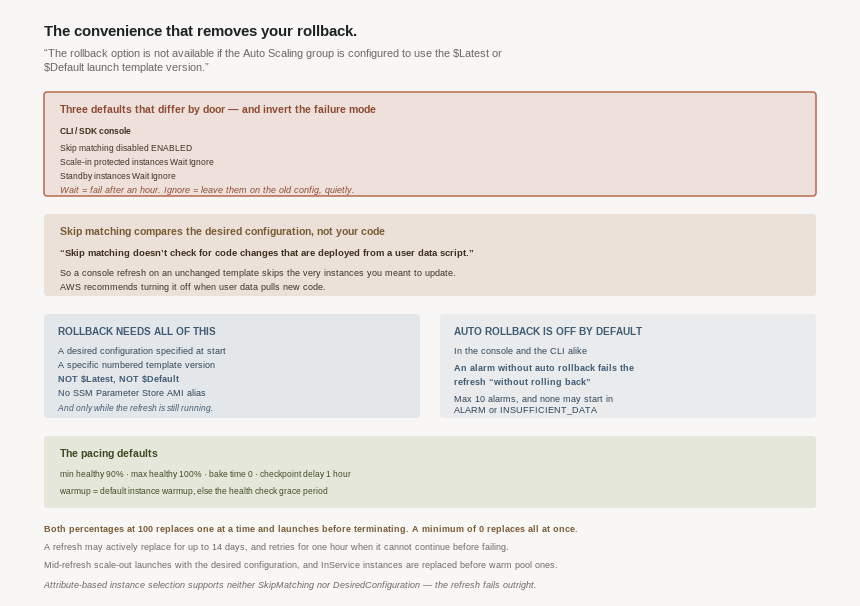
“You can only roll back to a previous version of a launch template if the version is a specific numbered version. The rollback option is not available if the Auto Scaling group is configured to use the $Latest or $Default launch template version.”
And the same applies to a convenience many teams use for AMI selection: “You also cannot roll back to a launch template that is configured to use an AMI alias from the AWS Systems Manager Parameter Store.”
Pinning to $Latest is what you do so a new template version takes effect without
touching the group. The cost is that there is no numbered version to return to, so a refresh on
such a group rolls forward only.
| Setting | AWS CLI or SDK | Console |
|---|---|---|
| Skip matching | Disabled | Enabled |
| Scale-in protected instances | Wait | Ignore |
| Standby instances | Wait | Ignore |
Those are not cosmetic. Wait means “Waits one hour for you to remove scale-in protection. If you don't do so, the instance refresh fails”. Ignore means it “Ignores instances that are protected from scale in and continues to replace instances that are not protected” — those instances stay on the old configuration, and the refresh reports success.
Same operation, same group: scripted it fails loudly after an hour, clicked it succeeds while leaving instances behind.
“If you start an instance refresh with both skip matching and a desired configuration, Amazon EC2 Auto Scaling checks to see if any instances match your desired configuration. Then, it only replaces the instances that don't match your desired configuration.”
“You can use skip matching with a new launch template, a new version of a launch template, or a set of instance types.”
AMI-ID comparison belongs to the replace root volume strategy. “When skip matching is enabled, Auto Scaling compares each instance's current AMI ID against the AMI IDs in your desired configuration.” A rolling refresh matches on the desired configuration itself, applicable launch template versions and instance types included.
“Skip matching doesn't check for code changes that are deployed from a user data script. If you use user data to pull new code and install these updates on new instances, we recommend that you turn off skip matching…”
So on the deployment pattern where user data pulls the latest build, a console refresh with the default on will skip every instance — which is precisely the set you wanted to replace.
Architecture
Two strategies, and what the quieter one preserves
The default is the one everyone knows: “Rolling strategy (default) — Terminates instances and launches new ones in batches according to your preferences.” The other is worth knowing exists: “Replace root volume strategy — Updates instances by replacing only the root volume without terminating the instance. This preserves instance network interfaces, non-root EBS volumes, and instance store data.”
That second strategy is the answer to a problem this series has circled repeatedly: replacement
discards the instance's identity and attachments, recovery does not. Root volume replacement sits
between them — a new image, the same instance. It has real prerequisites, including a mixed
instances policy with ImageId overrides, and it does not support Elastic Load
Balancing, which rules it out for most web tiers.
How a refresh decides to move on
Two numbers set the pace. “The minimum healthy percentage is the percentage of the desired capacity to keep in service, healthy, and ready to use during an instance refresh so that the refresh can continue”, and the maximum is how far above desired capacity the group may go. The difference between them “cannot be greater than 100”.
The two extremes are worth memorising, because they are stated plainly: “To replace one instance at a time, set both the minimum and maximum healthy percentage to 100 percent. This changes the behavior of an instance refresh to launch before terminating… To replace all instances at once, set a minimum healthy percentage of 0 percent.”
Then health is not the only gate: “It waits for the warmup period before it moves on to replacing the next instance.” And the warmup default is a chain, not a value: “The default instance warmup, if defined, or the health check grace period otherwise.”
That last line ties this post to #121. If a group was created through the API with no default instance warmup and no grace period — both of which default to zero or nothing there — then a refresh moves to the next instance as soon as the health check passes, with no settling time. The setting you never configured for health checking is the one now pacing your deployment.
Rollback, and every condition it carries
Rollback is narrower than its presence suggests. All of the following must hold:
- “The rollback option is only available if you specify a desired configuration as part of starting an instance refresh.” A refresh started without one cannot be rolled back.
- A specific numbered launch template version — not
$Latest, not$Default. - No AMI alias from Systems Manager Parameter Store.
- “You can roll back an instance refresh that is still in progress. You can't roll it back after it's finished.”
- “The configuration that you last saved on the Auto Scaling group must be in a stable state. If it's not in a stable state, the rollback workflow will still occur, but it will eventually fail.”
The last one deserves attention. A rollback returns the group to the configuration it had before, so if that configuration was already broken — an AMI that no longer launches, a subnet that has filled up — the rollback inherits the breakage. The documentation says the group “might be in a failed state where it can no longer launch instances successfully”, which is a worse position than either the old or the new config.
Auto rollback is off, and an alarm alone does not arm it
Auto rollback defaults to disabled in both the console and the CLI. The interaction with alarms is the part that surprises: “If you specify a CloudWatch alarm but do not enable auto rollback, and the alarm state goes to ALARM, the instance refresh fails without rolling back.”
So attaching an alarm buys you a stop, not an undo. The refresh halts partway with some instances on the new configuration and some on the old, and the group's settings have not yet been updated, because that only happens on success.
Two further alarm constraints, both easy to trip:
“You can choose a maximum of 10 alarms when you start an instance refresh”, and
“If the alarm state is INSUFFICIENT_DATA or ALARM, you receive an error when you try to
start the instance refresh.” An alarm on a sparse metric is frequently in
INSUFFICIENT_DATA, which means a deployment guard can block the deployment it was meant
to protect — the same missing-data problem this series has met in three other services, here
turning into a refusal to start.
Checkpoints, and what continuous really means
“A checkpoint is a point in time where the instance refresh pauses for a specified amount of time”, with a default delay of “1 hour (3600 seconds)” — so a checkpointed refresh is slow by design, and that is the point.
The alternative is stated without euphemism: “If you don't use checkpoints, rolling replacements are performed continuously.” Continuously means the whole group is replaced as fast as the healthy percentages and warmup allow, with no pause at which a human could look. For a change you are confident about that is what you want. For a new AMI it is how a bad image reaches every instance before anyone notices.
Where a refresh fails outright
-
Attribute-based instance selection.
“An instance refresh will fail if you start it with the SkipMatching parameter in an Auto
Scaling group that has InstanceRequirements configured.” The same applies to
DesiredConfiguration— and since rollback requires a desired configuration, groups using attribute-based selection cannot have rollback at all. - The one-hour wall. When it cannot proceed, “Amazon EC2 Auto Scaling keeps retrying for an hour” and then fails.
- The fourteen-day ceiling. “The maximum amount of time that an instance refresh can continue to actively replace instances is 14 days.”
Two behaviours during the refresh
“If a scale-out event occurs during an instance refresh, Amazon EC2 Auto Scaling launches new instances with the desired configuration instead of the group's current settings.” So a traffic spike mid-deployment accelerates the rollout rather than mixing in old instances, which is the right call and worth knowing when reading capacity graphs afterwards.
And, connecting to the previous post: “Replace InService instances before instances that are in a warm pool.” A warm pool built from the old AMI keeps handing out warm starts on the old image until the refresh reaches it, which is the last thing it does.
Why This Architecture Holds Up
The rollback conditions are honest rather than arbitrary
Two of the three restrictions follow from the same fact: a rollback needs a specific thing to go
back to, and $Latest and an SSM AMI alias are both moving pointers. The third is
documented as a requirement rather than explained — the rollback option is only available if
you specify a desired configuration as part of starting an instance refresh. Either way it means the
convenience and the safety net are mutually exclusive, and the documentation is where you find that
out.
Launch-before-terminate at 100 percent is the right lever
Expressing one-at-a-time replacement as both percentages at 100 rather than as a separate mode means the same two numbers describe every pace from one instance to the whole group. It is harder to discover and better designed than a dropdown would have been.
Failing on an alarm without rolling back is the correct default
It looks like a gap, but an automatic rollback is itself a mass replacement, and performing one because a metric was briefly red could make a bad situation worse. Stopping and waiting for a human is the conservative action. The criticism is only that an operator attaching an alarm will probably assume otherwise.
Key Architecture Decisions
| Decision | Take | Why |
|---|---|---|
| Launch template version on the group | A specific numbered version if you want rollback | $Latest and $Default remove the rollback option entirely |
| Starting a refresh | Set skip matching, standby and scale-in-protected behaviour explicitly | All three default differently in the console and the API, with opposite failure modes |
| Skip matching with user-data deploys | Turn it off | It compares the desired configuration and cannot see code pulled by user data |
| Auto rollback | Enable it deliberately, with a desired configuration | Off by default, and an alarm alone only fails the refresh |
| New AMI rollouts | Checkpoints, and bake time above zero | Without checkpoints, replacements run continuously to the end of the group |
| Alarms used as deployment guards | Set missing-data treatment before using them here | INSUFFICIENT_DATA at start is an error that blocks the refresh |
The audit worth running
-
Every Auto Scaling group whose launch template version is
$Latestor$Default. Those groups have no instance refresh rollback, whatever else is configured. - Every refresh automation that omits a desired configuration, which silently forgoes rollback.
- Every pipeline that deploys code through user data and starts refreshes from the console, where skip matching is on by default.
- Any group with instances protected from scale in, checked against which door your refreshes come through — the console will leave them behind and report success.
Closing Thought
Five posts into Auto Scaling, the recurring theme is no longer the defaults themselves but what they reveal: the service has two front doors, and they disagree. The health check grace period is 300 seconds through one and zero through the other. Skip matching is on through one and off through the other. Standby and protected instances are waited for through one and ignored through the other. Each difference is individually defensible as a choice about who the user is — a person clicking wants the forgiving option, a script wants the strict one — and collectively they mean you cannot reason about an Auto Scaling group without knowing how it was made.
The $Latest finding is the one I would act on first, because it is not a default you can
change at refresh time. It is a property of the group, probably set years ago for a good reason, and
it quietly removes the undo from every deployment you will ever run on that group. Worth knowing
before the deployment you need to undo.
And the smaller lesson, consistent with everything else in this run: read what the feature does when it fails. A refresh that stops on an alarm leaves the group half-migrated. A rollback onto a broken previous configuration leaves it unable to launch at all. Neither is a bug, both are documented, and both are worse than the thing you were trying to avoid.
Reliability — Amazon EC2 Auto Scaling instance maintenance policies: how a minimum and maximum healthy percentage set once on the group changes every replacement it performs, how that interacts with the per-refresh preferences, and why a policy is the setting that finally makes the defaults consistent.
Official AWS Reference
- How an instance refresh works in an Auto Scaling group — the rolling and replace-root-volume strategies and what the latter preserves, that skip matching is on by default in the console and that the AMI-ID comparison belongs to the replace root volume strategy, that it cannot see code deployed by user data and the recommendation to turn it off, the minimum and maximum healthy percentage definitions and the 100-difference limit, the one-at-a-time and all-at-once settings, that the refresh waits for the warmup period before moving on, that a mid-refresh scale-out uses the desired configuration, that
InServiceinstances are replaced before warm pool instances, the checkpoint definition and the continuous behaviour without them, the 14-day active replacement ceiling, the one-hour retry before failure, and the attribute-based selection limitations - Use an instance refresh with skip matching — that skip matching checks instances against the desired configuration and replaces only those that do not match, that it can be used with a new launch template, a new version of a launch template or a set of instance types, that it falls back to the group's last saved configuration when no desired configuration is given, and that it cannot tell whether a user data script will pull updated code
- Understand the default values for an instance refresh — the full default table including minimum healthy percentage at 90 percent and maximum at 100 percent absent an instance maintenance policy, the 1 hour (3600 seconds) checkpoint delay, instance warmup falling back to the default instance warmup or the health check grace period, and the
WaitversusIgnoredefaults for standby and scale-in protected instances with what each one does - Undo changes with a manual or auto rollback — that rollback requires a desired configuration and a specific numbered launch template version, that
$Latestand$Defaultand an SSM Parameter Store AMI alias all disqualify it, that a finished refresh cannot be rolled back, that the previously saved configuration must be stable or the rollback itself fails, that an alarm without auto rollback fails the refresh without rolling back, the maximum of 10 alarms, and that an alarm inALARMorINSUFFICIENT_DATAerrors on start - Use an instance refresh to update instances in an Auto Scaling group — further reading on the situations an instance refresh is intended for; no claims in this post are drawn from it
- Add checkpoints to an instance refresh — further reading on configuring checkpoint percentages and delays; no claims in this post are drawn from it
- Instance maintenance policies — further reading on the group-level policy that supplies the healthy percentages a refresh otherwise defaults; no claims in this post are drawn from it
Comments