Business Challenge
This is the simplest setting in the series: one number, in seconds, after which an instance is replaced. “The maximum instance lifetime specifies the maximum amount of time (in seconds) that an instance can be in service before it is terminated and replaced.” And AWS is explicit about who it is for: “A common use case might be a requirement to replace your instances on a schedule because of internal security policies or external compliance controls.”
A control that an auditor can be shown. That framing is what makes the rest of the page worth reading closely, because three of its paragraphs describe conditions under which the number is not what happens.
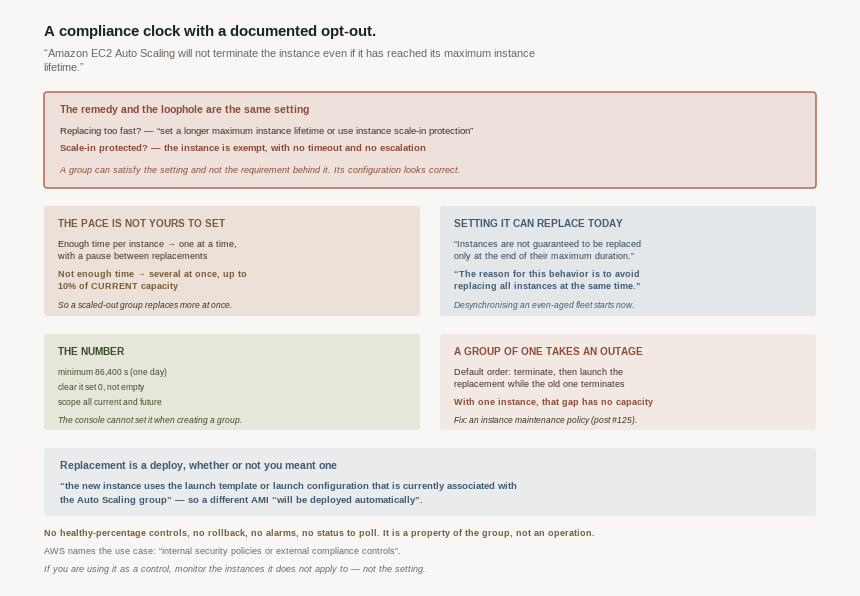
“When this protection is enabled on an instance, Amazon EC2 Auto Scaling will not terminate the instance even if it has reached its maximum instance lifetime.”
There is no timeout on that and no escalation. A protected instance is simply exempt, for as long as the protection is set. If the reason for the lifetime was a 30-day rotation requirement, a protected instance does not rotate at 30 days or at 300.
What makes this more than a footnote is that the same page proposes it as a fix: “To avoid replacing too many instances at once, either set a longer maximum instance lifetime or use instance scale-in protection to temporarily prevent individual instances from being terminated.”
So the documented mitigation for one behaviour of this feature is the documented way to opt out of it. Both sentences are correct; read together they mean a group can satisfy the setting and not the requirement behind it, and nothing in the group's configuration shows the difference.
“Amazon EC2 Auto Scaling will usually replace instances one at a time, with a pause between replacements.” Usually is doing real work in that sentence:
“if the specified maximum instance lifetime doesn't provide enough time to replace each instance individually, Amazon EC2 Auto Scaling must replace more than one instance at a time. Several instances might be replaced at once, by up to 10 percent of the current capacity of your Auto Scaling group.”
The concurrency is therefore a function of the lifetime and the group size, not something you set. A number chosen to be strict, on a group large enough that one-at-a-time cannot keep up, converts itself into a rolling replacement of a tenth of the fleet. Nothing warns you at the moment you set it; the group's behaviour simply changes.
“Instances are not guaranteed to be replaced only at the end of their maximum duration.” And the reason is the useful part:
“In some situations, Amazon EC2 Auto Scaling might need to start replacing instances immediately after you update the maximum instance lifetime parameter. The reason for this behavior is to avoid replacing all instances at the same time.”
A group whose instances all launched together would, under a naive implementation, reach their lifetime together. Auto Scaling prevents that by spreading them out, and the only way to spread out instances that are already the same age is to start replacing some of them early. So the mechanism that protects you from a synchronised mass replacement in 90 days is a replacement now.
Architecture
The one number, and its floor
“You must specify a value of at least 86,400 seconds (one day). To clear a previously set value, specify a new value of 0. This setting applies to all current and future instances in your Auto Scaling group.”
One day is the floor, and it is a sensible one: below that, the adaptive pacing from challenge 2 would be the normal case rather than the exception for all but the smallest groups. The clearing value being 0 rather than an unset field matters for infrastructure as code, where omitting a property and setting it to zero are different operations.
The console cannot set it at creation time: “When you create an Auto Scaling group in the console, you cannot set the maximum instance lifetime.” It is available when editing an existing group, and from the API at creation. That is a smaller version of the console-versus-API divergence this series keeps running into: not a different default, but a different set of available settings.
Why the pace cannot be configured
Every other replacement feature in this series exposes its pacing. An instance refresh takes a minimum and maximum healthy percentage; a maintenance policy sets them for the group. Maximum instance lifetime takes neither, and the reason is structural: the pace is whatever satisfies the deadline you gave it.
The arithmetic is worth doing before setting the number. One at a time with a pause, across a group of N instances, needs roughly N pauses of headroom inside the lifetime. Where it does not have that, the documented consequence is replacement in batches of up to 10 percent of current capacity — and because the ceiling is expressed against current capacity, a group that has scaled out replaces more instances at once than the same group scaled in.
The single-instance outage
This is the one unambiguous defect-shaped behaviour on the page, and it is stated as a limitation rather than buried: “When there is only one instance in the Auto Scaling group, the maximum instance lifetime feature can result in an outage because Amazon EC2 Auto Scaling terminates an instance and then launches a new instance by default.”
The cause is the default order, described a few paragraphs earlier: “By default, Amazon EC2 Auto Scaling creates a new scaling activity for terminating the instance and then terminates it. While the instance is terminating, another scaling activity launches a new instance.”
So a group of one has no capacity during the gap. The fix is the previous post's subject — an instance maintenance policy that launches before terminating — and this is the clearest case for setting one. A compliance rotation that takes the service down once a month is a worse outcome than the rotation not happening.
The deploy nobody asked for
Replacement is not a restart. It is a launch, from whatever the group currently points at: “Whenever an earlier instance is replaced and a new instance launches, the new instance uses the launch template or launch configuration that is currently associated with the Auto Scaling group.”
And the consequence is spelled out: “If your launch template or launch configuration specifies the Amazon Machine Image (AMI) ID of a different version of your application, this version of your application will be deployed automatically.”
That is a genuine second function of this feature. A group with a maximum instance lifetime and a
launch template pointing at a rolling AMI converges on the current AMI without anyone starting an
instance refresh — which is useful if intended and a surprise if not. Combined with
$Latest from post #124, a template updated for a different reason reaches production on
the lifetime's schedule rather than on a deployment's.
What this feature does not have
| An instance refresh has | Maximum instance lifetime has |
|---|---|
| Minimum and maximum healthy percentage | Adaptive pacing, up to 10 percent of current capacity |
| A rollback, under conditions | Nothing — replacements are not a tracked operation |
| Checkpoints and a bake time | A pause between replacements, not configurable |
| CloudWatch alarms that can fail it | Nothing — it is a standing property of the group |
| A status you can poll | Activity history, after the fact |
The comparison is the point rather than a criticism. An instance refresh is an operation you start, so it can be paced, paused and reversed. A maximum instance lifetime is a property the group holds forever, so there is no operation to attach any of that to.
Why This Architecture Holds Up
Expressing it as a per-instance age is the only thing that works
A fleet-wide replacement schedule stated as a schedule — replace everything every 30 days — would synchronise the fleet by construction, and every group would take a correlated replacement on the same day. A per-instance age cannot do that, because instances enter service at different times and so age out at different times. The desynchronisation is a property of the unit AWS chose, not a feature bolted on.
Honouring scale-in protection is right, even though it defeats the control
The alternative is worse. Scale-in protection exists so that an operator can say this instance must not be terminated, and a feature that overrode it would make the protection conditional on which other settings a group happens to carry. Auto Scaling honours the more specific, more deliberate instruction, and it documents that it does so. The gap is not in the behaviour; it is that nothing reports a group where the two are in conflict.
Adaptive pacing beats refusing the setting
Faced with a lifetime too short to honour one instance at a time, Auto Scaling could reject the value. Instead it replaces faster, up to a documented ceiling. That is the better failure mode for a compliance control, where the deadline is the requirement and the pace is the negotiable part — and the 10 percent cap is what stops it becoming a full-fleet replacement.
Key Architecture Decisions
| Decision | Take | Why |
|---|---|---|
| Using it as a compliance control | Audit scale-in protection alongside it | A protected instance is exempt, with no timeout |
| Choosing the value | Long enough for N one-at-a-time replacements | Otherwise the pace escalates to 10 percent of capacity |
| Setting it on a live group | Expect replacements to begin immediately | Desynchronising an even-aged group means replacing some early |
| Groups of one | Set an instance maintenance policy first | The default order terminates before launching, and that is an outage |
| Launch template on the group | Know that replacement deploys whatever it points at | A template change reaches production on the lifetime's schedule |
| Clearing it | Set 0, not an empty value | That is the documented way to clear a previously set value |
| Creating groups in the console | Set it in a second step, or use the API | The console cannot set it at creation time |
The audit worth running
- Every group with a maximum instance lifetime, cross-referenced against instances carrying scale-in protection — that intersection is the set of instances the control does not cover.
- Every such group's instance count against its lifetime, to find the ones where one-at-a-time cannot keep up and replacement is running at 10 percent of capacity.
- Every group of one or two instances with a lifetime set and no instance maintenance policy.
- Every group whose launch template is updated by a pipeline, where the lifetime is silently acting as the deployment mechanism.
Closing Thought
Seven posts into Auto Scaling, the pattern across all of them is that a setting's name describes its intent and the documentation describes its behaviour, and the gap between the two is where the operational surprises live. This one has the widest gap so far, because the name is a guarantee and the page lists two conditions under which it does not hold.
The finding I would act on is the scale-in protection exemption. Everything else here is a pacing question you can reason about from the group's size. That one is different in kind: it means a group can be configured exactly as an auditor asked, hold an instance that has been running for a year, and present nothing anomalous in its configuration. If you are using this feature as a control, the thing to monitor is not the setting. It is the instances the setting does not apply to.
Official AWS Reference
- Replace Auto Scaling instances based on maximum instance lifetime — the definition and the compliance use case, the 86,400-second minimum and clearing with 0, that it applies to all current and future instances, the usually-one-at-a-time pacing and the escalation to 10 percent of current capacity when the lifetime is too short, the recommendation to lengthen the lifetime or use scale-in protection, that replacement is not guaranteed to wait for the end of the duration and may begin immediately after the parameter is updated, that scale-in protection prevents termination even at maximum lifetime, the single-instance outage from the default terminate-then-launch order, that the console cannot set it at creation time, and that replacements use the launch template currently on the group and so deploy whatever AMI it names
- Instance maintenance policies — further reading on the policy that changes the replacement order to launch before terminating, which is the documented fix for the single-instance outage; no claims in this post are drawn from it
- Use instance scale-in protection to control instance termination — further reading on the protection that exempts an instance from its maximum lifetime; no claims in this post are drawn from it
- Use an instance refresh to update instances in an Auto Scaling group — further reading on the operation this feature is deliberately not, and the pacing controls it has that a lifetime cannot; no claims in this post are drawn from it
Comments