Business Challenge
#105 answered how an administrator reaches a machine. This post answers the question underneath it: for how long is the door open at all? Bastion removes the need for a public IP, which is the right answer. Just-in-time VM access is the answer for the estate that still has management ports exposed — and most estates do.
The problem statement in the documentation is unusually blunt about the bind: “To reduce attack surfaces, minimize open ports, especially management ports. Legitimate users also need these ports, making it impractical to keep them closed.” That is the whole tension. JIT's answer is to keep them closed and open them on request.
Where this gets designed badly is in two places, and they are the two halves of the post. The first is the defaults. The second is a category error about what “just-in-time” is protecting.
Just-in-time access is a network control, not an authorisation control
JIT rewrites NSG and Azure Firewall rules. It does nothing to the requester's Azure RBAC permissions — in fact it depends on them: “Defender for Servers checks that the user has Azure role-based access control (Azure RBAC) permissions for that VM.”
So after you deploy JIT, your administrators still hold Contributor on the VM twenty-four hours a day. The port is temporary; the permission is permanent. Reducing the permission is a separate product — Privileged Identity Management — with a separate licence, a separate configuration surface and separate gaps. Shipping one and describing it as least privilege is the mistake this post exists to prevent.
Architecture
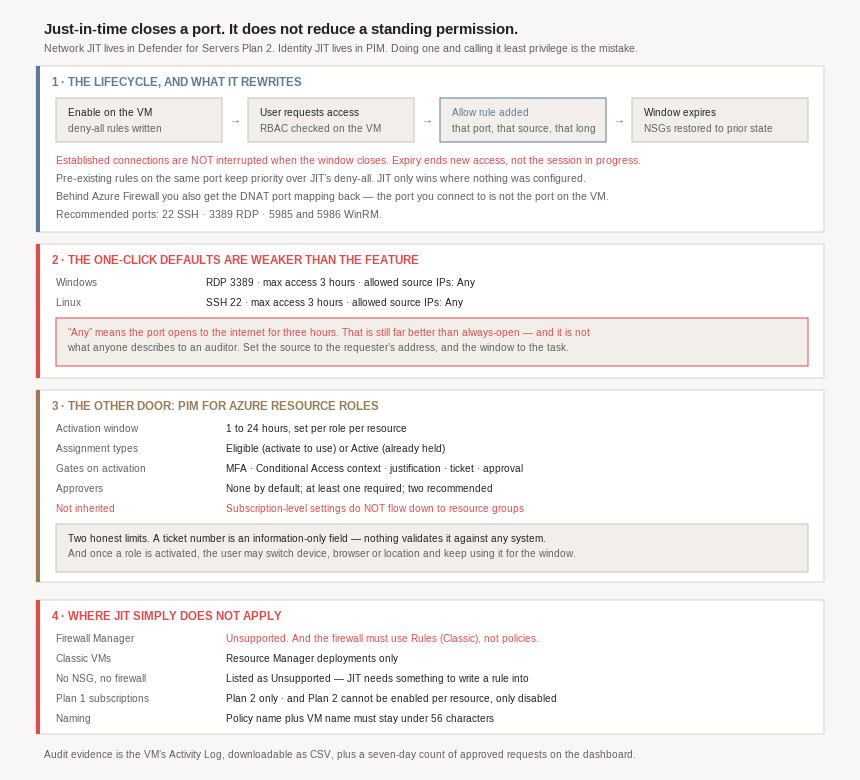
What a request actually does
The mechanism is pleasingly literal. Enabling JIT means “Defender for Cloud ensures deny all inbound traffic rules exist for your selected ports in the network security group and Azure Firewall rules.” On an approved request it “configures the NSGs and Azure Firewall to allow inbound traffic to the selected ports from the relevant IP address (or range) for the specified amount of time”, and when the window closes it “restores the NSGs to their previous states.”
Three details in that flow change how you plan around it:
- Existing rules win. “If other rules already exist for the selected ports, those existing rules take priority over the new deny all inbound traffic rules” — JIT only takes top priority “if no existing rules are on the selected ports.” So enabling JIT on a VM whose NSG already allows 3389 from a wide range changes nothing about that exposure. The rule you forgot is the rule that still governs.
- Expiry does not disconnect anyone. “Connections that are already established aren't interrupted.” The window bounds when a session can start, not how long it can run — the same semantics as an NSG change, covered in #104. A three-hour window does not mean a three-hour session.
- Behind a firewall, the port moves. After approval for a VM protected by Azure Firewall, Defender “provides the user with the connection details, including the port mapping from the DNAT table” — so the port the administrator types is not the port on the machine, and any runbook that hardcodes 3389 is wrong in that topology.
The defaults are the weakest version of the feature
Enabling JIT from a VM's own Configuration blade is one click, and the documentation states exactly what that click buys. For Windows: RDP port 3389, maximum allowed access 3 hours, allowed source IP addresses Any. For Linux: SSH port 22, 3 hours, Any.
“Any” means the internet
The default configuration opens the management port to every source address on earth for three hours per request. That is a genuine improvement on a permanently open port — the exposure window shrinks by orders of magnitude — and it is not what anybody means when they say “we use just-in-time access.”
Both knobs are per-port and both are available: the richer configuration path lets you set “Protocol”, “Allowed source IPs” and “Maximum request time” for each port. Set the source to the requester's address, and the window to the length of the task rather than the length of a working afternoon. The documented PowerShell example shows the opposite default explicitly: allowedSourceAddressPrefix=@("*") with maxRequestAccessDuration="PT3H".
One practical note that will come up immediately: “If a user who is requesting access is behind a proxy, enter the IP address range of the proxy.” In a corporate estate that is usually a shared egress range, which blunts the source restriction — worth knowing before promising per-user source control.
The recommended port set is wider than most people enable: 22 (SSH), 3389 (RDP), 5985 and 5986 (WinRM). The two WinRM ports are the ones habitually forgotten, and they are management ports in exactly the sense the feature exists for.
Why This Architecture Holds Up
Because it is a Plan 2 feature, and Plan 2 is a subscription-level commitment
JIT is not available in Defender for Servers Plan 1. It sits in Plan 2 alongside agentless vulnerability scanning, agentless malware scanning, machine secrets scanning, file integrity monitoring, Defender for DNS alerts, Azure network-layer threat detection, the network map and the 500 MB free data ingestion benefit.
The deployment-scope table is the part that affects the bill. Defender for Servers “should be enabled at the subscription level”, and the granularity differs by plan: Plan 1 can be enabled and disabled per resource, while Plan 2 cannot be enabled at the resource level — only disabled there. So you cannot buy Plan 2 for the three jump hosts that need JIT; you buy it for the subscription and then switch it off where you do not want it. That is an opt-out model on a paid plan, and it wants a policy rather than good intentions.
Two consequences worth putting in a plan. A 30-day trial begins on enablement and “can't be stopped, paused, or extended” — so evaluate deliberately rather than clicking it on to look at the UI. And enabling Plan 2 turns on agentless scanning by default and installs the Defender for Endpoint extension on supported machines automatically, which is a change to every VM in the subscription, not just the ones you had in mind.
Because the unsupported list contains common topologies
JIT needs somewhere to write a rule, and it is particular about where:
| Condition | Status |
|---|---|
| VMs deployed through Azure Resource Manager | Supported |
| VMs protected by Azure Firewall on the same virtual network as the VM | Supported |
| AWS EC2 instances | Supported (Preview) |
| VMs deployed with classic deployment models | Unsupported |
| VMs protected by Azure Firewalls controlled by Azure Firewall Manager | Unsupported |
| Azure Firewall configured with Firewall policies rather than Rules (Classic) | Unsupported |
| VM with no NSG and no firewall configuration | Unsupported — nothing to write into |
Those two bold rows deserve attention, because they conflict with the direction the rest of Azure networking has moved. #85 was about Firewall Manager and secured hubs; Firewall policies are the modern configuration model and Rules (Classic) is the legacy one. JIT requires the legacy model and does not work with the centralised manager. A Virtual WAN secured-hub estate — the architecture Microsoft recommends at scale — cannot use JIT for the machines behind that firewall.
That is a genuine architectural fork, not a configuration detail. If the estate is on secured hubs, the answer to administrative access is Bastion with private-only deployment from #105, not JIT.
Because the other door is PIM, and its defaults are also worth reading
If the goal is actually least privilege rather than a smaller port window, the paired control is Privileged Identity Management for Azure resource roles. Its shape is the mirror image of JIT: instead of a temporary network rule against a permanent permission, you get a temporary permission — an eligible assignment the user must activate — against whatever the network allows.
| Setting | What it gives you |
|---|---|
| Activation maximum duration | 1 to 24 hours, per role per resource |
| Assignment types | Eligible (activate to use) or Active (already held) |
| On activation | MFA, Conditional Access authentication context, justification, ticket number, approval |
| Approvers | No defaults; at least one required; two recommended |
| Least-privilege activation (preview) | Activate a lower-privileged subset role, still governed by the eligible role's policy |
Four honest limits the documentation states, each of which shapes how much the control is worth:
- Settings do not inherit. “Role settings configured on a higher level, such as Subscription, for example, aren't inherited on a lower level, such as Resource Group.” A carefully configured subscription policy says nothing about the resource groups inside it — the opposite of how Azure Policy and RBAC behave, and therefore the opposite of what people assume.
- A ticket number proves nothing. Requiring ticket information “is an information-only field. Correlation with information in any ticketing system isn't enforced.” It is a prompt, not a control. Approval is the control.
- Active assignments cannot be MFA-gated at use. PIM “can't enforce multifactor authentication when the user uses their role assignment because they're already active in the role from the time that it's assigned” — MFA only applies when the administrator creates the assignment. Which is the argument for eligible assignments over active ones, stated by the product.
- Activation binds the moment, not the session. “After the role is activated, users aren't prevented from using another browsing session, device, or location to use permissions.” Activating from an Intune-compliant device and then using the role from an unmanaged one is explicitly possible; preventing it means scoping Conditional Access to the eligible users directly, not to the activation.
And one sharp dependency: if activation is gated on a Conditional Access authentication context, then “security principals with permissions to manage Conditional Access policies… can change requirements, remove them, or block eligible users from activating the role”, and should “be considered highly privileged.” The backup behaviour is sensible — with no matching policy in the tenant, MFA is required instead — but it “isn't triggered if the Conditional Access policy is turned off, is in report-only mode, or has an eligible user excluded.” A disabled policy is therefore worse than a missing one.
Because the evidence is thinner than the control
For an audit, what JIT leaves behind is the VM's Activity Log: “a filtered view of previous operations for that VM along with time, date, and subscription”, downloadable as CSV. The dashboard adds “the number of approved JIT requests in the last seven days”, the last access time, and the last user.
That answers “who requested a port to be opened, and when.” It does not answer what they did once inside — which is the Bastion session recording question from #105 — and it does not answer what traffic actually flowed, which is the flow-log question from #103. Three features, three partial records, and a complete answer only if you have deliberately assembled all three.
Key Architecture Decisions
| Decision | Do this | Because |
|---|---|---|
| Management ports currently open | JIT, with configured source and window | The default “Any” source for 3 hours is the weak version of the feature. |
| Enabling from the VM blade | Then go and edit it | One click gives you Any source, 3 hours, one port. |
| Which ports to protect | 22, 3389, 5985 and 5986 | WinRM is the pair people forget, and it is a management port. |
| Estate on secured hubs or Firewall policies | Bastion private-only, not JIT | Firewall Manager and Firewall policies are both unsupported. |
| Existing broad NSG allow rules | Remove them first | Pre-existing rules on the port keep priority over JIT's deny-all. |
| Promising per-user source restriction | Check for a corporate proxy | Behind a proxy you must allow the proxy's range, which is shared. |
| Runbooks for firewall-protected VMs | Read the DNAT mapping per request | The connect port is assigned, not 3389. |
| Expecting expiry to end sessions | Don't | Established connections aren't interrupted. |
| Buying Plan 2 for a few hosts | Budget per subscription | Plan 2 can't be enabled per resource, only disabled. |
| Clicking Plan 2 on to explore | Plan the evaluation first | The 30-day trial can't be stopped, paused or extended. |
| Actual least privilege | PIM eligible assignments as well | JIT shortens the port window and leaves the permission permanent. |
| PIM configured at subscription scope | Configure resource groups too | Role settings are not inherited downward. |
| Relying on ticket numbers | Require approval instead | The ticket field is information-only and uncorrelated. |
| Choosing eligible versus active | Eligible | MFA can't be enforced at use time on an active assignment. |
| Audit question “what did they do?” | Add session recording and flow logs | JIT's Activity Log records the request, not the activity. |
Closing Thought
Just-in-time VM access is a good feature with a misleading name. “Just-in-time” in the identity world means a permission you do not hold until you ask for it. Here it means a port you cannot reach until you ask for it, while the permission sits there permanently. Both are worth having. They are not substitutes, and the word does not distinguish them.
The pattern that actually holds up is boring and has three parts: close the port and open it per request with a real source restriction, make the permission eligible rather than active so it has to be activated under approval, and keep a record of what happened inside the session. Azure sells those as three features, in two products, on two licences, with two sets of defaults that are weaker than their own documentation recommends.
The one line to take away
JIT makes the port temporary; PIM makes the permission temporary. If you have deployed only the first, your administrators still hold standing access to every machine — and the default JIT policy opens their management port to the internet for three hours at a time.
Next in the series: cross-region connectivity and latency — back to the data path, and what distance actually costs.
Official Azure Reference
- Enable just-in-time access, Microsoft Defender for Cloud — the Plan 2 prerequisite, the supported and unsupported VM lists, the 56-character policy naming limit, the Reader and SecurityReader requirement and the three permission sets, the four recommended ports, the per-port protocol, source and duration settings, the Windows and Linux one-click defaults of 3 hours and Any source, the PT3H PowerShell example, the Configured, Not configured and Unsupported groupings with the seven-day request count, the proxy guidance, the DNAT port mapping on approval, and the Activity Log audit path
- Configure Azure resource role settings in PIM — the 1-to-24-hour activation maximum, the Owner or User Access Administrator requirement and per-role per-resource scoping, the absence of inheritance from subscription to resource group, the eligible and active assignment duration options, the inability to enforce MFA at use time on an active assignment, the approval requirements and the recommendation of two approvers, the information-only ticket field, the Conditional Access authentication context and its 10-minute reauthentication window, the post-activation device and location freedom, the privileged nature of Conditional Access administrators, the backup MFA mechanism and when it doesn't trigger, least-privilege role activation, and the 1000-recipient notification cap
- Understand just-in-time virtual machine access — the Plan 2 attribution, the deny-all rules written into NSG and Azure Firewall, the priority rule for pre-existing rules, the RBAC check on request, the allow rule scoped to port, source and duration, the restoration of NSGs on expiry, the non-interruption of established connections, the Azure Firewall Manager and Rules Classic constraints, the AWS EC2 security group behaviour, and the Unhealthy resources recommendation
- Overview of Defender for Servers — the Plan 1 and Plan 2 split, just-in-time VM access as a Plan 2 feature with Azure and AWS availability, the other Plan 2 only features including the 500 MB ingestion benefit, the deployment scope table showing Plan 2 cannot be enabled per resource, the unstoppable 30-day trial, agentless scanning and Defender for Endpoint enabled by default, the retirement of the Log Analytics and Azure Monitor agents for most features, and the Machine Configuration extension requirement for baseline assessment
- Common questions about Defender for Servers — the billing and licensing scenarios behind the plan choice (no claims drawn from it)
- Approve or deny requests in Privileged Identity Management — the approver experience that makes the approval gate real (no claims drawn from it)
Comments