Business Challenge
“AWS Resource Explorer is a resource search and discovery service.” That sentence makes it sound like a convenience, and for most of its life in an account it is one — somebody types half a resource name into the console search bar and finds the thing.
It is also an inventory of every resource in the account, with a documented access-control model attached to it. This post is about that model: where the boundary is drawn, where it is described as being drawn, and why those two places are not the same.
The service is no longer something you choose to turn on. “Beginning October 6, 2025, Resource Explorer is enabled by default in your AWS account with no setup steps required to begin searching for and finding resources.”
The query path is strict, and AWS says so twice. From the concepts page: “Users can't directly query the index. Instead, they must always query using a view.” From the views page: “A user never directly queries the Resource Explorer index. Instead, queries must always go through a view which lets the view creator limit which resources the user can see in search results.”
And the filtering is genuinely enforced, not advisory: “Results from queries that users make with a view are always automatically filtered to include only those resources that match the view's criteria.”
So the documentation's summary is fair: “Views are the method the administrator can use to control access to the information about resources in your AWS account.”
Then, further down the same page:
“If you use the AWS managed policy named AWSResourceExplorerReadOnlyAccess with
your principals, it grants them the ability to search using any view in the
account.”
That is the policy the quickstart path hands out. A view restricts what it returns to whoever calls
it; it does nothing at all about which views a principal may call. Creating a narrow
Payments-only view and granting that policy does not confine anybody to payments
resources — it adds a convenient option beside every other view in the Region, including
whichever one is the default, which where automatic setup created it
“doesn't have any filters”.
Restriction is an IAM act on the view ARN, not a property of the view. “To search successfully with Resource Explorer, a principal must have Allow access to both the resource-explorer-2:GetView and resource-explorer-2:Search operations on the view's ARN.” Scope the Resource element — “by specifying the Amazon resource name (ARN) of each view in the Resource element of the policy statement” — and audit for principals holding the managed policy, which is the real grant.
If views are the partition, the quota is the ceiling on how finely you can partition. It is 10 views in an AWS Region — and unusually, the default and the maximum are the same number, under a page that opens with “You cannot increase the quotas for AWS Resource Explorer.”
Views do not travel either. “Views are stored on a per-Region basis. A view can access only the Resource Explorer index in that AWS Region.” And when you want the same partition elsewhere: “You can select only a view that exists in the Region to be that Region's default view”, with the blunt note “There is no copy view operation.”
Ten is generous for "production, pre-production, and a couple of team views". It is not a per-application or per-team access model, and the quota page is where you find that out rather than the design page.
FixDesign views around durable boundaries — environment, data classification, business unit — and use tag filters inside a view for the fine-grained part. If the model needs more than ten slices in one Region, views are the wrong instrument and the ABAC approach below is the one that scales.
The natural assumption — that a Region with no view is a Region with no search — is wrong in both halves.
“If no user-owned view exists in a Region, Resource Explorer automatically falls back to using a Resource Explorer-owned view to ensure search functionality remains available. Resource Explorer-owned views are service-managed and cannot be modified or deleted.”
The index underneath it is not inert either: “A Resource Explorer owned index exists in every AWS Region and is managed by the Resource Explorer service. These indexes cannot be deleted or modified by users.”
Meanwhile the complete index appears on use, not on an administrator's decision:
“automatic index creation occurs when users with, at minimum, the
permissions in the AWSResourceExplorerReadOnlyAccess managed policy perform their
first search in a Region that doesn't have a user-index set up already” —
and that automatic setup creates a default view, which per the concepts page
“doesn't have any filters”.
So a Region nobody has governed gets its index and its unfiltered default view from the first read-only user who searches there. There is no deny-by-absence available.
FixThe lever is the IAM grant, not the inventory. If a set of principals should not search a Region, scope their Search and GetView permissions to named view ARNs and do not attach the account-wide managed policy. Then enumerate what exists: ListServiceViews returns the service views, which are “automatically available to authorized callers without setup as a global resource”.
Architecture
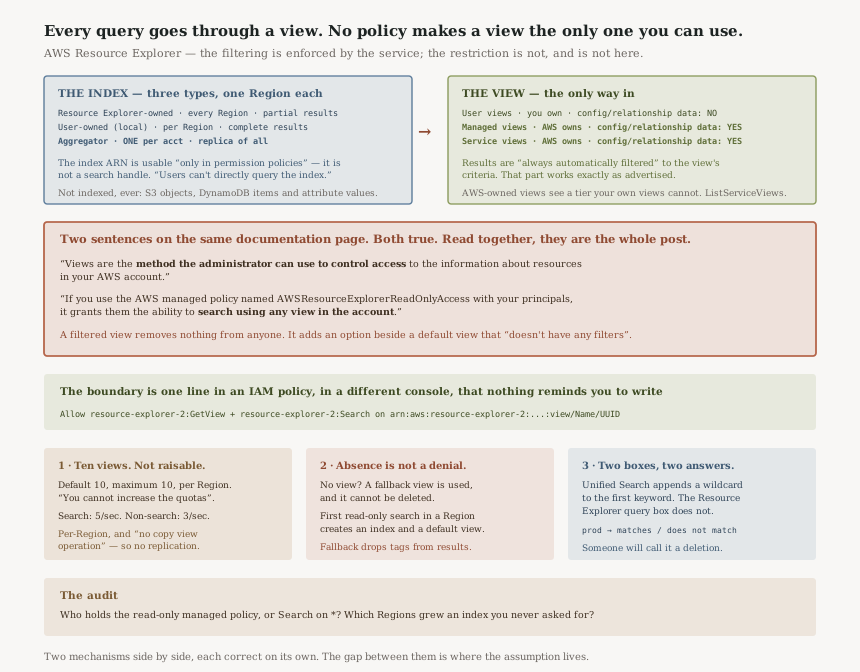
Three kinds of index, three kinds of view, one mandatory hop between them, and a permission boundary that sits beside the whole arrangement rather than inside it.
Three index types, counted two ways
The welcome page says “These indexes come in two types: Resource Explorer-owned indexes that provide immediate partial results, and user-owned indexes that provide complete results with automatic updates”. The concepts page says “There are three types of indexes”. Both are right — the third is a promotion of the second, not a separate species — but it is worth knowing which page you read, because the aggregator is the one that decides whether cross-Region search exists at all.
| Index type | Who owns it | What it returns | Can you delete it |
|---|---|---|---|
| Resource Explorer-owned | The service — it “exists in every AWS Region” | “immediate partial results” | No — “cannot be deleted or modified by users” |
| User-owned (local) | You, per Region | “complete results with automatic updates” | Yes |
| Aggregator | You — one per account | Its own Region plus a replica of every other user-owned index | Yes, and “There can be only one aggregator index in an AWS account” |
The ARN tells you the index is not a search handle: “An index is a resource with an Amazon resource name (ARN). However, you can use this ARN only in permission policies to grant access to operations that interact directly with the index.” You can authorise someone over the index; you cannot read through it.
Three view types, and one of them sees more than yours
| Capability | User views | Managed views | Service views |
|---|---|---|---|
| Created by | User | AWS Service (per account) | AWS Service (global) |
| Can user modify | Yes | No | No |
| Can user delete | Yes | Via service only | No |
| Access to config/relationship data | No | Yes | Yes |
| Streaming support | No | No | Yes |
The bolded row is the interesting one. A view you create cannot reach configuration and relationship data;
views created by AWS services can. That is a defensible split — an integration needs structure a
search box does not — but it means the inventory has a tier your own tooling cannot query, and the
way to see who holds that tier is ListServiceViews.
“Unified Search automatically inserts a wildcard character (*) operator at the end of the first keyword in the string.”
“The search performed by the Query text box on the Resource search page in the Resource Explorer console does not automatically append a wildcard character.”
So prod in the console's top bar matches prod-payments-db; the same string in Resource Explorer's own query box does not. Somebody will conclude a resource has been deleted. Add the * yourself in the Resource Explorer box, and do not compare counts between the two surfaces.
The ARN carries a UUID, deliberately
“Every view ARN includes an AWS generated UUID at the end. This helps to ensure that users who might have had access to views with a specific name that was deleted can't automatically access a new view created with the same name.”
This is the right call and it has a cost you should plan for: a policy naming a view ARN breaks if the view is recreated. That is the point — the alternative is a stale grant silently re-attaching to a new object — but it means view ARNs belong in a managed policy under version control, not pasted into roles by hand.
What is deliberately not in the index
Resource Explorer indexes resources, not their contents. Not indexed, and “never returned in search results”: “Amazon S3 objects that are contained within a bucket”, “Amazon DynamoDB table items”, and “DynamoDB attribute values”.
Worth stating plainly because the exclusion is the reason the whole thing can be enabled by default. An account-wide search index that reached object keys would be a very different risk conversation.
Why This Architecture Holds Up
Forcing every query through a view is the right structure
The alternative — letting a principal query the index and filtering afterwards — puts the filter in the caller's hands. Making the view the only entry point means the filter is applied by the service, to everybody, and the documentation is unambiguous that it is: “always automatically filtered”.
The gap is not in the mechanism. It is that the mechanism's effectiveness depends entirely on an IAM policy written somewhere else, and the service has no way to tell you that policy is missing. A view with a careful filter and an account-wide grant looks identical, in the console, to a view with a careful filter and a scoped one.
The ABAC guidance states its own prerequisite, which most guidance does not
For anything beyond ten slices, the documented approach is attribute-based: tag the resources, tag the
principals, and match them in a condition. The example is
"aws:ResourceTag/Environment": "${aws:PrincipalTag/Environment}", and AWS is clear about the
failure mode: “If those two tags don't exactly match, or if either tag is
missing, then the Resource Explorer denies the request.” Fail-closed, which is
correct.
And then the sentence that most ABAC write-ups leave out: “To successfully use ABAC to secure access to your resources, you must first restrict access to the ability to add or modify the tags attached to your principals and resources.”
That is the whole dependency, said out loud. If a principal can tag itself, ABAC is decoration. Stating it as a precondition rather than a footnote is the difference between guidance and a recipe for a finding.
Resource Explorer-owned views “do not include resource tags in search results”, while the views automatic setup creates are described as including tags.
So a Region on the fallback is not merely unconfigured — it is searchable on names and types but not on the tags your conventions are built around. That is a confusing failure to debug from the console, because the search works; it just quietly cannot see the dimension you were searching on.
The quota page carries rate limits the overview page never mentions
Search is capped at 5 operations per second and non-search at 3, with
default equal to maximum on both — so an inventory-reconciliation job built on
Search is rate-limited by design, not by your account's history. That is a reasonable shape
for a human-facing discovery service and a hard constraint for anybody planning to treat it as a
programmatic inventory API.
There is a neat consequence of the per-Region singletons, recorded in the IAM notes:
“The Resource Explorer Get* permissions included in the ViewOnlyAccess
policy perform like List permissions although they return only a single value,
because a Region can contain only one index and one default view.”
Key Architecture Decisions
| Decision | Choice | Reasoning |
|---|---|---|
| Where the access boundary lives | In the IAM policy's Resource element, naming view ARNs | The managed policy “grants them the ability to search using any view in the account”. |
AWSResourceExplorerReadOnlyAccess |
Treat as account-wide read, not as least privilege | It is the grant, and it is the one the quickstart suggests. |
| Number of views per Region | Design within 10; it is not raisable | “You cannot increase the quotas for AWS Resource Explorer.” |
| Fine-grained partitioning | Tag filters and ABAC inside a view, not more views | Ten is a ceiling; tags are not. |
| Before adopting ABAC | Lock down who can set tags first | AWS names this as the precondition, not an improvement. |
| Cross-Region search | Requires the aggregator index, one per account | A view “can access only the Resource Explorer index in that AWS Region”. |
| Replicating a view to another Region | Codify it in IaC and recreate | “There is no copy view operation.” |
| Regions you do not govern | Expect an index and an unfiltered default view to appear | Automatic creation fires on a read-only user's first search. |
| View ARNs in policies | Manage in version control, expect breakage on recreate | The UUID suffix is deliberate anti-reuse protection. |
| Resource Explorer as an inventory API | No — 5 searches per second | Default equals maximum; there is no increase to request. |
The audit worth running
One query answers most of it: which principals in the account hold
AWSResourceExplorerReadOnlyAccess, or any policy granting
resource-explorer-2:Search on Resource: "*"? Every one of those can enumerate
the account's resources through whatever view is broadest, and any filtered views you built are not
narrowing them.
Then list the Regions with a user-owned index and compare against the Regions you intended to use. The difference is where somebody searched. Each one has a default view that, if automatic setup made it, has no filters.
Finally, call ListServiceViews and read what comes back. Those views reach configuration and
relationship data your own views cannot, and they are global and unremovable, so the only available
control is knowing they are there.
Closing Thought
Resource Explorer's design is better than its defaults. Forcing every query through a view is a real structural decision — it puts the filter on the service's side of the boundary, where a caller cannot route around it. Putting a UUID in the view ARN is the kind of detail that only exists because somebody thought about a deleted name being recreated.
What is missing is any connection between the thing that filters and the thing that grants. You build a view with a careful filter, and the view is complete and correct and enforced, and it changes nobody's access until a separate policy, in a separate console, names its ARN. The service cannot warn you, because from where it is standing nothing is wrong.
That is the same shape as the posts around it. #80 had a resource shared into an account and then governed by that account's IAM rather than by the share. #83 had a liveness probe quietly setting a detection threshold. Here a filter is mistaken for a boundary. In each case two mechanisms sit next to each other, each doing its own job correctly, and the gap between them is where the assumption lives.
Security & Identity — Amazon Detective: why the behaviour graph reads its own duplicate stream rather than your CloudTrail and VPC flow log configuration, which traffic that flow log ingestion leaves out, and what a one-year retention window means for an investigation opened late.
Official AWS Reference
- What is AWS Resource Explorer — the service description, the default-enablement date, and the two-type index count
- Terms and concepts for Resource Explorer — the index definition, the three index types, the rule that users cannot query an index directly, the index ARN's limited use, automatic index creation on first search, the unfiltered default view, the Unified Search wildcard behaviour, and the resource types deliberately excluded
- Working with views — the view definition, per-Region storage, the aggregator requirement for account-wide results, the UUID in every view ARN, the Resource Explorer-owned fallback view, and the comparison table showing config and relationship data access by view type
- User views — views as the administrator's access-control method, the two operations a principal needs on a view ARN, the automatic filtering of results, and the statement that the read-only managed policy grants search on any view in the account
- Granting access to Resource Explorer views for search — restricting the Resource element to named view ARNs, the ABAC condition example, and the requirement to control tagging before relying on ABAC
- Setting a default view in an AWS Region — the fallback to a Resource Explorer-owned view, its omission of resource tags, the use of the default view when none is specified, and the absence of a copy view operation
- Quotas for Resource Explorer — ten views per Region with default equal to maximum, the statement that quotas cannot be increased, and the search and non-search rate limits
- What are AWS service views — global availability without setup, and enumerating them with ListServiceViews
- AWS managed policies for AWS Resource Explorer — the note that Get* permissions behave like List because a Region holds one index and one default view
- Search query syntax reference — further reading on operators and attributes; no claims in this post are drawn from it
Comments