Business Challenge
The documentation opens the whole subject with a size limit rather than a principle:
“The simplest approach for managing access to small-to-medium numbers of datasets in Amazon S3 by AWS Identity and Access Management (IAM) principals is to define IAM permission policies and S3 bucket policies. This strategy works, so long as the necessary policies fit within the policy size limits of S3 bucket policies (20 KB) and IAM policies (5 KB)”
That is an unusual way to introduce an access-control model, and it is the honest one. Everything that follows is a way of buying more room.
“As your number of datasets and use cases scales, you might require more policy space.” The second rung buys it by multiplying the number of policies:
“An approach that offers significantly more space for policy statements is to use S3 Access Points as additional endpoints for S3 buckets, because each access point can have its own policy … you can have thousands of access points per AWS Region per account, with a policy up to 20 KB in size for each access point.”
With a cost that is not about bytes at all: “Although S3 Access Points increases the amount of policy space available, it requires a mechanism for clients to discover the right access point for the right dataset.”
So rung two solves a capacity problem and creates a routing problem. Rung three solves both and creates a build problem: “while the IAM session broker approach supports arbitrarily dynamic permissions patterns and scales effectively, you must build the access-pattern logic.”
FixWork out which rung you are on before designing anything. If your policies fit comfortably in 20 KB and 5 KB, the first approach is not a compromise — it is the recommended one, and the other three exist to solve a problem you do not have.
“S3 Access Grants provides a simplified model for defining access permissions to data in Amazon S3 by prefix, bucket, or object.” And the capacity, stated as counts rather than kilobytes:
“You can create 1 S3 Access Grants instance per AWS Region per
account.”
“You can register 1,000 S3 Access Grants locations per S3 Access Grants
instance.”
“You can create 100,000 grants per S3 Access Grants instance.”
That is the trade in one line: you stop measuring permissions in bytes and start counting them. A grant is a row rather than a statement, so the ceiling moves from a document size to a quota — and the quota is negotiable, since “If your use case exceeds these limitations, contact AWS support to request higher limits”, which a 20 KB policy limit is not.
The one instance per Region per account is the constraint to notice. Everything else here is plural; the instance is not, which makes it a shared object that every team in that account depends on.
FixTreat the Access Grants instance as account infrastructure with an owner, not as something a team creates for its own dataset. There is exactly one per Region per account, so the first team to need it is setting it up for everybody.
The capacity argument would justify Access Grants on its own. The audit argument is the one that changes what you can answer afterwards.
“When you integrate S3 Access Grants with the trusted identity propagation feature of AWS IAM Identity Center, your applications can make requests to AWS services … directly on behalf of an authenticated corporate directory user. Your applications no longer need to first map the user to an IAM principal.”
And the consequence in the log: “each AWS CloudTrail data event for Amazon S3 contains a direct reference to the end user on whose behalf the data was accessed”, so “you no longer need to reconstruct the relationship between different users and IAM sessions”.
Anybody who has answered which person read this object from CloudTrail knows what that reconstruction costs. The role is in the log; the human is in a session the log does not describe, and joining them is an exercise in correlation that gets harder the longer ago it happened.
It is not free, though, and the cost is organisational: “Setting up trusted identity propagation requires collaboration between the administrators of connected AWS services and the IAM Identity Center administrators.”
FixIf attribution is why you want this, confirm the Identity Center side has an owner who will engage before you design around it. The documentation names the dependency explicitly, which usually means it is the step that stalls.
Architecture
Four approaches, presented as a progression, with the thing that moves you along it stated in kilobytes.
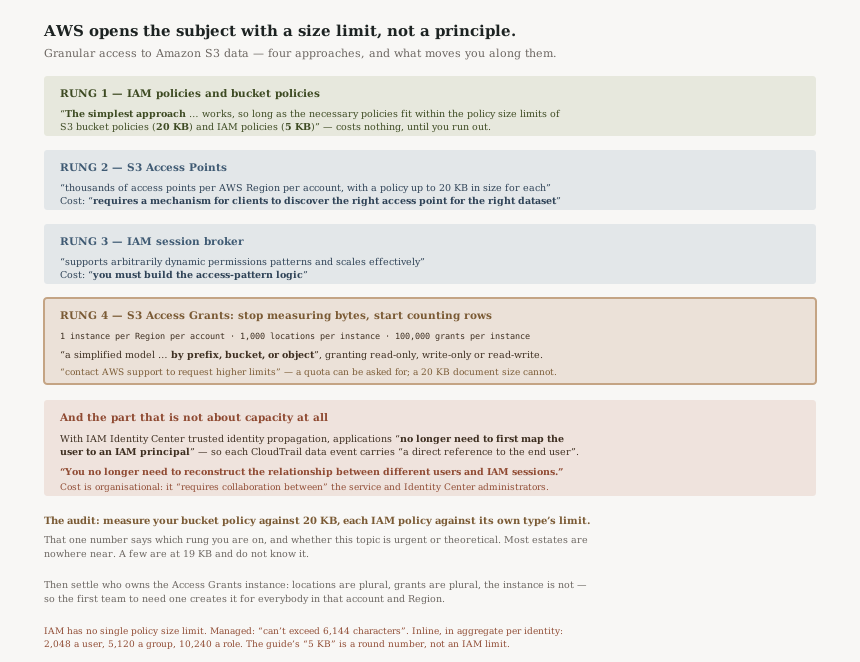
The ladder, with its prices
| Approach | Policy capacity | What it costs you |
|---|---|---|
| IAM policies and bucket policies | “20 KB” per bucket policy, “5 KB” per IAM policy | Nothing — until you run out |
| S3 Access Points | “thousands… per AWS Region per account”, 20 KB each | “a mechanism for clients to discover the right access point” |
| IAM session broker | Unbounded, effectively | “you must build the access-pattern logic” |
| S3 Access Grants | 100,000 grants per instance, one instance per Region per account | A shared account-level object, and an Identity Center dependency for the audit benefit |
Read down the middle column and the progression is a capacity argument. Read down the right and it is four different kinds of work. Those are the two axes a design review should actually weigh, and the documentation gives you both.
“If your use case exceeds these limitations, contact AWS support to request higher limits.”
That note sits above the three Access Grants limits and quietly changes their character. 100,000 grants is a starting position; 20 KB is a fact about a document. Moving from bytes to counts is not only more room, it is room that can be asked for.
What a grant actually expresses
“you can grant read-only, write-only, or read-write access on a per-S3-prefix basis to both IAM principals and directly to users or groups from a corporate directory.”
Three permission levels and a prefix. That is deliberately less expressive than a bucket policy, which can condition on anything in the request. The simplification is the point — it is what makes a grant a countable row rather than a document to be parsed and merged — but it means a bucket policy expressing something conditional does not translate into a grant, and will still be needed alongside.
The directory identity is the part that is genuinely new
“applications can request data from Amazon S3 on behalf of the application's current authenticated user”, and with trusted identity propagation “Your applications no longer need to first map the user to an IAM principal”.
The approaches above this one all reach S3 through an IAM principal, so a directory user has to become one somewhere along the way. Removing that step is the structural change, and the CloudTrail benefit follows from it rather than being a separate feature.
Why This Architecture Holds Up
Presenting the alternatives first is unusually good documentation
AWS could have led with Access Grants and described the others as legacy. Instead the page spends three paragraphs explaining when you do not need it, and names the specific cost of each alternative rather than dismissing it. The first approach is described as “the simplest”, not as the deprecated one.
That matters because the failure mode here is adopting a scaling solution before you have a scaling problem, and paying the shared-instance and Identity Center costs for an estate that three bucket policies would have covered.
Counting grants instead of measuring policies is the right abstraction
A policy document is parsed, merged and evaluated as a unit, which is why its size is bounded. A grant is a record. Moving to records is what lets the ceiling be a quota, lets the quota be raised on request, and lets permissions be managed by a system rather than edited as text.
The cost is expressiveness, and AWS does not pretend otherwise — three permission levels on a prefix is the whole vocabulary.
“You can create 1 S3 Access Grants instance per AWS Region per account.”
Locations are plural, grants are plural, the instance is not. Whoever creates it is creating the object every other team in that account will have to register their locations against, and there is no second one to fall back to if its ownership is unclear.
That is the right design — a per-team instance would reproduce the discovery problem Access Points has — and it means the thing to settle first is who owns it, which is a conversation rather than a configuration.
Naming the Identity Center dependency is honest
“requires collaboration between the administrators of connected AWS services and the IAM Identity Center administrators” is the kind of sentence that gets skipped, and it is describing the step most likely to take a quarter. The audit benefit is real and it is gated on two teams agreeing to work together.
Key Architecture Decisions
| Decision | Choice | Reasoning |
|---|---|---|
| Which approach | Measure your policy size first | The ladder is driven by “more policy space”, not by elegance. |
| Staying on rung one | Legitimate while you fit | AWS calls it “the simplest approach”, not the outdated one. |
| Access Points | Only with a discovery mechanism | It “requires a mechanism for clients to discover the right access point”. |
| Session broker | Only if the logic is genuinely yours | “you must build the access-pattern logic”. |
| Access Grants instance | Name an owner before creating it | There is “1 … per AWS Region per account”. |
| Capacity planning | Count grants, and ask early if you will exceed | 100,000 per instance, and higher limits are available on request. |
| Conditional access | Keep the bucket policy | A grant expresses three permission levels on a prefix, and nothing conditional. |
| Attribution | Requires trusted identity propagation | The CloudTrail end-user reference follows from it, not from Access Grants alone. |
| Identity Center | Confirm an engaged owner first | The documentation names the cross-team collaboration as a requirement. |
The audit worth running
Measure your largest bucket policy and your largest relevant IAM policy against 20 KB and 5 KB. That single number tells you which rung you are on and whether this whole topic is urgent or theoretical. Most estates discover they are nowhere near, and a few discover they are at 19 KB and did not know.
Then ask who would own the Access Grants instance. If the answer is whichever team gets there first, settle it before anybody creates one — there is only the one.
Closing Thought
It is rare for documentation to lead with the constraint rather than the capability, and rarer for the constraint to be a byte count. But it is the honest framing: bucket policies and IAM policies are documents, documents have sizes, and every other approach on that page exists because somebody's permissions stopped fitting.
What Access Grants adds beyond room is the part worth wanting for its own sake. Removing the mapping from human to IAM principal is not a capacity improvement at all — it is the difference between a log that records which role read an object and one that records which person did.
#96 was about the gap between a result and a finding. This is about the gap between a permission model and the thing it is made of. In both cases the useful move is to read what the service is counting: evaluations there, kilobytes and grants here.
Security & Identity — AWS Backup: why a vault lock has two modes and only one of them is reversible, what a backup plan's lifecycle actually moves, and how tag-based resource selection decides coverage silently.
Official AWS Reference
- Managing access with S3 Access Grants — the 20 KB and 5 KB policy size limits, the four documented approaches and the specific cost of each, the per-prefix grant model and its three permission levels, grants to corporate directory identities, trusted identity propagation and the end-user reference in CloudTrail data events, and the cross-team collaboration requirement
- S3 Access Grants limitations — one instance per Region per account, 1,000 locations per instance, 100,000 grants per instance, and the note that higher limits can be requested from AWS support
- Working with S3 Access Grants instances — further reading on creating and configuring the instance; no claims in this post are drawn from it
- Working with S3 Access Grants locations — further reading on registering locations; no claims in this post are drawn from it
Comments