Business Challenge
This is not a pattern you choose so much as one you are given. “The hub-spoke network pattern… is the network topology that the Cloud Adoption Framework for Azure recommends.” And it is structural rather than advisory: “The Azure landing zone architecture is based on hub-spoke topology… All hubs reside in a Connectivity subscription… Spoke virtual networks exist across many individual workload subscriptions, called workload landing zone subscriptions.”
So if your organisation adopted landing zones, you have this topology whether or not anyone designed it. Which makes the interesting question not whether to use it but what the centralisation actually costs, and that is poorly understood because the diagram does not show it.
The hub exists to concentrate six things: “Cross-premises gateway… Egress control… Ingress control… Remote access… Remote spoke access for VMs… Routing”. Concentrating each one is the point — and each one also turns a per-spoke concern into a shared-fate one:
| What the hub centralises | What becomes shared |
|---|---|
| Egress through one firewall | The SNAT port budget, and therefore every spoke's concurrent connection ceiling |
| One cross-premises gateway | The gateway's throughput and flow limits, regardless of circuit size |
| One DNS solution | Name resolution — and a mismatch makes the firewall block valid traffic |
| One set of public IPs | The egress identity every partner must allow-list |
| One hub per region | A regional blast radius |
None of those appear on the star diagram. All five are the reason a hub-and-spoke estate that worked at six spokes behaves strangely at sixty.
One thing to settle up front, because it reframes the whole design: the hub is not a global construct. “A hub is a regional resource. If your workloads reside in multiple regions, place one hub in each region.”
Architecture
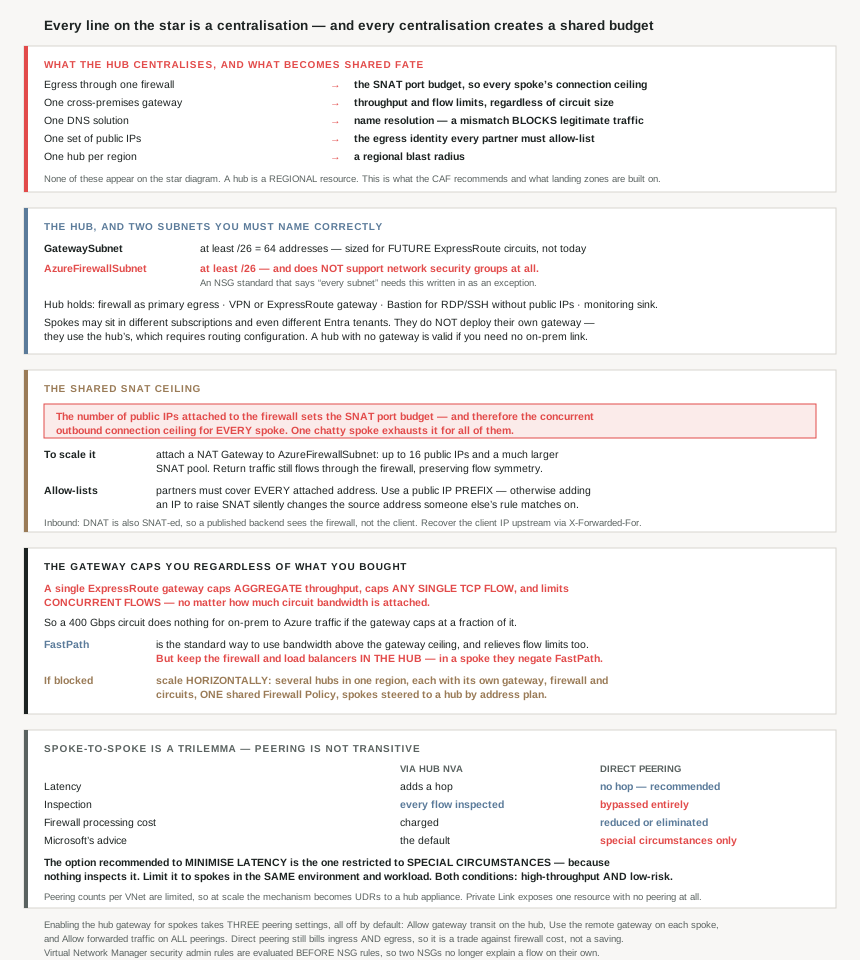
What goes in the hub, and the two subnets you must name correctly
The hub holds shared networking services — a firewall as “the primary egress point”, a VPN or ExpressRoute gateway, Azure Bastion for “RDP and SSH access to VMs without exposing their public IP addresses”, and a monitoring sink. Two of its subnets have mandated names and minimum sizes:
| Subnet | Minimum | Why that size, and what is unusual |
|---|---|---|
GatewaySubnet |
/26 | “provides sufficient scalability to avoid gateway size limitations and accommodate extra ExpressRoute circuits in the future” |
AzureFirewallSubnet |
/26 | “This subnet doesn’t support network security groups (NSGs).” |
A /26 is 64 addresses, which against #62's sizing table is a small allocation to reserve twice over in every hub — and it is reserved for growth you may never use. The guidance is explicit that the size is for the future rather than today, which makes it one of the few places in Azure networking where over-provisioning is the documented default.
Worth knowing that two Microsoft pages give different minimums for the same subnet, and reconciling them tells you something. The gateway SKU page says “Create a gateway subnet of /27 or larger for most configurations”, then: “If you plan to connect 16 ExpressRoute circuits to your gateway, you must create a gateway subnet of /26 or larger.” The hub-spoke page asks for /26 up front, because a hub is where future circuits land. The stricter figure is the hub-specific one, and the reason for it is the sixteen-circuit case rather than today's gateway.
The AzureFirewallSubnet row deserves more attention than it gets — and it turns out not to be the only exception. The gateway subnet is the same: “NSGs on the gateway subnet aren’t supported. Associating a network security group to this subnet might cause your virtual network gateway (VPN and ExpressRoute gateways) to stop functioning as expected.”
So both of the hub's mandated subnets are places where everything in #64 and #65 about NSG evaluation does not apply. If your security standard says “every subnet carries an NSG with an explicit deny” — and the hub-spoke page does recommend “always set explicit deny rules in NSGs” — then the hub contains two documented, permanent exceptions. Note how differently they fail: the firewall subnet simply does not support NSGs, while attaching one to the gateway subnet can stop the gateway working. One is ignored; the other is harmful.
The gateway subnet carries two further constraints that read as routing trivia and are really availability requirements: “User-defined routes with a 0.0.0.0/0 destination… are not supported”, and “BGP route propagation should be enabled on the gateway subnet… If BGP route propagation is disabled, the gateway won’t function.” A default route or a propagation toggle rolled out estate-wide as a hardening measure will take the hub's gateway down with it.
Spokes, and what they deliberately do not have
“Spokes can exist in different subscriptions and represent different environments… One workload can spread across multiple spokes” — and peering across subscriptions is permitted even across tenants: “you can associate the subscriptions to the same or different Microsoft Entra tenants”.
What spokes do not get is their own way out: “Spokes typically don’t deploy their own VPN gateway. They use the centralized solution that the hub provides. To manage this connectivity, you must establish routing configuration.” The same sentence is repeated for ExpressRoute gateways.
And the egress intent is stated plainly, which connects this topology directly to #68: “Spoke networks follow the rules for default outbound access… A core purpose of the hub-spoke network topology is to direct outbound internet traffic through the control mechanisms in the hub.”
So the topology's main job is to take away each spoke's independent route to the internet and replace it with a controlled one. That is the centralisation, and the next three sections are what it costs.
Why This Architecture Holds Up
Because the hub's SNAT budget is shared by every spoke
This is the sharpest consequence of centralising egress, and it is stated in one sentence:
“The number of attached public IP addresses also sets the SNAT port budget and therefore the concurrent outbound connection ceiling for every spoke that egresses through the firewall.”
So a single chatty spoke — a batch job opening thousands of short-lived connections — can exhaust a budget that every other spoke depends on. The symptom lands on whichever workload tries to connect next.
#70 covered SNAT port exhaustion as a per-resource problem. Hub-and-spoke makes it an estate-wide one, and the documented remedy is the same resource applied one layer up: “attach an Azure NAT Gateway to the AzureFirewallSubnet… provides up to 16 public IPs… and significantly increases the available SNAT port pool. Return traffic still flows back through the firewall, which preserves flow symmetry.”
That last clause is why this works rather than breaking inspection: the NAT Gateway takes over the outbound path, but returns still traverse the firewall, so the firewall still sees both directions of every flow.
There is a second, non-performance consequence of centralised egress that outlives any architecture review: “partner allow lists and audit logs need to cover the entire set of IP addresses attached to the firewall. Use a public IP address prefix to express that set as a contiguous range.”
Every third party that allow-lists you is allow-listing your hub. Add a public IP to the firewall — which is exactly what you do to raise the SNAT budget — and you have silently changed the source address of traffic that someone else's firewall rule is matching on. Taking the prefix advice up front turns a recurring negotiation into a one-off one, and #69's point about SKU choices applies to every address in it.
The inbound direction has its own loss, and it is a loss of information rather than capacity. Publishing a workload uses DNAT, and “Azure Firewall also applies SNAT on DNAT-matched packets to ensure return traffic flows back through the same firewall instance. As a result, the backend observes the firewall instance’s IP address as the source rather than the original client’s IP address.” If you need the client address, the fix is architectural rather than a setting: terminate upstream in Application Gateway or Front Door and forward X-Forwarded-For.
Because the gateway caps you regardless of what you bought
The second shared budget, and the one that makes #76's bandwidth tables conditional:
“A single ExpressRoute virtual network gateway caps traffic from on-premises into the virtual network at the gateway SKU’s aggregate throughput limit, caps the throughput of any single TCP flow, and limits concurrent flows, no matter how much circuit bandwidth is attached.”
So the 400 Gbps circuit from #76 does nothing for on-premises-to-Azure traffic if it lands on a gateway that caps at a fraction of it.
The gateway SKU page puts numbers on all three ceilings, and the spread is what makes this a design decision rather than a default:
| Gateway SKU | Mbps | Packets/sec | Supported VMs | Flow count | Routes learned | Max circuits |
|---|---|---|---|---|---|---|
| Standard / ERGw1Az | 1,000 | 100,000 | 2,000 | 200,000 | 4,000 | 4 |
| High Performance / ERGw2Az | 2,000 | 200,000 | 4,500 | 400,000 | 9,500 | 8 |
| Ultra Performance / ErGw3Az | 10,000 | 1,000,000 | 11,000 | 1,000,000 | 9,500 | 16 |
The top SKU tops out at 10,000 Mbps — 10 Gbps. So a 100 or 400 Gbps circuit from #76 cannot be consumed through any ExpressRoute gateway at all. That is not a tuning gap, it is an order of magnitude, and it is why the FastPath dependency in #76 matters more than its feature list suggested.
Two more columns deserve separate attention. The flow count limit is a ceiling distinct from throughput, so a workload with many small connections can exhaust the gateway while using little of its bandwidth. And the supported-VM column counts the same expansive set as the VPN gateway's did in #73 — “Virtual Machines in peered spoke virtual networks… Private Endpoints… Network Virtual Appliances… Backend instances of PaaS services” — so in a hub it is the whole estate behind the hub, not the hub's own virtual network.
A third limit only appears once you are building hub-and-spoke: “A virtual network with an ExpressRoute gateway can have virtual network peering with up to 500 other virtual networks.” That is the concrete number behind the hub-spoke page's warning that peerings are limited, and it is high enough that most estates will meet the gateway's throughput or flow ceilings long before they run out of peering slots.
And one that catches circuit-level resilience plans: “The maximum number of ExpressRoute circuits from the same peering location that can connect to the same virtual network is 4 for all gateways.” Sixteen circuit connections on an Ultra Performance gateway, but no more than four from any one peering location — consistent with #72's point that maximum resiliency means two locations rather than two circuits in one.
That reframes FastPath from a performance tweak into the mechanism that makes a large circuit usable: “FastPath is the standard way to use circuit bandwidth that exceeds the gateway ceiling, and it also relieves per-flow throughput and concurrent-flow limits.”
And this page repeats #76's constraints in topology terms, which is where they bite: “Keep inspection appliances in the hub. FastPath supports Azure Firewall and internal load balancers only when they’re in the hub… If they’re in a peered (spoke) virtual network, traffic to them falls back through the gateway and negates FastPath.”
So “firewall per spoke” — which looks like better isolation and sometimes like better team autonomy — is a choice that silently cancels your highest-value ExpressRoute optimisation. That is a strong argument for the shared hub firewall beyond cost, and it is one the cost section also supports: “Using an Azure Firewall deployment as a shared solution consumed by multiple workloads can significantly save cloud costs compared to other NVAs.”
When a constraint does block FastPath, the answer is counter-intuitive and worth internalising, because the instinct is to buy a bigger hub:
“If a constraint blocks FastPath, scale horizontally instead. Deploy multiple hubs in the same region, each with its own ExpressRoute gateway, firewall, and circuit connections. Use Azure Firewall Manager to apply a shared Firewall Policy across every hub firewall, and direct each spoke’s traffic to a specific hub through routing and IP-address planning.”
Several hubs in one region, one policy across all of them, and spokes assigned to hubs by address plan. The same page offers the related move for shared services generally: “You can move some of these shared services to a second level of hubs.” Both make #62's advice about contiguous, summarisable allocation load-bearing, because the address plan is what assigns spokes to hubs.
Because spoke-to-spoke is a trilemma, not a setting
Spokes do not reach each other by default, for the reason #71 established: “Virtual network peering or connected groups are nontransitive…” So you choose a mechanism, and the three properties you want do not come together.
| Via hub NVA | Direct peering / direct connectivity | |
|---|---|---|
| Latency | “adds a hop” | “doesn’t add a hop… recommended to minimize latency” |
| Inspection | Every flow passes the firewall | Bypasses it entirely |
| Firewall processing cost | Charged | “reduce or eliminate” |
| Scale | One peering per spoke | Peerings per virtual network are limited |
| Microsoft’s advice | The default | “only in special circumstances” |
Read the last two rows against the first. The option documented as “recommended to minimize latency” is the same option documented as being for “special circumstances” only, and the recommendation narrows it further: “limit peering or direct connectivity to spoke virtual networks that are part of the same environment and workload”.
That is not a contradiction, it is a security position: direct spoke-to-spoke is faster and cheaper precisely because nothing inspects it, so its blast radius should be one workload's own tiers rather than arbitrary pairs of spokes. The cost guidance names exactly where it pays: “Savings can be significant for… high-throughput, low-risk communication between spokes, such as database synchronization or large file copy operations.” High-throughput and low-risk, together — both conditions, not either.
Worth noting that direct peering is cheaper than the firewall path but not free: #71's finding that peering charges “ingress and egress” still applies. You are trading firewall processing for two-way data charges, which is a calculation rather than a saving.
At scale the choice gets made for you: “The number of virtual network peerings per virtual network is limited. If you have many spokes that need to connect with each other, you might not have enough peering connections. Connected groups also have limitations.” Past that point the mechanism becomes routing — “consider using user-defined routes to force spoke traffic to be sent to Azure Firewall or another NVA that acts as a router at the hub” — which is #78's subject and the reason it follows this post.
And there is a fourth option that sidesteps the topology altogether, worth remembering because it has no peering cost or limit at all: “Azure Private Link can selectively expose individual resources to other virtual networks… without the need to form or maintain peering or routing relationships.” For one service consumed across spokes, that is often the right answer and it does not consume a peering slot.
Because enabling the hub's gateway takes three settings, all off by default
The mechanism for letting spokes use the hub's cross-premises gateway is explicit, and it is three separate toggles across two sides of the relationship:
| Where | Setting |
|---|---|
| The peering on the hub | “Allow gateway transit” |
| The peering on each spoke | “Use the remote virtual network’s gateway” |
| All peering connections | “Allow forwarded traffic” |
#71 established that of peering's four per-side settings, only one is on by default — and all three of these are among the three that are off. So a freshly peered spoke reaches the hub and nothing beyond it, which is the single most common “the peering says Connected but on-premises is unreachable” report.
Note the third row says all peering connections, not just the hub's. Forwarded traffic has to be permitted on both sides of every hop a packet takes, and a spoke that has gateway transit but not forwarded traffic is a configuration that looks two-thirds done and behaves as though none of it is.
Because a DNS mismatch makes the firewall block legitimate traffic
The most interesting reliability finding on the page, and one that would be very hard to diagnose from the symptom:
“Because of how Azure Firewall implements FQDN application rules, ensure that all resources that egress through the firewall use the same DNS provider as the firewall itself. Otherwise, Azure Firewall might block legitimate traffic because the firewall’s IP resolution of the FQDN differs from the traffic originator’s resolution of the same FQDN.”
The workload resolves api.example.com to one address and connects. The firewall's rule allows api.example.com, which it resolved to a different address. The packet's destination matches neither, and a correct-looking allow rule denies valid traffic.
The documented fix keeps the two in step: “You can include Azure Firewall proxy in the spoke DNS resolution to keep FQDNs in sync with the traffic originator and with Azure Firewall.” The firewall “can also function as a DNS proxy server to support FQDN traffic rules”, which is what makes that possible.
This is why “Hub-spoke solutions often provide a DNS solution that all peered spokes use” is in the concepts list rather than the optional extras. Shared DNS is not a convenience in this topology; it is a correctness requirement the moment you write FQDN-based firewall rules. And it compounds #71's finding that peering does not extend name resolution by itself — the hub has to supply it deliberately.
Because one hub per region is a blast-radius decision
The reliability guidance gives the reason, and the reason is better than the rule: “we recommend that you use at least one hub per region and that you connect only spokes from the same region to those hubs. This configuration helps bulkhead regions to avoid failures in one region’s hub that could cause widespread network routing failures in unrelated regions.”
A spoke peered to a hub in another region is not merely slower — it imports that region's failure domain. The word bulkhead is the design intent: the hub is a single point of failure by construction, so the discipline is to bound how much it can take down rather than to pretend it is not one.
A related detail that is easy to miss when the estate is private by design. Three public IPs exist in a hub whether or not anything is published, and all three need DDoS protection: “Azure Firewall public IP addresses… VPN gateway public IP addresses… The ExpressRoute control plane public IP address” — because “Any resource that has a public IP is susceptible to a DDoS attack… even if your workloads aren’t exposed publicly”. An ExpressRoute-only estate with no internet-facing workload still has a public attack surface in its hub.
Because Virtual Network Manager introduces a rule class that outranks NSGs
Managing this by hand means maintaining “virtualNetworkPeerings, routeTables, and subnets” across subscriptions, and Virtual Network Manager is the documented alternative. The part that matters architecturally is not the automation — it is a new layer in the evaluation order:
“Security admin rules take precedence over and are evaluated before NSG rules. Security admin rules support prioritization, service tags, and network layer (L3) and transport layer (L4) protocols.”
#64 worked out NSG evaluation order in detail: inbound subnet then NIC, outbound NIC then subnet. Security admin rules sit above all of that. So in an estate using Virtual Network Manager, reading both NSGs on a flow is no longer sufficient to explain whether traffic is allowed — there is a higher-precedence rule set, and it is owned by a different team.
That is the intended effect: “Network group security admin rules prevent spoke virtual network owners from overwriting baseline security rules, but they can add their own security rules and NSGs.” A platform team gets a floor that workload teams cannot lift. It is a governance win and a troubleshooting cost, and both should be stated when it is adopted.
Because the alternative is a managed hub, and the trade is named
Virtual WAN is the Microsoft-managed version of this topology, and the page is unusually direct about why you might keep building it yourself. “The benefits of using a customer-managed hub-spoke configuration include: Cost savings… Overcoming subscription limits… Workload isolation… More control over how NVAs are deployed, such as number of NICs, number of instances, or the compute size… Use of NVAs that aren’t supported by Virtual WAN.”
Two of those five are about network virtual appliances, which makes the decision sharper than “managed versus self-managed”. If your security posture depends on a specific third-party appliance, or on controlling its instance count and sizing, the managed hub may not be able to host it. That is a vendor question answered before the topology question, not after.
Key Architecture Decisions
| Decision point | Choose | Because |
|---|---|---|
| Workloads in several regions | One hub per region | A hub is a regional resource, and cross-region spokes import a failure domain. |
| Which spokes attach to which hub | Same region only | Bulkheading is the stated purpose. |
Sizing GatewaySubnet |
/26 minimum | Sized for future ExpressRoute circuits, not today’s gateway. |
| An NSG standard that covers every subnet | Write in the AzureFirewallSubnet exception |
That subnet doesn’t support NSGs at all. |
| Spokes needing on-premises access | Set all three peering options | Gateway transit, use-remote-gateway and allow-forwarded are all off by default. |
| Raising the estate’s outbound connection ceiling | NAT Gateway on AzureFirewallSubnet |
Up to 16 public IPs and a much larger SNAT pool, with flow symmetry preserved. |
| Partners allow-listing your egress | Give them a public IP prefix | Adding a firewall IP silently changes your source address otherwise. |
| One spoke exhausting SNAT ports | Treat it as an estate-wide incident | The budget is shared by every spoke that egresses through the firewall. |
| A published backend needing the client IP | Terminate in Application Gateway or Front Door | DNAT is SNAT-ed, so the backend sees the firewall. |
| FQDN-based firewall rules | One DNS provider for firewall and spokes | Divergent resolution makes the firewall block legitimate traffic. |
| A large ExpressRoute circuit | Check the gateway ceiling first | The gateway caps aggregate, per-flow and concurrent flows regardless of circuit size. |
| Using circuit bandwidth above the gateway cap | FastPath | It is the documented standard way, and it relieves flow limits too. |
| Firewall or load balancer placement | Hub, not spokes | In a spoke they negate FastPath, and the shared firewall is cheaper. |
| Needing more than one hub’s throughput | Multiple hubs in the region, one Firewall Policy | Horizontal, with spokes assigned by address plan. |
| Spoke-to-spoke by default | Through the hub | Direct peering is for special circumstances. |
| High-throughput, low-risk spoke-to-spoke | Direct peering — both conditions | It removes firewall processing cost but also all inspection. |
| Scoping direct spoke connectivity | Same environment and workload only | Nothing inspects it, so bound the blast radius. |
| Costing direct peering against the hub path | Remember peering bills both directions | It is a trade, not a saving. |
| Running out of peerings per virtual network | UDRs to a hub appliance | Peering and connected-group counts are both limited. |
| One service consumed across spokes | Private Link | No peering or routing relationship, and no peering slot consumed. |
| Latency-sensitive flows like SAP or storage | Bypass the firewall deliberately | Named as a case for bypassing hub routing; IDPS also reduces throughput. |
| Adopting Virtual Network Manager | Document that security admin rules outrank NSGs | Two NSGs no longer explain a flow on their own. |
| An ExpressRoute-only private estate | Still enable DDoS protection | Firewall, VPN gateway and the ExpressRoute control plane all have public IPs. |
| Choosing against Virtual WAN | Decide on NVA requirements first | Two of the five stated benefits are about NVA control and support. |
Closing Thought
Hub-and-spoke is drawn as a connectivity diagram and it is really an ownership diagram. The lines show which properties stopped belonging to individual workloads: the route to the internet, the identity that traffic egresses with, the resolution of names, the path to on-premises, and the ceiling on concurrent connections. Centralising each of those is exactly the point — it is how you get one place to enforce policy — and each one also means a workload's behaviour now depends on the hub and, through the hub, on every other workload sharing it.
That is why the pattern changes character with scale rather than breaking. Nothing about six spokes reveals that the SNAT port budget is shared, that the gateway caps throughput independently of the circuit you bought, or that the peering count per virtual network is finite. All three are discovered later, usually by the workload that happened to grow last, and all three have the same structural fix: another hub rather than a bigger one.
The detail I would carry furthest is the DNS one, because it is the only item here whose symptom actively misleads. A firewall rule that names an FQDN, a workload resolving that FQDN through a different resolver, and the result is a correct-looking allow rule that denies valid traffic. Everything else in this topology fails in a direction you would eventually guess — too few ports, too little throughput, no route. That one fails as a security control doing its job on information nobody realised was inconsistent.
#78 takes the mechanism this post kept deferring to: user-defined routes and route tables — how Azure actually selects a route, why a system route can beat the one you wrote, and what changes when a route table is the thing holding your topology together.
Official Azure Reference
- Hub-spoke network topology in Azure — the hub and spoke concepts and components, the mandated subnet names and sizes, the three gateway-transit peering settings, the SNAT and DNAT behaviour of a hub firewall, the FQDN and DNS consistency requirement, the gateway throughput ceiling and horizontal scaling guidance, spoke-to-spoke options and costs, and the customer-managed versus Virtual WAN trade
- About ExpressRoute virtual network gateways — the SKU table with throughput, packets per second, supported VMs, flow count and route limits, the maximum circuit connections per gateway and per peering location, the 500-peering limit with a gateway, the gateway subnet naming and sizing rules, and the unsupported NSG and default-route configurations on that subnet
- Create, change, or delete virtual network peering — peering non-transitivity and the ingress-and-egress charge this post weighs against firewall processing cost
- Define an Azure network topology — the Cloud Adoption Framework reasoning behind the recommendation (no claims drawn from it)
- Hub-spoke network topology with Azure Virtual WAN — the Microsoft-managed alternative referenced above (no claims drawn from it)
- What is Azure Virtual Network Manager? — network groups, connected groups and security admin rules in detail (no claims drawn from it)
- NAT Gateway with Azure Firewall in a hub-spoke network — the walkthrough for the SNAT scaling fix above (no claims drawn from it)
Comments