Executive summary
AWS Backup logically air-gapped vault now supports Amazon FSx for NetApp ONTAP, in “all AWS Regions where both logically air-gapped vault and Amazon FSx for NetApp ONTAP are available.” One more resource type on an existing feature.
The announcement is small. The feature is not, and it is routinely misread as a standard vault with stricter settings. The documentation says something more literal: “a logically air-gapped vault stores its backups in an AWS Backup service owned account.”
Not your account. That is the air gap, and it is the property that makes the vault survive the compromise or loss of the account that created the backups — which is the entire point of a ransomware recovery plan.
What changed
FSx for NetApp ONTAP joins the supported resource list, enabled by “specifying it as the primary target or copy destination in your backup plan.” Console, CLI or SDK; no new concepts.
What is worth re-reading on the occasion is the vault itself, because several of its properties are not configurable and two of them cannot be changed after creation.
The vault lock is not optional. A standard vault “can optionally use a vault lock in compliance or governance mode”. A logically air-gapped vault “is always locked with a vault lock in compliance mode.” Compliance mode is the one that cannot be weakened or removed by anyone, including the root user.
And the minimum retention is a floor you inherit.
“The minimum value allowed is 7 days”, and
“Backups with retention periods shorter than this value cannot be copied to this
vault.” A backup plan with a shorter retention will simply not copy.
Architecture
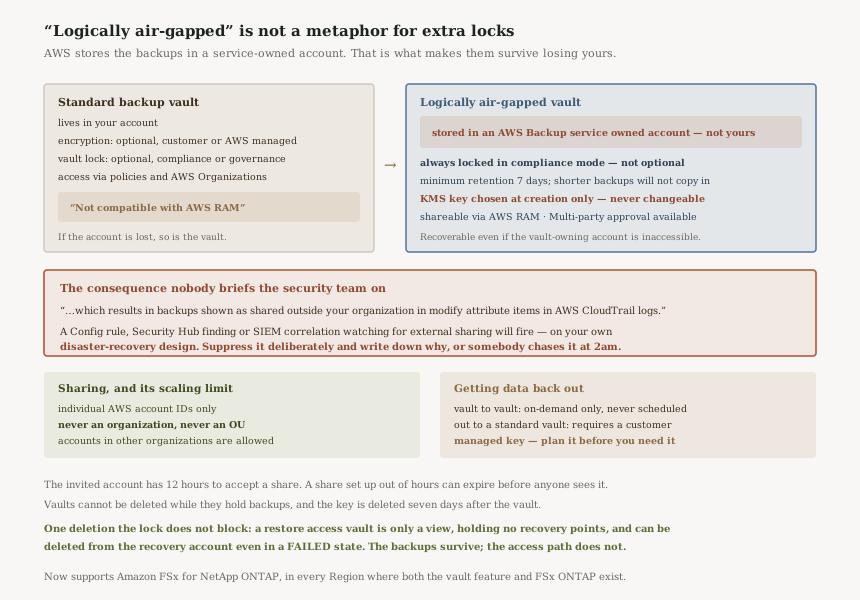
The comparison table in the documentation is the clearest statement of the difference. A standard vault: “Can optionally be encrypted… Can optionally use a vault lock in compliance or governance mode… Not compatible with AWS RAM.”
A logically air-gapped vault: “Is always locked with a vault lock in compliance mode… Can optionally be shared across accounts using AWS RAM.”
Those two rows are the same design decision seen twice. Because the data is held outside your account, it can be shared to an account that still works when yours does not — and because it can be shared that widely, it is locked in compliance mode so that sharing cannot become deletion.
“A vault can be shared with individual AWS account IDs only. You can share with an account in your organization or with an account in another organization. The vault cannot be shared with an entire organization or with organizational units (OUs).” Every other cross-account mechanism in AWS Backup goes through Organizations. This one does not, so the recovery account list is maintained by hand, per vault. Worth noting too: the recipient “has 12 hours to accept the invitation” — a share set up out of hours can expire before anyone sees it.
Two decisions you cannot revisit
The encryption key. “You can only select an AWS KMS encryption key during vault creation. Once created, all backups contained in the vault will be encrypted with that key. You cannot change or migrate your vaults to use a different encryption key.”
The default is an AWS owned key, which is the easy path and forecloses the customer-managed option for that vault permanently. It matters beyond preference: for resource types that are “not fully managed”, “the source must be encrypted with a customer managed key. AWS managed keys for not fully managed resources are not supported.”
The lock. Compliance mode is applied at creation and cannot be removed. That is the point of the feature, and it means a vault created with the wrong retention window is a vault you live with.
Business value
The recovery-time argument is the real one: “the ability to share vault access to other accounts so that recovery time objectives (RTOs) can be faster and more flexible in case of an incident that requires rapid restoration.”
Most cross-account backup designs assume the owning account still functions. This one does not. With Multi-party approval you get “recovery of backups in the vaults even if the vault-owning account is inaccessible” — the scenario that actually happens during a ransomware event or a destructive credential compromise.
For FSx for NetApp ONTAP specifically, this closes a gap for file workloads that often hold exactly the unstructured data an attacker encrypts first.
Security considerations
The CloudTrail signal is the thing to brief your security team on before enabling this. AWS says it plainly: backups are stored in a service-owned account, “which results in backups shown as shared outside your organization in modify attribute items in AWS CloudTrail logs.”
Many organisations run a detective control for exactly that phrase — a Config rule, a Security Hub finding, a SIEM correlation on resources shared beyond the org boundary. Enabling air-gapped vaults will trip it, and the alert will be describing your own disaster-recovery design. Suppress it deliberately and document why, or someone will chase it at 2am.
Sharing across organizations is permitted. A vault can go to
“an account in another organization”, which is genuinely useful for a recovery
partner or a separate break-glass org, and is also a path for data to leave your organisation entirely.
ram:CreateResourceShare on the vault-owning account is the permission that
governs it.
One deletion path is not blocked by the lock. A restore access vault is
“a view of an underlying logically air-gapped vault and contains no recovery points of its
own… You can delete it with DeleteBackupVault from the recovery
account even when it is in FAILED state. Vault Lock (compliance mode)
does not block this deletion.” The underlying backups survive; the access path does
not. Worth knowing before someone in the recovery account tidies up.
Cost considerations
The announcement points at the AWS Backup pricing page without stating rates, so there is nothing to quote here.
What is structurally predictable is the floor. Compliance-mode lock plus a minimum retention of 7 days means storage you cannot release early, by design. A vault created with a long minimum retention is a long-term commitment to storing whatever lands in it — the same shape as the commitment terms in #62, in a different service.
One operational cost to plan for: copies between air-gapped vaults are “on-demand” and “cannot be scheduled in a backup plan”, so any vault-to-vault replication is something you build and run yourself.
Operational considerations
Getting data back out has a condition. “You can copy a backup from a logically air-gapped vault to a standard backup vault as long as the copy is encrypted with a customer managed key.” If the vault was created with the default AWS owned key, plan that path before you need it.
Empty the vault before deleting it. “Vaults cannot be deleted if they still contain backups.” Combined with compliance-mode retention, a vault cannot be removed until its contents have aged out — which is the intended behaviour and a surprise during an account teardown.
Key deletion lags the vault. “Deletion of a vault also deletes the key associated with the vault seven days after the vault is deleted.”
Test the share, not just the backup. The recovery account can “view the encryption key type but cannot modify the encryption configuration”, and the whole mechanism only helps if someone has accepted a share and run “restore testing” from the other side.
Tradeoffs
Immutability against flexibility. Compliance mode is why the vault is trustworthy and why a mistake in its configuration is permanent.
Survivability against a confusing audit trail. Storing backups outside your account is what makes them survive losing it, and it is what makes CloudTrail describe them as shared externally.
Per-account sharing against Organizations integration. Individual account IDs give precise control and no way to express “the recovery OU”.
Implementation guidance
Choose the KMS key deliberately at creation. It is the one setting with no migration path, and a customer managed key is required for not-fully-managed resource types and for copying back out to a standard vault.
Brief security on the CloudTrail signal first. Before enabling, not after the alert.
Set the minimum retention from your shortest legitimate backup, not your longest. Anything shorter silently will not copy.
Maintain the share list as a named artefact. Account IDs only, no OUs, and a 12-hour acceptance window mean this is a runbook item rather than a policy.
Add Multi-party approval if the scenario you fear is losing the owning account. That is the only configuration that covers it.
Best practices
Treat the vault as a one-way destination. Copies out are conditional and copies between vaults are manual.
Run restore testing from the shared account. A share nobody has exercised is a plan, not a capability.
Record why the external-sharing alert is suppressed. The next reviewer will have the same reaction the first one did.
Who should adopt this
Available now everywhere both the vault feature and FSx for NetApp ONTAP exist, enabled through an existing backup plan.
Adopt it if you run FSx for NetApp ONTAP and your recovery plan has to survive the compromise of the account holding the data — that is the case this is built for. Hold off if you cannot yet commit to a fixed encryption key and a minimum retention, since neither is changeable, or if your security tooling would treat “shared outside your organization” as an incident before anyone has been told why.
Key takeaways
- AWS Backup logically air-gapped vaults now support Amazon FSx for NetApp ONTAP.
- Backups are stored in an AWS Backup service owned account — the air gap is literal.
- That appears in CloudTrail as backups shared outside your organization. Brief security first.
- The vault is always locked in compliance mode; it is not optional.
- Minimum retention 7 days, and shorter-retention backups cannot be copied in.
- The KMS key is chosen at creation and can never be changed or migrated.
- Sharing is via AWS RAM to individual account IDs only — not organizations, not OUs.
- The invited account has 12 hours to accept the share.
- Multi-party approval enables recovery even if the vault-owning account is inaccessible.
- Vault-to-vault copies are on-demand only and cannot be scheduled in a backup plan.
- Copying out to a standard vault requires the copy to be encrypted with a customer managed key.
- A restore access vault can be deleted from the recovery account — compliance-mode lock does not block it.
Comments