Business Challenge
Every tenant has guests, and most organisations acquired them without a decision being made. Somebody shared a Teams channel, a SharePoint site or a Power BI report, and a user object appeared. The thing to understand before governing them is what that object actually is, and the documentation is direct about it:
“A user object is created for the B2B collaboration user in the same directory as your employees… they can be managed like employees — for example, added to groups or assigned to applications.”
There is no separate guest directory. A guest is a row alongside your staff, distinguished by one attribute, and UserType is weaker than it looks: “The UserType has no relation to how the user signs in, the directory role of the user, and so on. This property simply indicates the user's relationship to the host organization.” It is a label for policy to key on, not a permission boundary. And the boundary it is not: “You can add a guest user to any role…”
“By default, all users in your organization, including B2B collaboration guest users, can invite external users to B2B collaboration.”
Guests can invite guests, out of the box. Nobody with an admin role has to be involved, and the invitation chain has no documented depth limit. If you have never looked at this setting, your tenant’s external population is self-extending.
The second default is about what they can read. Guests are restricted relative to members — “Guest users are set to a limited permission level by default… while the default for member users is the full set of user permissions” — but the limited level still says this: “Guests can see membership of all non-hidden groups.”
Those two sentences are the whole problem. One contractor invited for one project can see your group structure, and can invite the next person.
Architecture
One object, two independent attributes, three governance dials that are each configured somewhere different.
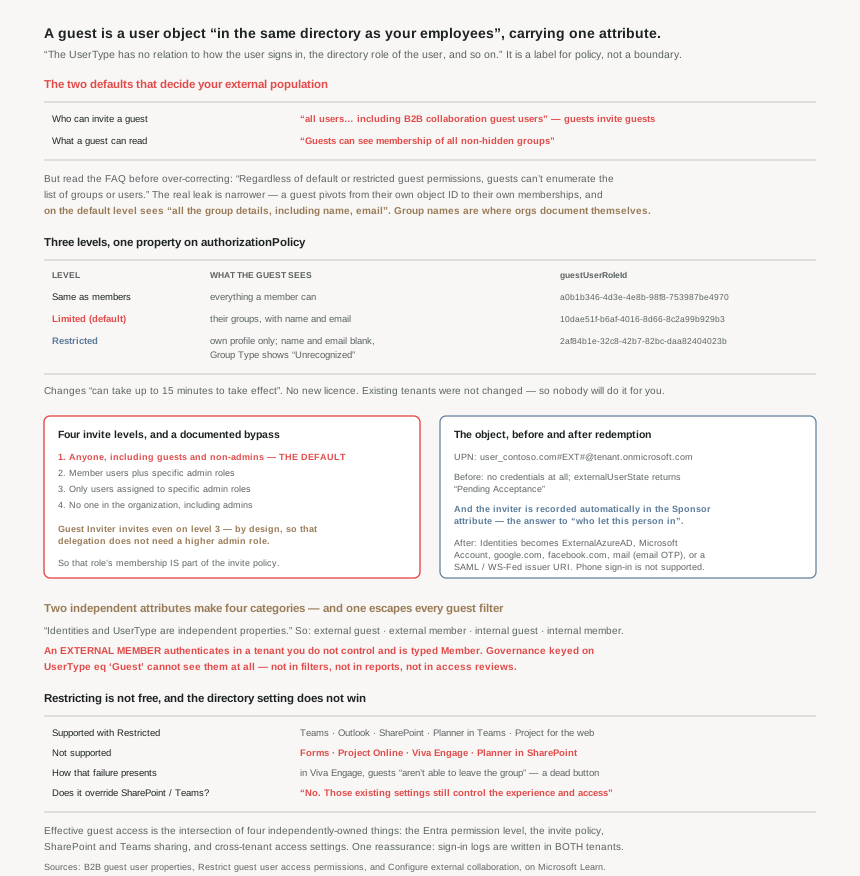
What the object looks like, before and after redemption
The UPN is mangled in a predictable way, which matters because it is what you search on: “the email of the guest user, followed by #EXT#, followed by the tenantname.onmicrosoft.com” — so john@contoso.com becomes john_contoso.com#EXT#@fabrikam.onmicrosoft.com.
An invited-but-not-yet-redeemed account already exists and already holds nothing: “This account doesn't have any credentials associated with it because authentication is performed by the guest user's identity provider.” Two properties are worth knowing for an audit query. externalUserState returns “Pending Acceptance” until redemption, and — genuinely useful, and under-used — “The user sending the invitation is added as a default value for the Sponsor attribute on the guest user account.”
That Sponsor attribute is the answer to “who let this person in”, recorded automatically at invitation time. If you are inheriting a tenant with hundreds of guests and no history, it is the first thing to query.
After redemption, Identities tells you how they actually authenticate, and the values are a reasonable inventory of your external attack surface: ExternalAzureAD, Microsoft account, google.com, facebook.com, mail for email one-time passcode, or an issuer URI for a SAML/WS-Fed provider. Note that email OTP is not opt-in any more — “turned on by default for all new tenants and for any existing tenants where you haven't explicitly turned it off” — and that turning it off does not make things stricter, it changes the fallback: “the fallback authentication method is to prompt invitees to create a Microsoft account.”
One useful absence: “Phone sign-in isn't supported for external users.”
Four categories, because two independent attributes make a matrix
UserType and Identities are orthogonal — “Identities and UserType are independent properties” — and the documentation names all four combinations. The one most people have never considered is external member: an account homed in another tenant, with “member-level access to resources in your organization” and UserType of Member, which is “common in organizations consisting of multiple tenants.”
That is the shape to reach for after an acquisition, and it is also the shape to audit for: a Member who authenticates somewhere you do not control is invisible to every “guest” filter, report and access review you have built. If your governance keys on UserType eq 'Guest', external members are outside all of it.
The mirror case is internal guest — the pre-B2B pattern of issuing partners your own credentials and labelling them Guest. Microsoft’s advice is to convert them, because it moves authentication and lifecycle to the partner: “allowing their external identity provider to manage authentication and their account lifecycle.”
The three permission levels, with the numbers you set them by
| Level | What the guest can see | guestUserRoleId |
|---|---|---|
| Same as member users | Everything a member can | a0b1b346-4d3e-4e8b-98f8-753987be4970 |
| Limited access (default) | “Membership of all non-hidden groups”, with full group details including name and email | 10dae51f-b6af-4016-8d66-8c2a99b929b3 |
| Restricted access | Only their own profile; group Name and Email blank, Group Type “Unrecognized” | 2af84b1e-32c8-42b7-82bc-daa82404023b |
It is one property on the authorizationPolicy object, so this is a one-line change and a one-line audit. Changes “can take up to 15 minutes to take effect for guest users”, which is worth knowing before concluding that it did not work.
And a correction to a belief that circulates widely, stated plainly in the FAQ: “Regardless of default or restricted guest permissions, guests can't enumerate the list of groups or users.” The default is not “guests can browse your directory”. The difference is narrower and stranger: a guest who looks up their own object ID can pivot to their group memberships, and on the default level sees “all the group details, including name, email, and so on” for each. Restricting them leaves the object IDs visible and blanks the names.
So the realistic risk from the default is not bulk enumeration. It is that group names leak design: Payroll-Approvers-EMEA, Project-Titan-Core, Finance-SOX-Reviewers. A contractor in one group learns the names of the others they are in, and group names are where organisations accidentally document themselves.
Why This Architecture Holds Up
Because the invite setting has four levels and a documented bypass
The dial most worth moving is who can invite, and it has four positions: anyone including guests and non-admins (the default), member users plus specific admin roles, only specific admin roles, and nobody at all including admins.
Most organisations should be on the second or third. But if you choose the third, know what it does not block: “Users with the Guest Inviter role are able to invite guests even when the option ‘Only users assigned to specific admin roles can invite guest users’ is selected.”
That is the feature working as intended — the role exists precisely “to give individual users the ability to invite guests without assigning them a higher privilege administrator role”, which is good least-privilege design. It is only a surprise if you read “only admin roles” as “only the admins I am thinking of”. Guest Inviter membership is therefore part of the invite policy, not separate from it, and it belongs in the same review as #45’s eligible assignments.
Because tightening permissions breaks four named services, and Microsoft says which
The honest reason tenants stay on the default is that the restrictive setting has real compatibility costs, and the documentation is unusually specific about them. Supported: Teams, Outlook, SharePoint, Planner in Teams and its mobile and web apps, Project for the web, Project Operations. Not supported: Forms, Project Online, Viva Engage, Planner in SharePoint.
The Viva Engage symptom is a good example of how these failures actually present: “With permissions set to ‘restricted’, guests signed into Viva Engage aren't able to leave the group.” Not an error message, not a blocked sign-in — a button that no longer works, which will be reported as a Viva bug rather than as an identity setting.
So this is a change to pilot against the services you actually run, not a hardening step to apply tenant-wide on a Friday. The reassuring half: “there are no new licensing requirements”, and existing tenants were not changed — “the existing default permissions remain unchanged.” Which also means nobody will do it for you.
Because the directory setting is not the only setting, and it does not win
This is the part that turns a one-line fix into an architecture question. Guest permissions in Entra govern the directory; they do not govern the applications: “Do these permissions override SharePoint or Microsoft Teams guest settings? No. Those existing settings still control the experience and access in those applications.”
So a guest’s effective access is the intersection of at least four independently-owned things: the Entra guest permission level, the invite policy, the SharePoint and Teams external sharing settings, and — for partners in other Entra tenants — cross-tenant access settings, which the documentation explicitly sends you to review in order to “scope access to specific users, groups, and applications”. That is #41a’s lesson again: no single screen shows you the answer, and each of these has a different owner in most organisations.
Collaboration restrictions — the allow and deny domain lists — sit alongside all of it as a blunt instrument that is genuinely useful: you choose “whether to allow or deny invitations to the domains you specify”. An allow-list is the one control here that converts guest sprawl from a monitoring problem into a configuration problem.
Because the lifecycle has two gaps that nothing reports
Guest accounts decay differently from employee accounts, and two of the ways are documented rather than discovered:
- The email address goes stale silently. “If a guest user accepts your invitation and they later change their email address, the new email doesn't automatically sync to the guest user object in your directory.” You now hold a contact address that does not reach them, which matters most when the thing you are sending is an access review notification.
- Leaving may not be possible. “External user leave settings” control whether guests can remove themselves — and the setting is conditional on something unrelated: “You can configure External user leave settings only if you have added your privacy information to your Microsoft Entra tenant. Otherwise, this setting will be unavailable.” A privacy-contact field you never filled in is quietly deciding your offboarding behaviour.
Which is why guest access reviews from #46 are the load-bearing control for this population rather than a nice-to-have. Nothing else notices that a project ended.
Because the audit trail is better than people expect, in both tenants
One genuinely reassuring detail, and an argument for B2B over issuing your own credentials to partners: “When a B2B user signs into a resource tenant to collaborate, a sign-in log is generated in both the home tenant and the resource tenant. These logs include information such as the application being used, email addresses, tenant name, and tenant ID for both the home tenant and the resource tenant.”
Two independent organisations hold a record of the same sign-in. That is a stronger position than an internal guest account, where only you have the log and you are also the party that set the password.
Worth knowing alongside it, because it changes what users see and therefore what they report: since the rollout that “began… in July 2025” and completed by the end of that year, guests are “redirected to their own organization's sign-in page… Guest users see the branding and URL endpoint of their home tenant.” A guest who says “your site sent me somewhere else to log in” is describing correct behaviour.
Key Architecture Decisions
| Situation | Decision | Why |
|---|---|---|
| Never reviewed the invite setting | Move off “anyone in the organization” | The default lets guests invite further guests. |
| Choosing “only specific admin roles” | Review Guest Inviter membership too | That role invites regardless of the setting. |
| Delegating invitations to a team | Guest Inviter, not User Administrator | It exists to avoid granting the higher role. |
| Group names encode projects or authority | Move to Restricted access | The default exposes names and emails of groups a guest is in. |
| Running Forms, Project Online, Viva Engage or Planner in SharePoint | Pilot before restricting | Those four are documented as unsupported. |
| Just changed the permission level | Wait 15 minutes before testing | Propagation delay is documented. |
| Assuming Entra settings govern SharePoint sharing | Check SharePoint and Teams separately | They explicitly are not overridden. |
| Partner is another Entra tenant | Also set cross-tenant access settings | That is where per-user and per-app scoping lives. |
| Known, finite set of partner organisations | Use a domain allow-list | Turns sprawl into configuration rather than monitoring. |
| Inheriting a tenant with unexplained guests | Query the Sponsor attribute | It records who invited them, automatically. |
| Finding stale invitations | Query externalUserState for Pending Acceptance |
An unredeemed account is still an object in your directory. |
| Governance keyed on UserType eq Guest | Check for external members separately | They authenticate externally and are typed Member. |
| Partners still using credentials you issued | Convert to B2B | Moves authentication and lifecycle to their provider. |
| Access reviews that email guests | Do not trust the stored address | A changed partner email never syncs back. |
| Want guests to be able to leave | Add tenant privacy information first | The setting is unavailable without it. |
| Guests need Teams shared channels | B2B direct connect, not B2B collaboration | Guest users aren't supported in shared channels. |
| Guest reports being sent to another sign-in page | Expected since the 2025 rollout | They authenticate at their home tenant, with its branding. |
Closing Thought
The useful correction here is to stop thinking of guests as a population living outside your directory and start treating them as rows inside it that carry a label and a weaker default. The label does nothing on its own: UserType has no bearing on sign-in or on roles, a guest can hold any directory role you give them, and an external member is not caught by any of it. What does the actual work is three settings in three places — who may invite, what a guest may read, and which domains are allowed — plus the application-level sharing controls that none of them override.
If there is one thing to do after reading this, it is to look at the invite setting. Everything else on this page is a tuning decision with trade-offs to weigh; that one is a default which lets your external population grow itself, chosen by Microsoft for convenience rather than by you for a reason. The second thing is to query the Sponsor attribute, because the platform has been quietly recording the answer to the hardest question about every guest you have.
And the pattern from this whole phase holds to the end, though gentler here than in the last few posts. The default is not a security failure — a guest genuinely cannot enumerate your directory, and the documentation says so against the grain of the usual advice. What it is instead is a default that reveals a little more than anyone chose: group names, to people invited for one thing, who can then invite others. Nothing errors, nothing reports it, and the only way to know what your external population can see is to set a level deliberately and go and look.
#54 turns to the other half of External ID: customer-facing identity, where the external users are not partners but your product’s end users — and the tenant itself is a different kind of object.
Official Azure Reference
- B2B guest user properties — the object itself, the four user categories, redemption states, the Sponsor attribute and the Identities values
- Restrict guest user access permissions — the three levels and their role template IDs, what each actually exposes, and the services that do not support the restrictive one
- Configure external collaboration — the four invite levels and their default, the Guest Inviter bypass, domain restrictions, leave settings and the dual sign-in logs
Comments