Business Challenge
#84 took one firewall and worked out the order in which it evaluates rules. That answered the question a single team asks. It does not answer the one an organisation asks, which is how a security baseline written once reaches forty firewalls across several regions and subscriptions without being copied by hand into each.
The answer is that the policy is not attached to a firewall at all:
“Firewall Policy… is a global resource that can be used across multiple Azure Firewall instances in Secured Virtual Hubs and Hub Virtual Networks. Policies work across regions and subscriptions… Firewalls can reside in any region or subscription linked to your account.”
That inverts the usual relationship. The firewall is the thing that gets replaced, moved or rebuilt; the policy outlives it. Which is also why classic rules are a dead end for this purpose — they “protect Virtual Networks only”, so they cannot be used with a Virtual WAN hub at all, and sharing them means “manually export and import rules.”
Firewall Manager is the service that does the reaching, and it manages exactly two shapes: a hub virtual network, which is “a standard Azure virtual network that you create and manage yourself”, and a secured virtual hub, which is the Virtual WAN hub from #81 once “security and routing policies are associated with” it. The temptation is to read those as small and large. They are not. Each can do things the other cannot, and two of the gaps decide architectures.
Architecture
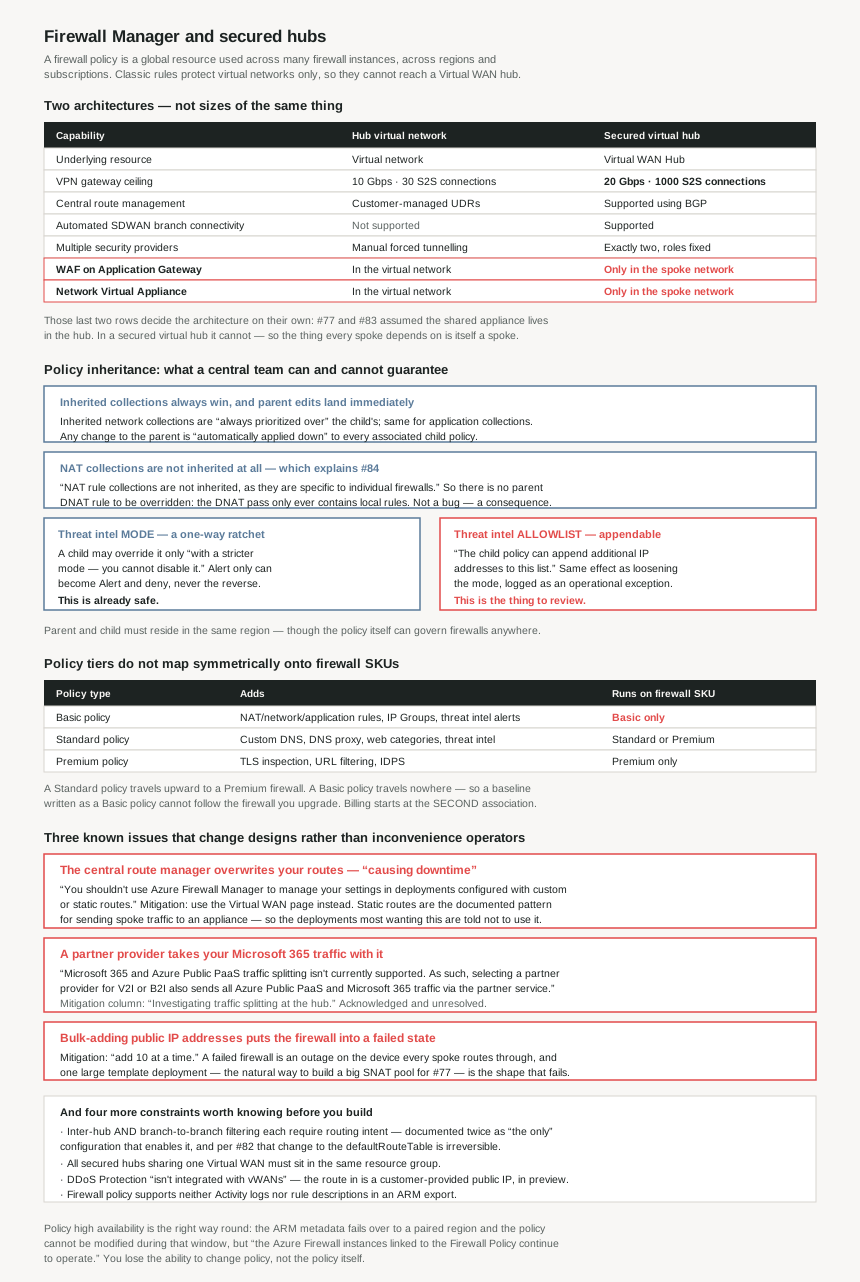
The two architectures, and what each cannot do
| Hub virtual network | Secured virtual hub | |
|---|---|---|
| Underlying resource | Virtual network | Virtual WAN Hub |
| Hub & spoke | Virtual network peering | Automated using hub virtual network connection |
| On-premises connectivity | VPN Gateway up to 10 Gbps and 30 S2S connections; ExpressRoute | VPN Gateway up to 20 Gbps and 1000 S2S connections; ExpressRoute |
| Central route management | Customer-managed user defined route | Supported using BGP |
| Automated SDWAN branch connectivity | Not supported | Supported |
| Multiple security providers | Manually configured forced tunnelling to third-party firewalls | Automated support for two providers, with fixed roles |
| WAF on Application Gateway | Supported in the virtual network | Currently supported in the spoke network |
| Network Virtual Appliance | Supported in the virtual network | Currently supported in the spoke network |
| Azure Firewall availability zones | Supported | Supported |
| Multiple public IP addresses | Customer provided | Auto generated, or customer provided (preview) |
Policy tiers, and how they map to firewall SKUs
| Policy type | Adds | Runs on which firewall SKU |
|---|---|---|
| Basic policy | NAT, network and application rules, IP Groups, Threat Intelligence (alerts) | Basic only |
| Standard policy | Custom DNS, DNS proxy, Web Categories, Threat Intelligence | Standard or Premium |
| Premium policy | All Standard, plus TLS Inspection, URL Filtering, IDPS | Premium only |
The asymmetry in that third column is worth noticing early. A Standard policy runs on a Premium firewall, so it travels upward. A Basic policy runs on Basic and nothing else, so it travels nowhere. Writing your baseline as a Basic policy means it cannot be applied to the firewall you upgrade to.
Why This Architecture Holds Up
Because the two architectures are not sizes of the same thing
The connectivity numbers do read like a ladder. The secured hub's VPN gateway is “more scalable… up to 20 Gbps and 1000 S2S connections” against the hub virtual network's “10 Gbps and 30 S2S connections” — twice the throughput and roughly thirty-three times the connection count. Add automated SDWAN branch connectivity, BGP-based route management instead of hand-written user-defined routes, and the automated partner-provider flow, and the secured hub looks like the grown-up option.
Then two rows in the same table go the other way:
WAF on Application Gateway — hub virtual network: “Supported in Virtual Network.” Secured virtual hub: “Currently supported in spoke network.”
Network Virtual Appliance — hub virtual network: “Supported in Virtual Network.” Secured virtual hub: “Currently supported in spoke network.”
That is a real architectural constraint rather than a feature gap. #77 was built on the idea that shared appliances belong in the hub, and #83 worked out how to keep such an appliance alive there. In a secured virtual hub you cannot put it there. A third-party appliance or an Application Gateway goes in a spoke, which means the thing every other spoke depends on is itself a spoke, with whatever routing that implies.
So the choice is not capacity. If the design needs a customer-managed appliance or a WAF co-resident with the firewall, the hub virtual network is the architecture, and the 1000 S2S connections are not available to you. #82's four-name appliance allowlist was the first version of this trade; this is the same trade stated as a topology rule.
Because DNAT is never inherited, which explains #84's strangest result
#84 found something that looked like a documentation bug: in Microsoft's own worked example a child policy's DNAT collection was evaluated ahead of a parent policy's network collection, despite a worse group priority, a worse collection priority, and being the child — while the documentation said the parent always takes precedence. The reason is here, and it is not a bug:
“NAT rule collections are not inherited, as they are specific to individual firewalls. If you want to use NAT rules, you must define them in the child policy.”
So there is no such thing as a parent DNAT rule to take precedence. DNAT translates a specific public address to a specific private one, which is a property of one firewall in one place — it cannot sensibly be written once and pushed to forty. The DNAT pass therefore only ever contains local rules, and a child DNAT rule running before a parent network rule is not inheritance being overridden; it is the only rules that exist in that pass being the local ones.
For everything that is inherited the rule is the strict one: “Network rule collections inherited from the parent policy are always prioritized over network rule collections defined as part of a new policy. The same logic also applies to application rule collections.” A central team's network and application rules genuinely cannot be pre-empted by a business unit. It is only inbound translation that is local, by design.
Because the threat-intelligence mode is a ratchet and the allowlist is not
Inheritance of the threat-intelligence setting is one-way, and deliberately so:
“Threat Intelligence mode is also inherited from the parent policy. While you can override this setting in the child policy, it must be with a stricter mode — you cannot disable it. For example, if your parent policy is set to Alert only, the child policy can be set to Alert and deny, but not to a less strict mode.”
That is exactly what a central baseline should do. A business unit can tighten the control and cannot turn it off. Then the next paragraph covers the allowlist:
“Similarly, the Threat Intelligence allowlist is inherited from the parent policy, and the child policy can append additional IP addresses to this list.”
Both sentences are reasonable in isolation and together they leave a gap. A child cannot move the mode from Alert and deny back to Alert only, which would be visible as a configuration change on the control itself. It can add an address to the allowlist, which produces the same outcome for that address and reads as an operational exception rather than a weakening of the baseline. If the central policy's guarantee is “threat intelligence blocks known-malicious destinations across the estate”, the thing to monitor is not the mode — that is already protected — but the growth of child allowlists.
One more property makes this worth watching: “any changes to the parent policy are automatically applied down to associated firewall child policies.” Inheritance is live, not a template you instantiate. That is the feature, and combined with #84's finding that “if you change a rule to deny previously allowed traffic, Azure Firewall drops any relevant existing sessions”, a single edit to a parent policy drops sessions on every firewall associated with every child, at once. A central policy change is an estate-wide change with an immediate blast radius.
Because base and local policy must share a region, even though policies do not
Two statements that look contradictory are both true and the distinction is easy to miss. Policies themselves are region-agnostic: “Azure Firewall Policies can be used across regions. For example, you can create a policy in West US, and use it in East US.” But a parent and child pair is not: “Both the parent and child policies must reside in the same region. However, a firewall policy, regardless of where it is stored, can be associated with firewalls in any region.”
So the constraint is on the inheritance relationship, not on use. A base policy in West Europe can govern firewalls in Australia East, but a local policy inheriting from it must itself be created in West Europe. Firewall Manager's known-issues table lists this as an issue under investigation with the instruction to “Create all your local policies in the same region as the base policy” — which means the region of the base policy is a decision made once, for every child policy anyone will ever write under it, and it is not the region the traffic is in.
Because the secured hub supports exactly two providers, with their roles fixed
The partner-provider integration is the main reason to pick a secured hub, and the shape is specific: “Automated support for two security providers: Azure Firewall for private traffic filtering and third-party for Internet filtering.”
Not two providers of your choosing in roles you assign — two, with the split predetermined. Azure Firewall takes branch-to-virtual-network and virtual-network-to-virtual-network; the partner takes virtual-network-to-Internet and branch-to-Internet. This is the same constraint #82 found from the routing side, where an SD-WAN appliance and a firewall could not share one hub, now expressed as a supported combination rather than a prohibition. If your security standard names a third-party vendor for east-west inspection, this architecture does not implement it.
And choosing a partner for internet filtering has a consequence that is easy to under-price:
“Microsoft 365 and Azure Public PaaS traffic splitting isn't currently supported. As such, selecting a partner provider for V2I or B2I also sends all Azure Public PaaS and Microsoft 365 traffic via the partner service.”
Microsoft's own guidance elsewhere is that Microsoft 365 traffic should take the shortest path to the service. Here, electing a partner for internet filtering routes it through a third-party inspection service instead, with no supported way to carve it out. The mitigation column reads “Investigating traffic splitting at the hub” — so this is acknowledged and unresolved, and it belongs in the capacity and latency estimate for the partner service, not just the security review.
Because inter-hub filtering requires the one change that cannot be undone
Two known issues resolve to the same instruction. On hub-to-hub traffic: “Secured Virtual Hub to Secured Virtual Hub communication filtering is supported with the Routing Intent feature… The only Virtual WAN routing configuration that enables inter-hub traffic filtering is Routing intent.” And on branch-to-branch: “The only Virtual WAN routing configuration that enables branch to branch private traffic is routing intent.”
“The only”, twice. So a multi-hub secured deployment that needs its inter-hub traffic inspected has exactly one option, and #82 established what that option costs: enabling routing intent makes an irreversible modification to the defaultRouteTable, rollback means restoring your own backup because the platform keeps none, and it is mutually exclusive with custom route tables.
Those two facts are documented on different pages and neither mentions the other. Read together they say: if the requirement is “inspect traffic between hubs”, the decision to use a secured virtual hub is also a decision to make a one-way change to your routing, and that should be settled before the first hub is built rather than discovered when the second one arrives.
Because the central route manager is documented as overwriting your routes
Centralised route management is listed as a headline feature — traffic reaches the hub “without the need to manually set up User Defined Routes (UDR) on spoke virtual networks”. The last row of the known-issues table is about that same capability:
“You shouldn't use Azure Firewall Manager to manage your settings in deployments configured with custom or static routes. Updates from Firewall Manager can potentially overwrite static or custom route settings.”
Mitigation: “If you use static or custom routes, use the Virtual WAN page to manage security settings and avoid configuration via Azure Firewall Manager.”
The word in the issue title is downtime, which is unusually direct for a documentation table. And the mitigation is not a setting or a sequence — it is to stop using the product for this deployment and manage security from the Virtual WAN blade instead.
This narrows Firewall Manager's usable scope considerably, because static routes in a Virtual WAN hub are not exotic. #78's whole subject was hand-built routing, and the documented pattern for sending spoke traffic to a third-party appliance in Virtual WAN uses static routes. So the deployments most likely to want central management — a hub with an appliance and deliberate routing — are the ones told not to manage it here.
Because bulk-adding public IP addresses breaks the firewall
One known issue is a plain operational landmine: “Bulk IP address addition fails. The secure hub firewall goes into a failed state if you add multiple public IP addresses.” The mitigation is a rate limit expressed as a suggestion: “Add smaller public IP address increments. For example, add 10 at a time.”
A firewall in a failed state is an outage in the one device every spoke routes through. This is worth writing into the runbook rather than remembering, because the natural way to build a firewall with a large SNAT pool — and #77 showed why you would want one, since the hub's SNAT port budget is shared by every spoke — is to add the addresses in one template deployment. That is precisely the shape that fails.
A related constraint on the same table affects how you lay out subscriptions: “All Secured Virtual Hubs sharing the same virtual WAN must be in the same resource group”, with the mitigation being “Create multiple Virtual WANs to allow Secured Virtual Hubs to be created in different resource groups.” If your governance model puts each region's networking in its own resource group, that model forces one Virtual WAN per group — and separate Virtual WANs do not share the inter-hub routing you were buying.
Because two pages disagree about DDoS Protection, and the newer answer is a preview
The architecture comparison lists “Azure DDoS Protection support” as “Yes” for a hub virtual network and “Yes (with a customer-provided public IP address)” for a secured virtual hub. The known-issues table on the overview page says “DDoS Protection not supported with secured virtual hubs… DDoS Protection isn't integrated with vWANs”, and then supplies its own update in the mitigation column: you can “associate a public IP address created in your tenants to secured hubs” and those addresses “can be configured with Azure DDoS Protection” — via a feature labelled preview.
So both pages are describing the same thing from different sides: there is no native integration, and the route to DDoS protection on a secured hub runs through customer-provided public IPs, which is also the preview feature in the public-IP row of the comparison table. Worth stating plainly because the comparison table on its own reads as a straightforward yes. Full detail belongs to a later post in this series on DDoS Protection; the point here is that the secured hub's answer is conditional and the condition is in preview.
Because centralisation starts costing at the second firewall
The billing model is simple and has one threshold worth knowing: “A policy with zero or one firewall association is free of charge. A policy with multiple firewall associations is billed at a fixed rate.” Classic rules, meanwhile, are “Free”.
So the configuration that Microsoft recommends, and that is mandatory for Virtual WAN, is free until the moment you use it for the thing it exists for. One firewall with a policy costs nothing; the second association turns the charge on. It is a fixed rate rather than per-firewall, so it does not scale with the estate — but it is a line item that appears when a single-firewall pilot becomes a two-firewall deployment, which is not where anyone looks for a new charge.
One genuinely good property is in the high-availability section, and it is the right way round: “If the region where you create the Policy goes down… the ARM object metadata automatically fails over to the secondary region. During the failover… you can't modify the Azure Firewall Policy object. However, the Azure Firewall instances linked to the Firewall Policy continue to operate.” The management plane can be unavailable while every firewall keeps enforcing. You lose the ability to change policy, not the policy — which is the failure mode to prefer, and worth knowing before an incident, because “we cannot edit the rules right now” and “the rules have stopped applying” call for very different responses.
Key Architecture Decisions
| Decision | Choose | Because |
|---|---|---|
| Architecture, when a customer-managed appliance or WAF must sit with the firewall | Hub virtual network | In a secured virtual hub both NVAs and WAF on Application Gateway are “currently supported in spoke network”, not in the hub. This decides the architecture regardless of scale. |
| Architecture, when branch scale or SDWAN automation is the driver | Secured virtual hub | 1000 S2S connections against 30, 20 Gbps against 10, automated SDWAN branch connectivity, and BGP-based route management instead of hand-written UDRs. |
| Architecture, when inter-hub or branch-to-branch traffic must be inspected | Secured hub, and accept routing intent | Routing intent is documented twice as “the only” configuration that enables it — and per #82 it is an irreversible change to the defaultRouteTable with no platform rollback. |
| Rules vs policy | Policy, always | Classic rules protect virtual networks only, so they cannot be used with a Virtual WAN hub, and sharing them means manual export and import. |
| Policy tier for a baseline you expect to reuse | Standard at minimum, never Basic | A Standard policy runs on Standard or Premium firewalls. A Basic policy runs on Basic only, so it cannot follow a firewall you upgrade. |
| Region for a base policy | Decide once, deliberately | Parent and child must reside in the same region, so the base policy's region constrains every local policy ever written under it — while the policy itself can govern firewalls anywhere. |
| Where DNAT rules live | In the child policy — there is no choice | NAT rule collections are not inherited because they are specific to individual firewalls. A central policy cannot carry them. |
| What to monitor on an inherited baseline | Child threat-intelligence allowlists | The mode is a one-way ratchet and cannot be loosened, but the allowlist is inherited and a child can append to it — the same effect, logged as an exception rather than a weakening. |
| Change control on a parent policy | Treat an edit as estate-wide and immediate | Parent changes are automatically applied down to every child, and per #84 a rule changed to deny drops relevant existing sessions. One edit, every firewall, live connections. |
| Firewall Manager in a hub with static or custom routes | Do not use it — manage from the Virtual WAN page | Microsoft's own mitigation. Firewall Manager “overwrites static and custom routes causing downtime”, and static routes are the documented pattern for sending spoke traffic to an appliance. |
| Partner provider for internet filtering | Price Microsoft 365 traffic into it | Traffic splitting is unsupported, so electing a partner for V2I or B2I sends all Microsoft 365 and Azure public PaaS traffic through it as well, with no supported carve-out. |
| Third-party east-west inspection in a secured hub | Not available — choose another architecture | The two-provider support has fixed roles: Azure Firewall for private traffic, third-party for internet. The split is not yours to assign. |
| Adding public IP addresses to a secured hub firewall | In increments, roughly 10 at a time | Bulk addition puts the firewall into a failed state — an outage on the device every spoke routes through. A single large template deployment is the shape that fails. |
| Resource-group layout for multiple secured hubs | One resource group per Virtual WAN | All secured hubs sharing a Virtual WAN must be in the same resource group. Splitting them means separate Virtual WANs, which do not share inter-hub routing. |
| Budgeting a pilot that will grow | Expect a charge at the second association | A policy with zero or one firewall association is free; multiple associations are billed at a fixed rate. The charge appears when the pilot becomes a deployment. |
Closing Thought
The clean idea in Firewall Manager is that the policy is the durable object and the firewall is disposable. A global resource, usable across regions and subscriptions, inherited by local policies that can tighten but not loosen it. Read the product pages in that order and it is a well-shaped answer to a real problem.
The known-issues table is where the shape gets complicated, and it is worth reading before the overview rather than after. Three of its rows change designs rather than inconvenience operators: central route management overwrites static and custom routes with downtime named in the issue title; selecting a partner provider for internet filtering silently takes Microsoft 365 with it; and bulk-adding public IP addresses puts the firewall into a failed state. None of those is a limitation you discover from the feature list, and the mitigation for the first is to stop using the product for that deployment.
The detail I would actually act on, though, is the smallest one. The threat-intelligence mode cannot be weakened by a child policy — the documentation is explicit and the design is right. The threat-intelligence allowlist is inherited and a child can append to it. Those two sentences sit in consecutive paragraphs, and together they mean a central baseline's strongest guarantee has a documented side door that looks like routine operational work. If you are running hierarchical policies, the mode is already safe. The allowlist is the thing to review.
#86 moves from the network perimeter to the application one: Web Application Firewall on Front Door and Application Gateway — two places to run the same product, and what differs between them.
Official Azure Reference
- What is Azure Firewall Manager? — the two architecture types, central deployment and hierarchical policies, partner security-as-a-service and centralized route management being secured-hub only, WAF policy management, cross-region policy use, and the full known-issues table: Microsoft 365 traffic splitting, base and local policy regions, routing intent as the only inter-hub and branch-to-branch filtering option, the same-resource-group rule, bulk public IP failure, DDoS Protection, activity logs, rule descriptions, and route overwriting with downtime
- Azure Firewall Manager policy overview — policy as a global cross-region, cross-subscription resource, policy versus classic rules including what each contains and what each protects, the Basic, Standard and Premium policy tiers and their firewall SKU support, hierarchical policy inheritance with the same-region requirement, inherited collections taking priority, NAT collections not being inherited, the threat-intelligence mode ratchet and the appendable allowlist, automatic downward propagation, policy high availability and failover behaviour, and the association-based pricing
- Azure Firewall Manager architecture options — the full hub virtual network versus secured virtual hub comparison: underlying resource, hub and spoke mechanism, the 10 Gbps / 30 S2S and 20 Gbps / 1000 S2S connectivity figures, SDWAN branch connectivity, public IP provisioning, availability zones, partner integration, route management, the two-provider support with fixed roles, WAF and NVA placement in the spoke rather than the hub, and DDoS Protection support
- What is a secured virtual hub? — the secured hub resource itself in full (no claims drawn from it)
- Azure Firewall Manager security partner providers — the supported provider combinations and key scenarios (no claims drawn from it)
- Virtual WAN routing policies — the routing intent feature the inter-hub filtering issues point at (no claims drawn from it)
Comments