Business Challenge
“Amazon Detective helps you analyze, investigate, and quickly identify the root cause of security findings or suspicious activities.” It is a tool for after. Something fired, somebody is asking what happened, and you open the graph.
Which makes its limits worth reading in a particular order — not "what does this cost at steady state" but "what does this do on the day I actually need it". Three limits answer that question, all three are written down clearly, and all three point the same way.
Detective's central investigative move is comparison. The documentation says so: “One avenue of investigation for a finding is to compare the activity during the finding scope time to activity that occurred before the finding was detected. Activity that has not been seen before might be more likely to be suspicious.”
That requires a baseline, and the baseline has a size: “Several profile panels also display a baseline value to show the average activity during the 45 days before the scope time.”
And it requires a minimum before it means anything at all: “to create this picture, Detective needs access to at least two weeks of data”, with the consequence stated outright: “The first two weeks after you activate Detective are considered a training period. During this period, profile panels that compare scope time activity to earlier activity display a message that Detective is in a training period.”
Read that against how Detective actually gets enabled in most accounts: during or just after an incident, because somebody asked a question the existing tools could not answer. Enable it then and the panels you opened it for will tell you they are in training. The tool is not broken and it is not lying — it simply has no yesterday to compare today against, and it says so.
There is a second axis to the same point: “The maturity of the Detective analysis also increases with the number of accounts in the behavior graph.” A graph covering one account is a less accurate picture of normal than one covering the organisation, independent of how long it has been running.
FixEnable Detective before you need it, organisation-wide, and treat the first two weeks as part of the installation rather than as service. There is no way to buy the history later: the 45-day baseline either exists or it does not, and nothing retroactively creates it.
A behaviour graph is relationships. “When an entity has too many relationships during a time period, Detective cannot store all of the relationships.”
What happens then is specific: “Detective maintains a limit on the number of connections that it can accommodate during each time interval. If an entity exceeds that limit, then Detective discards the connections for that time interval.”
Now put that beside a sentence from the same page: “A high-volume time interval might be an indicator of suspicious activity.”
So the condition that causes the data to be dropped is also, by the documentation's own account, a thing worth investigating. The interval where an EC2 instance was reached from an implausible number of addresses is the interval whose connection list does not exist.
To its credit the product does not hide this. It notifies, it lists the affected intervals, and it gives you a button to scope the investigation to one of them. You are told precisely where the hole is, which is far better than a quiet truncation — it is the same instinct as #82's provenance field. What it does not offer is a way to get the discarded relationships back.
FixWhen Detective discards connections for a high-volume entity, investigate the affected interval from the IP-address side as an alternative — AWS offers it as one: “you might be able to analyze that activity based on the entity at the other end of the relationship”. An individual IP address may have fewer relationships than the affected EC2 instance, allowing useful connections to remain visible: “while an EC2 instance might be connected to from millions of IP addresses, a single IP address connects to far fewer EC2 instances”. However, this does not guarantee recovery of every discarded relationship.
Three numbers, in increasing order of consequence.
“If the data volume for an administrator account exceeds 10 TB per day, then the administrator account cannot enable Detective.”
“If the behavior graph data volume exceeds 10 TB per day, then you cannot add a new member account to the behavior graph.”
“If the behavior graph data volume exceeds 15 TB per day, then Detective stops ingesting data into the behavior graph.”
The headroom between those two is 15 / 10 — fifty per cent above the number at which
you were allowed to switch the service on. And AWS is explicit that the ceiling is not a spike
allowance on top of normal running:
“The 15 TB per day quota reflects both normal data volume and spikes in the data
volume.”
What stopping looks like is handled well — nothing is lost: “no new data is ingested into the behavior graph, but existing data is not removed. You can still use that historical data for investigation.” The console says so too.
Getting it back is the part to plan for: “If the data ingest is suspended, you must work with Support to get it re-enabled.” And the advice for making that go faster: “before you contact Support, try to remove member accounts to get the data volume below the quota”.
Which is a hard thing to be told mid-incident. The remedy for your investigation tool having stopped recording is to reduce the number of accounts it is recording.
FixKnow your daily volume and your distance from 15 TB before you need to. “Detective checks the behavior graph data volume each day” and warns on the console as you approach the quota, so this is observable in advance — which makes it an alarm worth building rather than a message worth noticing.
Architecture
A graph built from its own copy of your logs, three core sources and two optional ones, and a set of volume limits that decide how much of your estate can be in it.
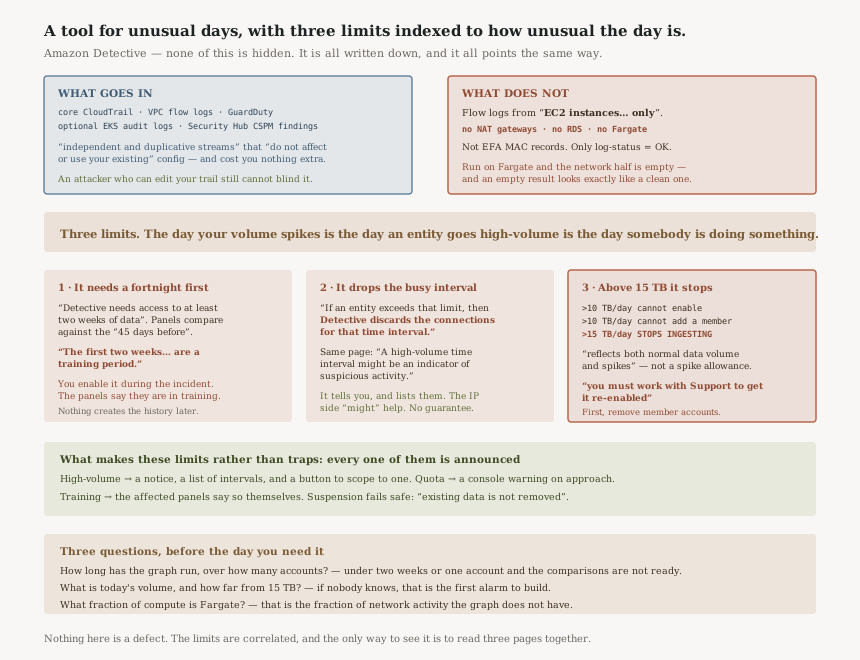
The duplicate stream is the right call, and it is worth saying why
“Detective consumes CloudTrail and VPC flow log events using independent and duplicative streams of CloudTrail and VPC flow logs. These processes do not affect or use your existing CloudTrail and VPC flow log configurations.” And: “They also do not affect the performance of or increase your costs for these services.”
Two properties fall out of that, both of them good. You cannot blind Detective by editing a trail, changing a log group retention or deleting a flow log — which matters, because an attacker with enough access to do that is precisely the case you are investigating. And you are not billed twice for the same records, so turning Detective on does not quietly inflate a CloudTrail bill somebody else owns.
It is the opposite of the pattern the last several posts have been about. Here the dependency was deliberately severed rather than quietly inherited.
What is in the graph, and what is not
| Source | Package | Notes from the documentation |
|---|---|---|
| AWS CloudTrail logs | Core | Own duplicate stream |
| Amazon VPC flow logs | Core | EC2 instances only — see the exclusions below |
| GuardDuty findings | Core | “For accounts that are enrolled in GuardDuty” |
| EKS audit logs | Optional | Correlated with CloudTrail management events and flow logs “without the need for you to enable or store these logs manually” |
| AWS security findings | Optional | From Security Hub CSPM |
“Ingests flow logs produced by Amazon Elastic Compute Cloud instances running in those VPCs only. No other resources, such as NAT gateways, RDS instances, or Fargate clusters are used.”
Also: “Ingests both IPv4 and IPv6 records, but not MAC records produced by Elastic Fabric Adapters”, and only “when the value of the log-status field is in OK state”.
For an estate that runs its workloads on Fargate, the network half of the behaviour graph is largely empty — and an empty result looks exactly like a clean one. This is the single most important thing to know before concluding from Detective that no network activity occurred.
Retention, the trial, and the gap you cannot backfill
“Detective retains all data received from each data source package for up to 1 year”, matching the “up to a year of historical event data” the overview promises. There is a “30-day free trial for all core and optional source packages per Region” — per Region, which is the word to notice if you are evaluating in one place and running in several.
And optional packages are not free to toggle: “If you stop and then restart an optional data source you will see a gap in the data… When a data source is restarted Detective does not retroactively ingest data.”
The console marks the gap, which is honest. But it means switching an optional source off to manage cost permanently removes that window from every future investigation. It is a decision about the past, taken in the present.
How the graph is actually built
Two stages, and the distinction matters when you are judging what a panel is telling you. “Extraction is based on configured mapping rules.” And a mapping rule, in the documentation's own framing, says: “Whenever you see this piece of data, use it in this specific way to update behavior graph data.” That part is deterministic.
Analytics are not. “For entities that make API calls, the algorithm looks for API calls that the entity doesn't normally use. The algorithm also looks for a large spike in the number of API calls.”
Both of those are statements about normality, which brings us back to the training period. The extraction half works on day one. The analytics half is the part that needs the fortnight.
Why This Architecture Holds Up
Every one of these limits is disclosed, and that is not the norm
It would be easy to ship a graph database that silently dropped relationships above a threshold, or to let ingest degrade without saying so. Detective does neither. The high-volume case gets a notification, a list, and a scope-time shortcut. The quota case gets a console warning on approach and a message on suspension. The training period announces itself inside the panels it affects.
That is the difference between a limit and a trap. A documented ceiling you can alarm on is an engineering constraint; an undocumented one is an outage you discover during an incident.
Dropping the busy interval is the correct trade, given the alternative
An unbounded graph is not a graph; it is a way to make one entity's bad day everybody's bad day. Capping connections per interval per entity bounds the damage to the entity that caused it, and the opposite-end route gives you somewhere to look rather than nowhere. That is a better design than degrading the whole graph, and better than silently sampling.
Suspension is recoverable only through Support, and the recommended preparation is to “remove member accounts”. Both of those are slow relative to an incident, and the trigger is correlated with incidents.
Which is why the distance-to-quota number belongs on a dashboard. “Detective checks the behavior graph data volume each day”, so the information exists; the gap is that reacting to it is a console message rather than an event you can route.
Independence from your own logging is the standout decision
Of everything here, the duplicate stream is the design worth copying. A forensic tool that read your CloudTrail configuration would be a forensic tool an attacker could reconfigure. Taking its own feed costs AWS duplicated ingestion and costs you nothing — explicitly nothing, since the documentation commits to not increasing your costs for those services — and it removes a whole class of tampering from the threat model.
Key Architecture Decisions
| Decision | Choice | Reasoning |
|---|---|---|
| When to enable | Before you need it, not during | “The first two weeks after you activate Detective are considered a training period.” |
| Scope | Organisation-wide from the start | Analysis maturity “increases with the number of accounts”. |
| Volume monitoring | Alarm on distance to 15 TB per day | Suspension needs Support, and the trigger correlates with incidents. |
| Member-account growth | Check headroom before adding | Above 10 TB per day, “you cannot add a new member account”. |
| On a high-volume notice | Investigate from the other end of the relationship | An alternative, not a recovery — “you might be able to”, because “a single IP address connects to far fewer EC2 instances”. |
| Fargate-heavy estates | Do not treat the network view as complete | Flow logs from “EC2 instances… only”; Fargate, NAT gateways and RDS are excluded. |
| Optional source packages | Turn on and leave on | Restarting “does not retroactively ingest data” — the gap is permanent. |
| Evaluation | Remember the trial is per Region | “a 30-day free trial… per Region”. |
| Relationship to your own logging | None required — and that is deliberate | “independent and duplicative streams” that “do not affect or use your existing” configuration. |
| Retention planning | One year, and not extendable by configuration | “retains all data… for up to 1 year”. |
The audit worth running
Answer three questions, in this order, and you will know whether Detective will help you on the day you need it.
How long has the graph been running, and over how many accounts? If the answer is "less than two weeks" or "one account", the comparison panels are not yet doing the thing you are going to ask them to do.
What is today's volume, and how far is it from 15 TB? If nobody knows, that is the first alarm to build. The number is checked daily by the service and surfaced on the console; it is not surfaced anywhere you would notice at three in the morning.
What fraction of your compute is Fargate? That fraction is the fraction of your network activity that is not in the graph, and it is the one gap that can make an investigation reach a confidently wrong conclusion rather than an obviously incomplete one.
Closing Thought
Nothing in this post is a defect. The training period is honest about statistics needing a sample. The per-interval cap is a sane bound with a documented workaround. The 15 TB ceiling is a real engineering limit on a service that stores a processed copy of your logs, and it fails safe by keeping what it already has.
What makes them worth putting in one place is that they are correlated. The day your volume spikes is the day an entity goes high-volume, and both of those are more likely on the day somebody is doing something they should not be. A tool for investigating unusual days has its three main constraints indexed to how unusual the day is.
That is a different shape from the previous few posts. #84 had two correct mechanisms with a gap between them. #83 had a signal promoted to a job it was not designed for. Here nothing is mismatched and nothing is hidden — the limits are simply all pointed the same direction, and the only way to find that out is to read three pages together and notice that their worst cases share a cause.
Security & Identity — AWS Signer: why revoking a signing profile stops new signing jobs without invalidating the signatures it has already made, what the six-month revocation-check window beyond a signature's expiry covers, and why a revocation's effective start time can only ever move earlier.
Official AWS Reference
- Source data used in a Detective behavior graph — the core and optional packages, the independent duplicative streams and their cost and performance guarantee, the VPC flow log exclusions, one-year retention, the per-Region trial, the non-retroactive restart gap, and all three volume quotas including the 15 TB per day suspension and the Support path back
- Training period for new Detective behavior graphs — the two-week minimum, the training-period message in affected panels, the 45-day baseline, and the dependence of analysis maturity on account count
- Viewing details for high-volume entities in Detective — the per-interval connection limit and the discard, the statement that a high-volume interval may itself be suspicious, the notification and listing behaviour, the opposite-end pivot, and the 30-day scope time applied when navigating
- How Detective populates a behavior graph — the split between deterministic extraction via mapping rules and the analytics that look for unusual and spiking API call volumes
- What is Amazon Detective — the service description, the techniques it uses, and the year of historical event data
- Overview of the behavior graph data structure — further reading on entities and relationships; no claims in this post are drawn from it
- Detective Investigation — further reading on indicators of compromise and automated triage; no claims in this post are drawn from it
Comments