Business Challenge
Every post since #71 has deferred something to this one. Spoke-to-spoke past the peering limit, forcing traffic through a hub firewall, the preview that suppresses peering routes — all of them end in “use a user-defined route”. This is the mechanism, and it is more layered than its documentation summary suggests.
The summary everyone remembers is the priority list: “If multiple routes contain the same address prefix, Azure selects the route type based on the following priority: 1. User-defined route 2. BGP route 3. System route.”
Read the condition on that sentence. It only applies to routes with the same prefix. Before it runs, something else has already happened:
“When outbound traffic is sent from a subnet, Azure selects a route based on the destination IP address by using the longest prefix match algorithm.”
So a /16 system route beats your /8 user-defined route, because the comparison never reaches the priority list. Being a UDR does not make a route win; it makes it win among routes of equal specificity.
That single ordering is the whole explanation for the bug #71 described, and the peering documentation states it in exactly these terms: “A system-generated peering route can be more specific than a summarized UDR. In that case, Azure selects the peering route, and traffic bypasses the NVA.”
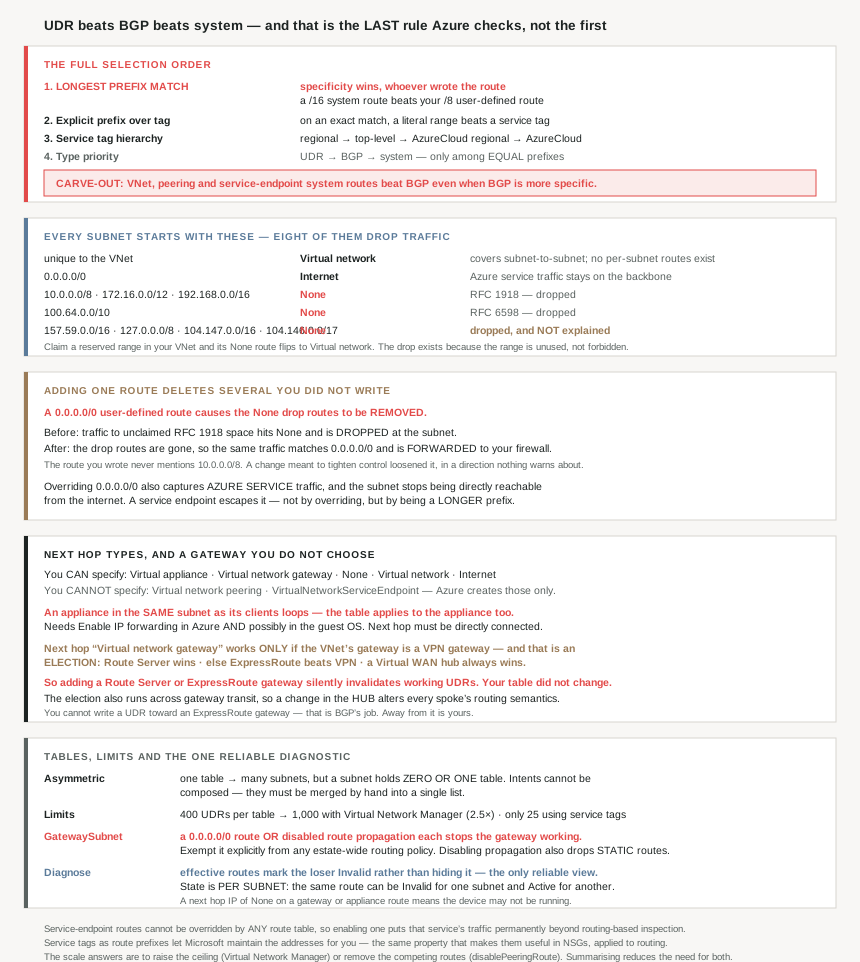
And there is a layer below the priority list too, which inverts even longest prefix match for three classes of route. The full selection order, assembled from the page:
| # | Rule | Effect |
|---|---|---|
| 1 | Longest prefix match | Specificity wins, regardless of who wrote the route |
| 2 | Explicit prefix over service tag | An exact match on a literal range beats a tag covering it |
| 3 | Service tag hierarchy | Regional → top-level → AzureCloud regional → AzureCloud |
| 4 | Type priority | UDR → BGP → system, among equal prefixes |
| — | Overrides | VNet, peering and service-endpoint system routes beat BGP even when BGP is more specific; service-endpoint routes cannot be overridden at all |
Four rules and a carve-out. Nobody reasons about a routing problem correctly from the priority list alone.
Architecture
The system routes, including eight that silently drop traffic
“Azure automatically creates a route table for each subnet… You can’t create system routes, and you can’t remove system routes, but you can override some.” Every subnet starts with these:
| Address prefix | Next hop type | What it does |
|---|---|---|
| Unique to the virtual network | Virtual network | Intra-VNet routing, including between subnets |
0.0.0.0/0 | Internet | Everything unmatched |
10.0.0.0/8, 172.16.0.0/12, 192.168.0.0/16 | None | “Traffic routed to the None next hop type is dropped” |
100.64.0.0/10 | None | |
157.59.0.0/16, 127.0.0.0/8, 104.147.0.0/16, 104.146.0.0/17 | None |
The first four of those are explained — RFC 1918 private space and the RFC 6598 carrier-grade NAT range. The last four are not explained anywhere on the page, and three of them are Microsoft-owned public space rather than reserved ranges. They are dropped by default and the documentation does not say why, which is worth knowing before you debug a connection to something in 104.146.0.0/17.
One thing these routes are not: a security control. They drop traffic to private ranges you have not claimed, so they stop a VM reaching an unrelated RFC 1918 destination — and the moment you use one of those ranges, “Azure automatically changes the next hop type for the route from None to Virtual network”. The drop exists because the range is unused, not because it is forbidden.
Note also what gets no route at all: “Azure doesn’t create default routes for subnet address ranges”, because every subnet falls inside the virtual network's own range. Subnet-to-subnet traffic rides the Virtual network route, which is why #64's NSGs are the only thing separating subnets by default.
Route tables attach asymmetrically, and the limits are not symmetric either
“you create a route table and then associate the route table to zero or more virtual network subnets. Each subnet can have zero or one route table associated to it.”
One table can serve many subnets; a subnet can hold at most one table. That asymmetry decides how you organise routing: you cannot compose two tables onto a subnet, so a subnet needing both “force egress to the firewall” and “keep storage traffic direct” needs one table containing both routes, not two tables. Every shared route then has to be duplicated into every table that needs it, which is where the capacity figures start to matter:
| Limit | Value |
|---|---|
| UDRs per route table, default | 400 |
| UDRs per route table, with Virtual Network Manager routing configuration | 1,000 |
| Routes using a service tag, per route table | 25 |
The uplift is a factor of 2.5, and the documented reason for needing it is precisely the topology #77 described: “directing traffic from on-premises datacenters through a firewall to each spoke virtual network in a hub-and-spoke topology when you have a higher number of spoke virtual networks.”
The 25-route service tag cap is much tighter than the 400 and easy to meet, because service tags are the natural way to write these rules. Which makes it worth knowing what they buy: “Microsoft manages the address prefixes encompassed by the service tag and automatically updates the service tag as addresses change” — the same property that made them valuable in NSGs in #65, now applied to routing.
Why This Architecture Holds Up
Because adding one route deletes several you did not write
The most surprising behaviour on the page, and it is stated twice in different words. First as a rule: “Default Route (0.0.0.0/0) with Next Hop Type = Virtual Network Gateway will cause these Default System Routes with Next Hop Type = None to be removed.” Then demonstrated in the worked example: “Azure removed the routes for the 10.0.0.0/8, 192.168.0.0/16, and 100.64.0.0/10 address prefixes from the Subnet1 route table when the UDR for the 0.0.0.0/0 address prefix was added.”
Before: traffic to an unclaimed RFC 1918 address hits a None route and is dropped at the subnet.
After you add a 0.0.0.0/0 route to your firewall: those drop routes are gone, so the same traffic now matches 0.0.0.0/0 and is forwarded to the firewall.
So a change whose purpose is “inspect internet-bound traffic” also redirects traffic bound for private space you never configured, to an appliance that was not sized or ruled for it. If the appliance has a permissive outbound rule and any path to those ranges — a VPN, an ExpressRoute circuit advertising a summarised prefix — you have created reachability that the default configuration denied.
This is a side effect in the strict sense: the route you wrote does not mention 10.0.0.0/8, and the thing that changed about 10.0.0.0/8 is not visible in your route definition. It is visible in effective routes, which is the argument for checking them after every routing change rather than reading your own template back.
Because overriding 0.0.0.0/0 captures Azure service traffic too
The default 0.0.0.0/0 route has a property that is easy to take for granted: “If the destination address is for an Azure service, Azure routes the traffic directly to the service over the Azure backbone… Traffic between Azure services doesn’t traverse the internet… It doesn’t matter which Azure region” either network is in.
Override that route and the property goes with it: “Azure sends all traffic to the next hop type specified in the route, including traffic destined for public IP addresses of Azure services that aren’t enabled service endpoints.”
So every blob read, every queue poll, every Key Vault call now traverses your firewall. That is often the intent — it is how you inspect egress to storage — but it is a throughput and cost decision landing on the hub, and it connects straight to #77's shared SNAT budget.
The documented escape is a service endpoint, and the reason it works is pure longest-prefix-match: “Traffic to the service doesn’t route to the next hop type in a route with the 0.0.0.0/0 address prefix. The address prefixes for the service are longer than 0.0.0.0/0.” Nothing about the service endpoint overrides your UDR — it simply installs a more specific route, and rule 1 does the rest.
Which also means the carve-out matters here: “Routes with a virtual network service endpoint as the next hop type can’t be overridden, even when you use a route table.” Enable a service endpoint and you have made that service's traffic permanently un-inspectable from this subnet by routing. If your security model requires all traffic through the firewall, a service endpoint is a hole you cannot close with a route.
Because “Virtual network gateway” is an election you can lose by adding a resource
This is the finding most likely to break something already working. A UDR can name “Virtual network gateway” as its next hop, and which gateway that means is not your choice: “A Virtual Network has a single gateway automatically set by the underlying software-defined networking platform.”
The election order, and the eligibility rule that sits on top of it:
| What is deployed | The VNet’s gateway becomes | UDR next hop “Virtual network gateway” |
|---|---|---|
| VPN gateway only | The VPN gateway | Supported |
| ExpressRoute gateway only | The ExpressRoute gateway | Not supported |
| VPN + ExpressRoute | ExpressRoute | Not supported |
| Route Server present | Route Server | Not supported |
| Connected to a Virtual WAN hub | Always the VWAN hub router | Not supported |
The eligibility rule is explicit: “User-defined routes with next hop Virtual Network Gateway are supported only when the Virtual Network’s gateway is a VPN gateway (and not ExpressRoute, RouteServer or Virtual WAN hub router).”
Put the table and the rule together. A virtual network with a VPN gateway and working UDRs pointing at it is one deployment away from breaking: add an ExpressRoute gateway for hybrid connectivity, or a Route Server for BGP, and the VNet's gateway is no longer the VPN gateway, so routes that were supported no longer are. Nothing in your route table changed. Neither did your intent.
The same election runs across a peering when gateway transit is in use, so a change in the hub can invalidate a spoke's routes. Given #77 established that spokes deliberately use the hub's gateway, that is a cross-team dependency worth writing down: adding a Route Server to a hub is a change to every spoke's routing semantics.
One related asymmetry that catches people designing around ExpressRoute: “You can’t create UDRs to force traffic to the ExpressRoute virtual network gateway… You can use UDRs for forcing traffic from the express route to, for example, a network virtual appliance.” Routes toward an ExpressRoute gateway are BGP's job; routes away from it are yours.
Because an appliance in the wrong subnet routes traffic to itself
The Virtual appliance next hop is the one that does real work, and it has three prerequisites that are each a separate failure if missed.
IP forwarding, in two places. “Any network interface… that forwards network traffic to an address other than its own must have the Azure Enable IP forwarding option enabled… The setting disables the check of the source and destination for a network interface by Azure.” And separately: “You might also need to enable IP forwarding within the virtual machine’s operating system.” Two switches, one in Azure and one in the guest, and the Azure one is a deliberate relaxation of anti-spoofing.
A different subnet. This is the one with the memorable failure mode:
“Deploy a virtual appliance into a different subnet than the resources that route through the virtual appliance. Deploying the virtual appliance to the same subnet and then applying a route table to the subnet… can result in routing loops where traffic never leaves the subnet.”
The route table applies to the appliance too, so the appliance's own forwarded traffic matches the route pointing at the appliance.
The worked example shows the escape when you genuinely need a table on the appliance's subnet: a more specific UDR for the subnet's own range with next hop Virtual network. “Traffic destined for addresses between 10.0.0.1 and 10.0.0.254 remains within the subnet. The traffic isn’t routed to the virtual appliance… because it has a longer prefix.” Rule 1 again, used deliberately this time.
Direct connectivity. “A next hop private IP address must have direct connectivity without having to route through an Azure ExpressRoute gateway or through Azure Virtual WAN. Setting the next hop to an IP address without direct connectivity results in an invalid UDR configuration.” This is the same constraint shape as the FastPath preview limitation in #76 — a next hop has to be somewhere the platform can reach without another hop of its own.
Because disabling route propagation removes more than BGP
Route propagation is a route-table property and it reads like a BGP toggle. It is not: “When you disable route propagation, the system doesn’t add routes to the route table of all subnets with virtual network gateway route propagation disabled. This process applies to both static routes and BGP routes.”
So disabling it on a spoke subnet also removes the static routes a VPN gateway would have installed from a local network gateway definition, not only the dynamically learned ones. The documented way back is explicit and manual: “Connectivity with VPN connections is achieved by using custom routes with a next hop type of Virtual network gateway.” Which lands you back on the election above — those custom routes are only supported if the VNet's gateway is a VPN gateway.
And the hard stop, which #77 met from the other direction: “Route propagation shouldn’t be disabled on GatewaySubnet. If this setting is disabled, the gateway doesn’t function.” Paired with the other gateway-subnet prohibition — “don’t associate a route table to the gateway subnet that includes a route with a destination of 0.0.0.0/0… can prevent the gateway from functioning properly” — the gateway subnet is a place where two ordinary hardening measures each take the gateway down.
Both are the kind of thing a policy applied estate-wide will do. “Every subnet gets a route table with a default route to the firewall” and “disable gateway route propagation except where needed” are both defensible standards, and both break the hub if applied without an exception for GatewaySubnet.
Because Azure tells you which route lost, and that is the only reliable diagnostic
The worked example shows something the portal surfaces and almost nobody uses: overridden routes are not hidden, they are marked. “Azure automatically changed the state from Active to Invalid, when ID2, a UDR, was added. It has the same prefix as the default route, and UDRs override default routes.”
So effective routes show both the winner and the loser, with a state field explaining the outcome. Given that four selection rules and a carve-out decide the result, reading that output is the only way to be sure — and the same view distinguishes a route whose device is simply down: “if you see that Next hop IP address shows None and Next hop type shows Virtual network gateway or Virtual appliance, it might be because the device isn’t running or isn’t fully configured.”
Note the state is per subnet, not per route. In the example, the same default route is Invalid for Subnet1 and still Active for Subnet2, because the table carrying the overriding UDR is associated only to the first. A route's fate depends on which subnet you ask about, which is the practical consequence of tables attaching per subnet.
Because the newest answer to all of this is to stop writing per-spoke routes
Two capabilities on this page exist because UDR management does not scale, and both point the same way. Virtual Network Manager's routing configuration raises the table limit to 1,000 specifically for per-spoke firewall routing. And #71's preview attacks the cause rather than the symptom: “disablePeeringRoute… All: Azure suppresses IPv4 and IPv6 system-generated peering routes”, so one summarised UDR can win without being out-specified.
Both are worth reading as the same admission: in a large hub-and-spoke estate, the per-spoke override is a workaround for rule 1, and the long-term fixes are either to raise the ceiling on workarounds or to remove the competing routes. Given the preview's constraints in #71, most estates will be doing the former for a while — which makes #62's summarisable address plan the thing that decides how many routes you need in the first place.
Key Architecture Decisions
| Decision point | Choose | Because |
|---|---|---|
| Reasoning about which route wins | Prefix length first, type priority last | Type priority only breaks ties among equal prefixes. |
| A summarised UDR that keeps being bypassed | Match the system route’s specificity, or suppress it | A more specific peering route wins on rule 1. |
| Expecting BGP to beat a peering route | Don’t | VNet, peering and service-endpoint system routes beat BGP even when BGP is more specific. |
| A security model requiring all traffic inspected | Audit your service endpoints | Service-endpoint routes cannot be overridden by any route table. |
Adding a 0.0.0.0/0 route |
Re-check effective routes afterwards | It removes the None drop routes for the private ranges. |
| Egress inspection via a hub firewall | Budget for Azure service traffic too | Overriding 0.0.0.0/0 captures Azure public endpoints as well. |
| Keeping storage or similar off the firewall path | A service endpoint, or a more specific route | Longer prefixes escape the default route by rule 1. |
| Composing two routing intents on one subnet | One table containing both routes | A subnet can hold zero or one route table. |
| Per-spoke firewall routes at scale | Virtual Network Manager routing configuration | Raises 400 UDRs per table to 1,000. |
| Writing many service-tag routes | Count them against 25 | A much tighter cap than the 400 general limit. |
| Routing to an Azure service by address | Use the service tag | Microsoft maintains the prefixes and updates them automatically. |
| An explicit range and a service tag covering it | Expect the explicit prefix to win | Documented preference on exact match. |
| Placing a network virtual appliance | Its own subnet | Same subnet as its clients can loop traffic indefinitely. |
| A table on the appliance’s own subnet | Add a longer route for the local range | Specificity keeps intra-subnet traffic off the appliance. |
| Standing up an appliance | Enable IP forwarding in Azure and the guest OS | Two separate switches; the Azure one relaxes source and destination checks. |
| Choosing a next hop IP | Something directly connected | Via ExpressRoute gateway or Virtual WAN is an invalid configuration. |
| UDRs with next hop Virtual network gateway | Confirm the VNet’s gateway is a VPN gateway | Route Server, ExpressRoute and VWAN all win the election and make them unsupported. |
| Adding a Route Server or ExpressRoute gateway to a hub | Treat it as a change to every spoke’s routing | The election also runs across gateway transit. |
| Forcing traffic toward an ExpressRoute gateway | Use BGP, not a UDR | UDRs toward an ExpressRoute gateway aren’t supported; away from it they are. |
| Disabling gateway route propagation | Know it drops static routes too | It applies to both static and BGP routes. |
| Any estate-wide route table or propagation policy | Exempt GatewaySubnet explicitly |
A 0.0.0.0/0 route or disabled propagation each stops the gateway working. |
| Diagnosing a routing problem | Read effective routes, per subnet | It shows the losing route and its Invalid state, and state varies by subnet. |
| A next hop showing None unexpectedly | Check whether the device is running | Documented as a sign of an unconfigured or stopped appliance or gateway. |
| Reducing route count generally | Summarise, on both sides | On-premises summarisation inbound, summarizedGatewayPrefixes outbound. |
Closing Thought
The priority list is the most quoted and least useful sentence in Azure routing. User-defined beats BGP beats system is true, and it is the last thing Azure checks — only among routes that already tie on prefix length. Every routing surprise I have written about in this series traces back to that ordering: a summarised override losing to a system route nobody wrote, a service endpoint escaping a firewall because its prefix is longer, an appliance subnet looping because the table applies to the appliance too. One rule, applied before the one everybody remembers.
The second thing to carry is that route tables are not additive and not local. A subnet gets one table, so intents have to be merged by hand into a single list; and a route's outcome depends on which subnet you evaluate it from, which is why “the route is there” and “the route is winning” are different claims. Effective routes answers the second one and nothing else does.
The detail I would most want in a runbook is the side effect. Adding a default route to force egress through a firewall silently removes the routes that were dropping traffic to unclaimed private address space. The change you made says 0.0.0.0/0; the behaviour that changed belongs to 10.0.0.0/8, 192.168.0.0/16 and 100.64.0.0/10. Nothing in the route you wrote mentions them, nothing warns you, and the new behaviour is forwarding rather than dropping — which is the wrong direction for a change whose entire purpose was tighter control.
#79 takes the specific case this post set up: forced tunnelling and its consequences — what changes when every route out of a subnet points at on-premises, and which Azure services stop working when it does.
Official Azure Reference
- Azure virtual network traffic routing — the default and optional system routes, the longest-prefix-match and type-priority selection rules with their carve-outs, every user-defined next hop type, the virtual appliance and gateway-election constraints, route table association and limits, service tags in routes, BGP propagation, and the worked route table with Active and Invalid states
- Azure Virtual Network peering — the longest-prefix-match bypass stated in routing terms and the
disablePeeringRouteproperty that suppresses the competing system routes - Create, change, or delete a route table — the portal and CLI steps, including the route propagation property referenced above (no claims drawn from it)
- Virtual network service tags — the full tag list and regional variants available as route address prefixes (no claims drawn from it)
- User-defined route management in Azure Virtual Network Manager — the routing configuration behind the raised limit (no claims drawn from it)
Comments