Business Challenge
#49 was about objects moving upward: Active Directory is the authority, the tenant is a copy, and the whole supported-topology list exists to keep exactly one sync server owning that copy. This post is about the three places where the arrow reverses.
That reversal is a bigger deal than the feature names suggest. Once the cloud can write a password, a device or a group into Active Directory, the directory is no longer the sole authority over its own contents — it is a system of record that accepts writes from a system you do not run. Everything awkward about these three features comes from that, and from the fact that AD was not designed to be written to by an internet service.
The three are not equivalent, and treating them as a single capability called “writeback” is how people end up planning around a feature that no longer exists:
- Password writeback is mature, synchronous, and the one most tenants actually run.
- Device writeback is narrow and legacy-shaped: it exists for AD FS and for one Windows Hello deployment model.
- Group writeback moved tools underneath everyone. “The preview of Group Writeback v2 in Microsoft Entra Connect Sync is deprecated and no longer supported.”
On password writeback, where the cloud policy and the on-premises policy disagree:
“There's a chance that the on-premises password policy is weaker than the cloud password policy. In this case, the on-premises policy is enforced.”
The weaker policy wins, by design, and the design is defensible — it is the only way a password set in the cloud can be guaranteed to work on-premises. But a tenant that has carefully configured a cloud password policy and assumes it applies to synchronised users has assumed wrong.
Architecture
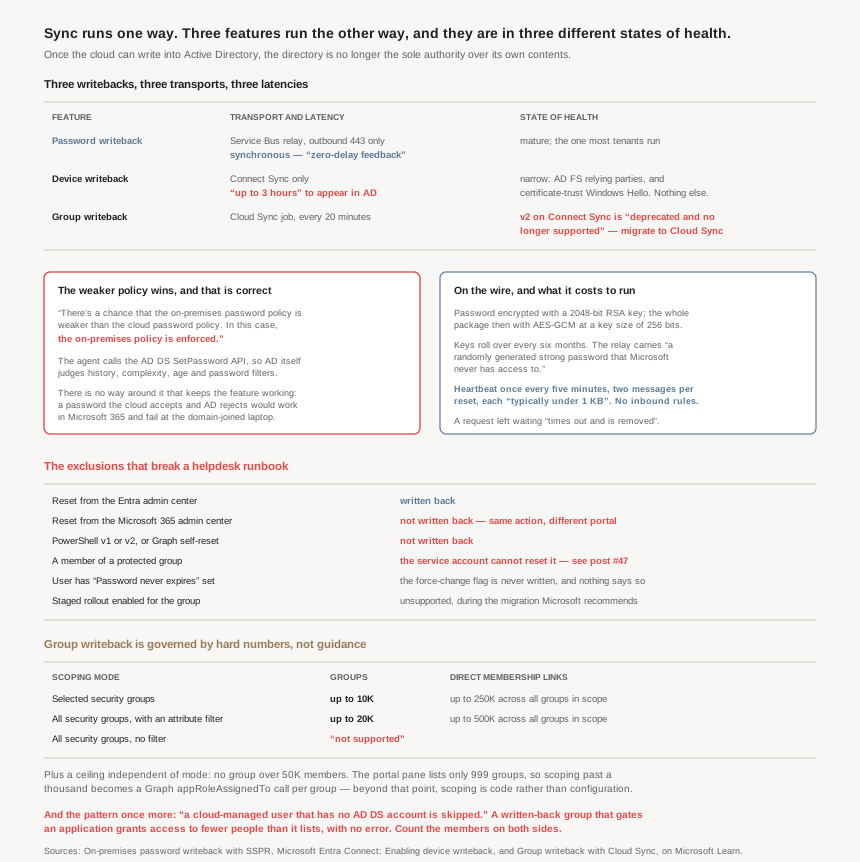
Three writebacks, three different transports, three different latencies, and three different states of health.
Password writeback: the only one that is synchronous
Everything else in hybrid identity is a sync cycle you wait for. Password writeback is not: “Password writeback is a synchronous operation. Users are notified immediately if their password doesn't meet the policy or can't be reset or changed for any reason.” Microsoft calls that zero-delay feedback, and it is the feature’s real design constraint rather than a nicety — the user is standing at a reset page, so the answer has to be the directory’s actual answer.
Which forces the mechanism. The on-premises agent “attempts to set the password through the AD DS SetPassword API. This step is what allows enforcement of your AD DS on-premises password policy (such as the complexity, age, history, and filters) in the cloud.” The cloud is not evaluating a copy of your policy. It is handing the password to Active Directory and reporting what AD said.
The transport is the same Service Bus pattern as pass-through authentication and Cloud Sync: “Password writeback uses an Azure Service Bus relay as an underlying communication channel. All communication is outbound over port 443,” and so it “doesn't require any inbound firewall rules.” On the wire, the password is encrypted with a 2048-bit RSA key, the whole package is then encrypted with AES-GCM at a key size of 256 bits, and “all keys roll over every six months.” The relay itself is “protected by a randomly generated strong password that Microsoft never has access to.”
It is also almost free to run. A heartbeat goes out “once every five minutes”, two messages per password operation, and each message is “typically under 1 KB”. If the agent is down, the request does not queue indefinitely — “it times out and is removed after several minutes”, which is a security property rather than a reliability gap.
Device writeback: a feature shaped by the thing it was built for
Device writeback has exactly two documented purposes, and both of them point backwards: Windows Hello for Business hybrid certificate trust deployment, and “Conditional Access based on devices to ADFS (2012 R2 or higher) protected applications.” If you are not running AD FS relying party trusts and not on the certificate trust model, this feature has nothing to offer you.
Its constraints read like a feature that was fitted to a single-forest world and never generalised:
- “Devices must be located in the same forest as the users. Since devices must be written back to a single forest, this feature does not currently support a deployment with multiple user forests.”
- “Only one device registration configuration object can be added to the on-premises Active Directory forest. This feature isn't compatible with a topology where the on-premises Active Directory is synchronized to multiple Microsoft Entra directories.”
- The forest schema must be at Windows 2012 R2 level for the device object and its attributes to exist at all.
Note what the second bullet does to #49’s multi-tenant section. Syncing one Active Directory into several tenants is supported; device writeback is one of the things that can only happen once, and here it is again from the other side of the arrow.
And it is slow in a way the other two are not: “It can take up to 3 hours for device objects to be written-back to AD.” That is a provisioning latency, not a sign-in latency, but it is long enough that a device-based Conditional Access rule evaluated on-premises will not see a freshly registered device.
Group writeback: the one that changed tools underneath its users
This is the one worth paying attention to, because the guidance is now a migration instruction rather than a configuration choice. “The preview of Group Writeback v2 in Microsoft Entra Connect Sync is deprecated and no longer supported.” Cloud Sync does it instead, and has since “the release of provisioning agent 1.1.1370.0”.
The migration is narrower than it sounds, and the exclusions are the interesting part. The documented path covers “only cloud-created security groups that are written back with a universal scope”, and “Mail-enabled groups and DLs written back using Microsoft Entra Connect group writeback V1 or V2 aren't supported.” Microsoft 365 groups are a separate case with a separate answer: “If you provision Microsoft 365 groups to AD DS, you can keep using Group Writeback v1.”
So a tenant writing back a mix of group types does not have one migration. It has a supported path for cloud security groups, a stay-put instruction for Microsoft 365 groups, and no path at all for mail-enabled groups and distribution lists.
Where it does apply, it is governed by hard numbers rather than guidance, and those numbers are the closest thing this post has to a capacity model:
| Scoping mode | In-scope groups | Direct membership links | Use it when |
|---|---|---|---|
| Selected security groups | Up to 10K (portal lists only 999) | Up to 250K across all in-scope groups | The tenant exceeds any of 200k users, 40K groups, 1M memberships |
| All security groups, with at least one attribute filter | Up to 20K | Up to 500K across all in-scope groups | The tenant is under all of those three limits |
| All security groups, no filter | “The use of ‘All security groups’ scoping without applying attribute scope filtering is not supported.” | ||
Plus one per-group ceiling that is independent of mode: “Groups that are larger than 50K members aren't supported.” The remedy is stated as a design change rather than a quota request — split the membership, or adopt staged groups by region or business unit.
Getting past 999 groups in scope is not a portal setting. It requires a Graph appRoleAssignedTo call per group, with a cloud-specific app role id. That is a meaningful operational difference: beyond a thousand groups, scoping becomes code.
Why This Architecture Holds Up
Because the weaker policy wins, and that is the correct behaviour
The quoted sentence above is worth sitting with. A tenant can configure cloud password protection, banned password lists and a long minimum length, and a synchronised user resetting their password is still measured against whatever the domain policy says. “This policy ensures that your on-premises policy is enforced in the cloud, no matter if you use password hash synchronization or federation to provide single sign-on.”
There is no way around it that keeps the feature working, because a password the cloud accepts and AD rejects would be a password that works in Microsoft 365 and fails at the domain-joined laptop. The architectural consequence is simply that on-premises password policy is still the real policy for every user who has an AD account, and hardening the cloud side without touching the domain side buys nothing for those users.
Because the exclusions are where the runbook breaks
Password writeback has a specific and widely-missed hole: “The on-premises service account that handles password write-back requests cannot change the passwords for users that belong to protected groups.” And the consequence is spelled out: “Administrators can change their password in the cloud but they cannot use password write-back to reset a forgotten password for their on-premises user.”
That is the AdminSDHolder mechanism doing its job — protected groups exist precisely so that a delegated account cannot reset a Domain Admin’s password — but it means the population most likely to need an emergency reset is the population SSPR cannot help. Which is the same lesson as #47: privileged recovery is a separate design, not a special case of the user one.
The surface-level exclusions matter too, and they are not intuitive. A reset from the Microsoft Entra admin center is written back. The same reset from the Microsoft 365 admin center is not. Nor is one done through PowerShell v1 or v2, nor a user resetting their own password via the Graph API. A helpdesk procedure that says “reset the password in the admin portal” without naming which portal is a procedure that silently half-works.
One more, for anyone automating offboarding or onboarding: if a user has “Password never expires” set in AD, “the force password change flag will not be set,” so ticking “force the user to change their password on next logon” during an admin reset does nothing. No error, no warning — the flag is simply not set.
Because coexistence has a winner, and it is written down
Running Connect Sync and Cloud Sync side by side is supported and is the recommended answer for disconnected domains after a merger. But for password writeback there is an arbitration rule worth knowing before you debug anything: “When Microsoft Entra Connect Cloud Sync and Microsoft Entra Connect Sync coexist and are configured for the same domain, all password writeback operations for users synchronized from that domain are processed by the Cloud Sync agent.”
So the agent you installed most recently may be the one handling resets, regardless of which tool you think of as primary. If writeback stops working after a Cloud Sync deployment, the Connect Sync server is the wrong place to look.
There is also a staged-rollout interaction that is easy to trip over while migrating off federation: “SSPR with writeback to an on-premises domain isn't supported when staged rollout is enabled for a security group. Although it works in some cases, SSPR can't be guaranteed to work consistently.” Staged rollout is the recommended way to move off AD FS, so this is a documented gap during exactly the migration Microsoft recommends.
Because group writeback drops members silently, and silence is the pattern
Group writeback has to resolve each cloud member to an AD account, and when it cannot, it does not fail: “Group membership written to AD DS includes only members that have an AD DS account… A cloud-managed user that has no AD DS account is skipped.”
The matching is attribute-based and exact — onPremisesObjectIdentifier on the cloud user must match an objectGUID in the target forest — and the Global Catalog lookup on TCP/3268 exists specifically “to filter out invalid membership references”. A group written back to AD and used to authorise a Kerberos application therefore grants access to a subset of its cloud membership, with the difference being invisible from the cloud side.
That is the fourth time this phase has found the same shape: #41a’s device filter that does not apply to an unregistered object, #46’s access review denial that is recorded and not applied, #49’s sync engine picking one of two accounts, and now a group that authorises fewer people than it lists. The platform resolves an edge case by doing less, and the only signal is an absence. If you write back a group that gates access, count the members on both sides — nothing else will tell you.
Key Architecture Decisions
| Situation | Decision | Why |
|---|---|---|
| SSPR for users who have an AD account | Enable password writeback, and harden the domain policy | The on-premises policy is enforced even when it is weaker than the cloud one. |
| Privileged accounts locked out | A separate recovery path, not SSPR | The writeback service account cannot reset passwords for protected groups. |
| Writing the helpdesk reset procedure | Name the Entra admin center explicitly | Microsoft 365 admin center and PowerShell v1/v2 resets are not written back. |
| Automating “must change at next logon” | Check for Password never expires first | With that set, the force-change flag is never written and nothing reports it. |
| Migrating off AD FS with staged rollout | Expect SSPR writeback to be unreliable during the rollout | Documented as unsupported with staged rollout, and it fails inconsistently. |
| Password writeback stopped after a Cloud Sync install | Debug the Cloud Sync agent, not Connect Sync | Where both serve one domain, Cloud Sync processes all writeback for it. |
| Firewall review for writeback | No inbound rules to request | Service Bus relay, outbound over port 443 only. |
| Not running AD FS or certificate-trust Windows Hello | Do not enable device writeback | Those are its only two documented purposes. |
| Multiple user forests, or one AD to several tenants | Device writeback is unavailable | Single forest only, and one device registration configuration object per forest. |
| On-premises device Conditional Access just after enrolment | Allow for the lag | Up to 3 hours for a device object to appear in AD. |
| Still running Group Writeback v2 on Connect Sync | Move to Cloud Sync | It is deprecated and no longer supported. |
| Writing back Microsoft 365 groups | Stay on Group Writeback v1 | Explicitly still the supported route for that group type. |
| Writing back mail-enabled groups or DLs | There is no migration path | Not supported by the Cloud Sync route at all. |
| Scoping more than 999 groups | Budget for Graph automation | The portal pane cannot select or display beyond 999. |
| A group approaching 50K members | Split it by region or business unit | Above 50K is unsupported; the fix is a design change, not a quota. |
| A written-back group that gates application access | Reconcile membership counts on both sides | Members without an AD DS account are skipped without an error. |
Closing Thought
The three features share a name and almost nothing else. The useful way to hold them is by what each one is for and how healthy it is: password writeback is a real-time control plane that most tenants should run and that quietly subordinates cloud password policy to the domain’s; device writeback is a narrow bridge to AD FS and one Windows Hello model, and if those words do not describe your estate you should leave it off; group writeback has changed tools, and the thing to know is not how to configure it but which of your group types still has a supported path.
What the direction itself costs is worth naming. Reversing the arrow means Active Directory now accepts writes decided elsewhere, and every constraint in this post is a consequence — the protected-groups exclusion, the single-forest limit, the membership links that silently do not resolve. None of those are bugs. They are the seams where a directory designed for one authority is being asked to have two.
And the pattern that has run through this entire phase shows up once more, on the way out. Four times now the platform has handled an edge case by doing less and saying nothing: an unapplied device filter, a recorded-but-not-enforced denial, a discarded duplicate account, a group member dropped for want of an AD object. If there is one habit worth taking from these ten posts, it is to stop treating a clean configuration screen as evidence, and go and count the thing on both sides.
#51 takes on Seamless SSO — what it actually places in Active Directory, why that computer account matters more than the feature name suggests, and what it needs on the client to work at all.
Official Azure Reference
- On-premises password writeback with self-service password reset — the synchronous model, the four-tier security design, the encryption details, and the supported and unsupported operations
- Microsoft Entra Connect: Enabling device writeback — the two scenarios it exists for, the single-forest constraints, the containers it creates, and the 3-hour latency
- Group writeback with Microsoft Entra Cloud Sync — the v2 deprecation, the prerequisites and ports, the scale limits per scoping mode, and which group types have no migration path
Comments