Business Challenge
#77 built a hub by hand and quoted Microsoft's own list of reasons to keep doing so: “Cost savings… Overcoming subscription limits… Workload isolation… More control over how NVAs are deployed… Use of NVAs that aren’t supported by Virtual WAN.” This post is the other side of that comparison.
The defining sentence is short: “A virtual hub is a Microsoft-managed virtual network.” Everything that follows comes from that. You do not own the hub's subnets, you do not place its gateways, and you do not resize it.
Three things genuinely get simpler, and they are the reasons to want this:
| Customer-managed (#77) | Virtual WAN | |
|---|---|---|
| Spoke gateways | Spokes use the hub's, via three peering settings | “your VNets don’t need their own virtual network gateway” |
| Multi-hub | Peer hubs and plan addresses yourself | “All hubs are connected in full mesh” on Standard |
| Spoke-to-spoke | A trilemma of hops, cost and inspection | A router in every hub, instantiated automatically |
The cost is that several things which were adjustable become fixed at creation. One of them is unusually unforgiving:
“The Virtual WAN hub address space can’t be modified after the hub is created.”
Compare the hub #71 described, where “You can resize the address space of Azure virtual networks that are peered without incurring any downtime”. The managed hub gives up a capability the hand-built one has.
And the size you need depends on what you will put in the hub later, which is the part that turns an immutable field into an architecture decision.
Architecture
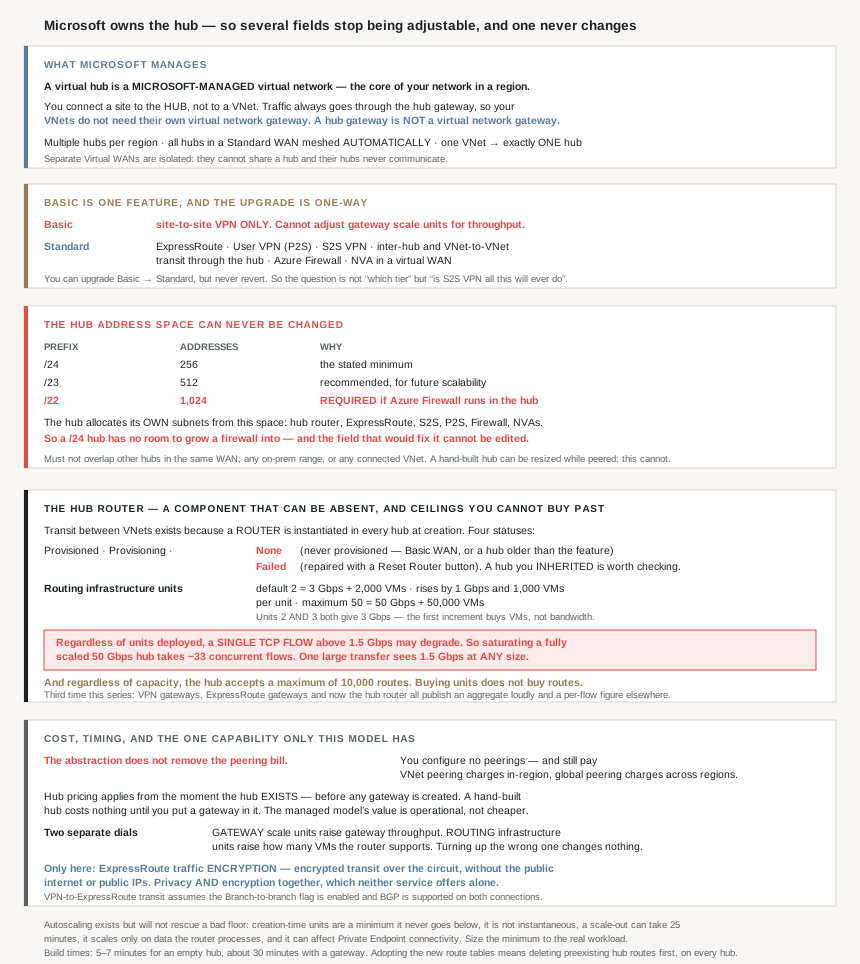
Basic is one feature, and the upgrade is one-way
| Virtual WAN type | Available configurations |
|---|---|
| Basic | Site-to-site VPN only |
| Standard | ExpressRoute · User VPN (P2S) · VPN (site-to-site) · Inter-hub and VNet-to-VNet transiting through the hub · Azure Firewall · NVA in a virtual WAN |
Basic is narrower than the name suggests. Not a smaller version of Standard — a single capability. No ExpressRoute, no point-to-site, no transit between virtual networks, no firewall, no appliances. And it cannot grow within itself: “Basic Virtual WAN doesn’t support adjusting gateway scale units to increase throughput.”
The transition is the familiar shape from #75: “You can upgrade from Basic to Standard, but can’t revert from Standard back to Basic.” So Basic is a one-way door in the cheap direction, and given it supports exactly one connectivity type, the question is less “which tier” than “is site-to-site VPN the only thing this will ever do”.
What connects, and the one-hub rule
A hub accepts site-to-site VPN, point-to-site User VPN and ExpressRoute connections, plus virtual network connections. Two structural constraints are worth reading before drawing a diagram:
- “One virtual network can be connected to only one virtual hub.” The customer-managed model permitted a spoke peered to two hubs — #79's FastPath caveats discussed exactly that case. Here it is simply not available.
- “Virtual WANs are isolated from each other and can’t contain a common hub. Virtual hubs in different virtual WANs don’t communicate.” The Virtual WAN object is a hard boundary, not an organisational grouping.
Within one Standard Virtual WAN, though, the mesh is free: “Hubs are all connected to each other… a branch, user, or VNet connected to a local hub can communicate with another branch or VNet using the full mesh architecture.” That is the clearest win over #77, where multiple hubs in one region meant explicit peering, a shared firewall policy, and spokes assigned to hubs by address plan.
Why This Architecture Holds Up
Because the immutable address space has to be sized for things you have not built
The sizing guidance is three numbers with three different justifications:
| Prefix | Addresses | Why |
|---|---|---|
/24 | 256 | The stated minimum |
/23 | 512 | “recommended… to accommodate future scalability and architectural needs” |
/22 | 1,024 | “If you are using an Azure Firewall within Virtual WAN, a minimum hub address space of /22 is required” |
Put the /22 row next to the immutability rule and the consequence is sharp. The hub allocates its own subnets — “automatically assigns subnets from the specified address space to… Virtual Hub Router… ExpressRoute… Site-to-site VPN… Point-to-site VPN… Azure Firewall… Network Virtual Appliances” — so a hub built at /24 has no room to grow a firewall into, and the field that would fix it cannot be edited.
The reason for /22 is specifically about scale rather than mere presence: it exists “to ensure Azure Firewall is able to allocate sufficient IP addresses to scale to maximum throughput”. So an undersized hub might run a firewall that works and cannot scale, which is a worse failure than one that refuses to deploy.
The practical rule is to size for the most expensive thing the hub might ever host, on day one, and accept the waste. That inverts #62's general advice about not over-allocating — here the allocation is unfixable, so over-provisioning is the cheaper error.
Three non-overlap rules apply as well, and the third is easy to miss: the hub space must not overlap “other Virtual Hub private address spaces in the same Virtual WAN… any on-premises network address spaces… any other virtual network/subnet address spaces connected to the virtual hub”. A spoke whose range collides with the hub cannot be connected, and neither range can be changed afterwards on the hub side.
Because the thing that makes it transitive is a component that can be absent
Transit between virtual networks is not a property of the hub — it is a router inside it: “Transit connectivity between the VNets in Standard Virtual WAN is enabled due to the presence of a router in every virtual hub. This router is instantiated when the virtual hub is first created.”
And it has its own state machine, with two states that mean trouble:
| Routing status | Meaning |
|---|---|
Provisioned / Provisioning | Normal |
None | “the virtual hub didn’t provision the router… if the Virtual WAN is of type Basic, or if the virtual hub was deployed prior to the service being made available” |
Failed | “failure during instantiation” — repaired with a Reset Router option on the hub's Overview page |
The None case is the interesting one, because it covers hubs that predate the feature. An estate that adopted Virtual WAN early can be running a Standard hub whose router was never provisioned, in which case transit between its spokes does not work and nothing about the hub looks broken. That is a status worth checking on any hub you inherited rather than built.
It is also a reminder of what the managed model actually changed. #77's spoke-to-spoke trilemma — hop, cost, inspection — has not been solved so much as moved inside a component you cannot see, whose failure mode is a portal field reading Failed and a button labelled Reset.
Because 50 Gbps is not 50 Gbps for one flow
Capacity is measured in routing infrastructure units, and the table is linear and long — from 2 units at 3 Gbps and 2,000 VMs up to 50 units at 50 Gbps and 50,000 VMs, in “increments of 1-Gbps and 1,000 VMs”. The default is “2 routing infrastructure units… 3-Gbps aggregate throughput and 2,000 connected VMs”.
One row of that table does not behave: units 2 and 3 both give 3 Gbps, differing only in VM count (2,000 versus 3,000). So the first increment buys capacity for machines and no extra throughput, which matters if you scale up expecting bandwidth.
And the ceiling that matters most is not in the table at all:
“currently, regardless of the number of routing infrastructure units deployed, traffic may experience performance degradation if more than 1.5 Gbps is sent in a single TCP flow.”
So saturating a fully scaled 50 Gbps hub takes roughly 33 concurrent flows. A single large transfer sees 1.5 Gbps whether you provisioned 2 units or 50.
This is the third time this series has met the same shape. #73 found the VPN aggregate benchmark did not describe one tunnel; #77 found the ExpressRoute gateway capped per-flow throughput separately from aggregate. Azure's networking numbers are nearly always aggregates, and the per-flow figure is nearly always much smaller and in a different paragraph.
One more capacity limit sits outside the table entirely: “Regardless of the virtual hub’s capacity, the hub can only accept a maximum of 10,000 routes from its connected resources.” Buying units does not buy routes. For comparison, #80 found a VPN gateway drops its BGP session past 4,000 prefixes, so the managed hub is more generous on routes and the same in kind: a ceiling you must design under rather than scale through.
Because autoscaling exists but will not rescue a bad floor
The router “supports autoscaling based on spoke VM utilization and data processed”, which sounds like it removes the sizing decision. Three qualifications say otherwise.
- “The scale unit on which the virtual hub is created becomes the minimum capacity”, and “Autoscaling won’t reduce the provisioned RIUs below this minimum.” So the creation-time choice is a floor you keep paying for.
- “autoscaling isn’t instantaneous”, and a scale-out “may take up to 25 minutes” — during which “the virtual hub router will continue to support traffic at its current capacity”. That is graceful, and it is not fast enough for a traffic spike.
- “The virtual hub router only scales on the data it processes” — so traffic that bypasses the router does not drive scaling.
Microsoft's own recommendation follows from those: “ensure that your minimum provisioned routing infrastructure units match the requirements of your workloads.” Which is to say, size it properly and treat autoscaling as headroom rather than as planning.
One side effect worth noting if you run private endpoints behind the hub: “Autoscaling can potentially affect connectivity for Private Endpoints.” A capacity change is not transparent to everything.
Because the abstraction does not remove the peering bill
This is the cost finding most likely to surprise someone comparing the two models on price. You do not configure peerings in Virtual WAN — and you still pay for them:
“The user doesn’t need to set up global VNet peering explicitly. VNets connected to virtual hub in same region incur VNet peering charges. VNets connected to virtual hub in a different region incur Global VNet peering charges.”
So #71's finding that peering is charged on both ingress and egress carries straight over. Virtual WAN hides the peering object, not the data charge. Combined with the hub's own fee — “once a virtual hub is created, virtual hub pricing applies, even if you don’t create any gateways” — the managed hub starts billing earlier than a hand-built one, which costs nothing until you put a gateway in it.
That is consistent with the first item on #77's list of reasons to stay customer-managed being “Cost savings”. The managed model's value is operational, and the comparison should be made on that basis rather than on an expectation that it is cheaper.
Because the two scaling dials are easy to confuse
A short but load-bearing distinction: “Gateway scale units are different than routing infrastructure units. You adjust gateway scale units when you need more aggregated throughput for the gateway itself. You adjust virtual hub infrastructure units when you want the virtual hub router to support more VMs.”
Two different numbers, two different bottlenecks, both adjusted on the same hub. A slow site-to-site tunnel is a gateway scale unit problem; a hub that cannot carry the spoke estate is a routing infrastructure unit problem. Turning up the wrong one costs money and changes nothing.
Because one capability only exists here
Worth ending on something the managed hub adds rather than removes, and it answers a gap #72 identified. That post noted ExpressRoute's documented claim is privacy — a path that avoids the internet — while VPN's is encryption, and that the two are not the same promise.
Virtual WAN closes that: “Azure Virtual WAN provides the ability to encrypt your ExpressRoute traffic… an encrypted transit between the on-premises networks and Azure virtual networks over ExpressRoute, without going over the public internet or using public IP addresses.”
Both properties at once, which neither service offers alone. If a compliance requirement demands encryption in transit on a private circuit, that is a reason to choose the managed hub that has nothing to do with operational convenience.
The adjacent transit capability has a prerequisite worth catching, because it is described as an assumption rather than a setting: VPN-to-ExpressRoute transit carries “an implicit assumption that the Branch-to-branch flag is enabled and BGP is supported in VPN and ExpressRoute connections”. So #80's protocol is load-bearing here too, and a flag somewhere in the Virtual WAN settings decides whether branches can reach each other at all.
Key Architecture Decisions
| Decision point | Choose | Because |
|---|---|---|
| Hub address space | /22 if Azure Firewall is even possible |
It is required for the firewall to scale, and the field can never be changed. |
| Hub address space with no firewall planned | /23 minimum, not /24 |
The recommendation is explicitly about future needs. |
| Discovering you undersized the hub | Rebuild it | There is no resize, unlike a peered virtual network. |
| Spoke ranges | Check them against the hub space first | A connected VNet must not overlap the hub, and the hub cannot move. |
| Basic Virtual WAN | Only if site-to-site VPN is the whole requirement, forever | It supports nothing else and cannot scale gateway throughput. |
| Choosing Basic to save money | Know it is a one-way door | Basic upgrades to Standard; Standard never reverts. |
| A hub you inherited rather than built | Check the router’s routing status | None means transit was never provisioned, and nothing looks broken. |
| Transit not working between spokes | Check for Failed and use Reset Router |
The router is a component with its own state, not a hub property. |
| Sizing the hub router | Set the minimum to your actual workload | Creation-time units are a floor autoscaling will not go below. |
| Relying on autoscaling for spikes | Don’t | It is not instantaneous and a scale-out can take 25 minutes. |
| Scaling from 2 to 3 routing infrastructure units | Expect VMs, not bandwidth | Both tiers deliver 3 Gbps; only the VM count rises. |
| A single large transfer through the hub | Budget 1.5 Gbps | The per-flow ceiling applies regardless of provisioned units. |
| Needing more than 1.5 Gbps on one flow | Don’t route it through the hub | No amount of capacity lifts the single-flow figure. |
| Approaching 10,000 routes | Summarise | The route limit is independent of hub capacity. |
| Private endpoints behind the hub | Review the autoscaling guidance | Autoscaling can affect their connectivity. |
| A slow site-to-site tunnel | Gateway scale units | Routing infrastructure units size the router, not the gateway. |
| A hub that cannot carry the spoke estate | Routing infrastructure units | That is the dial for supported VM count. |
| Comparing cost against a hand-built hub | Include the hub fee and the peering charges | The hub bills from creation and peering charges still apply. |
| Expecting Virtual WAN to remove peering charges | It doesn’t | It removes the configuration, not the per-GB charge. |
| A spoke that needs two hubs | Redesign | One virtual network connects to exactly one hub. |
| Organising hubs across business units | One Virtual WAN, many hubs | Separate Virtual WANs cannot communicate at all. |
| Multi-region connectivity | Standard, and let the mesh form | All hubs are connected in full mesh automatically. |
| Encryption required on a private circuit | Virtual WAN | IPsec over ExpressRoute without public internet or public IPs. |
| VPN and ExpressRoute sites that must reach each other | Enable branch-to-branch and BGP on both | Stated as an implicit assumption rather than a default. |
| Planning the build window | 5–7 minutes empty, about 30 with a gateway | Documented creation times. |
| Adopting the new route table features | Delete preexisting hub routes first, on every hub | Documented prerequisite for creating new route tables. |
| Onboarding many spokes | Virtual Network Manager connection policy | Applies routing behaviour consistently at scale. |
Closing Thought
Virtual WAN is usually framed as hub-and-spoke with the operations removed, and that is accurate as far as it goes. Spokes genuinely stop needing gateways, the inter-hub mesh genuinely forms itself, and the transit that #77 described as a trilemma genuinely becomes a default. For a multi-region estate with many branches, those are not small savings in effort.
What the framing understates is which decisions move rather than disappear. The hub's address space becomes a one-time, unchangeable choice whose correct value depends on services you may not have specified yet — and the figure that matters, /22, is four times the stated minimum and exists so a firewall you have not deployed can reach a throughput you have not measured. A hand-built hub lets you resize a virtual network while it is peered; the managed one does not let you resize at all. That is the single most consequential difference between the two models, and it is settled in the first five minutes.
The number I would carry into a performance conversation is 1.5 Gbps. The hub router scales to 50 Gbps aggregate across fifty units, and a single TCP flow is capped well below that no matter what you provision. This is the third time in this series the same pattern has appeared — VPN gateways, ExpressRoute gateways, and now the hub router all publish an aggregate figure prominently and a much smaller per-flow figure elsewhere. Reading only the first number is how a design ends up correct on paper and slow in practice.
#82 takes the part of Virtual WAN this post deliberately left alone: routing intent and policies — how you tell a managed hub to send traffic through an inspection point, and what the hub decides for you when you do not.
Official Azure Reference
- About virtual hub settings — the Microsoft-managed hub definition, the immutable address space with its
/24,/23and/22figures, the routing infrastructure unit table and single-flow ceiling, the 10,000-route limit, autoscaling behaviour, creation and scale-out times, and the router status values - Azure Virtual WAN overview — the resource model and hub-to-hub mesh, the Basic and Standard configuration table and one-way upgrade, the transit router, the 50 Gbps and 2,000 VM figures, VPN to ExpressRoute transit, ExpressRoute encryption, and the peering charges that survive the abstraction
- Hub-spoke network topology in Azure — the stated benefits of staying customer-managed that this post is measured against
- Azure Virtual Network peering — the downtime-free address space resize that the managed hub does not offer
- Azure VPN Gateway FAQ — the 4,000-prefix BGP limit compared against the hub's 10,000-route ceiling
- About Virtual WAN gateway settings — gateway scale units in detail, the dial this post distinguishes from routing infrastructure units (no claims drawn from it)
- Global transit network architecture — the design pattern the hub-and-spoke mesh implements (no claims drawn from it)
Comments